Superb quality and spec AB-Com PULSe 4K SE. Crazy offer! Only £99! FREE UK DELIVERY! 4K UHD, Enigma 2, Multiboot 4 images & more!...
Superb quality and spec AB-Com PULSe 4K Rev II Twin Satellite tuner only £149! FREE UK DELIVERY! 4K UHD, Enigma 2, SATA HDD facility, Multiboot 4 images & more!...

[VU+ Ultimo] New ViX Team VU+ Ultimo OE3.0 Release Discussion

Maxwell

Moderator ,
Joined
Sep 9, 2010
Messages
2,651
Reaction score
37
Points
0

attachment.php

Brand New VIX Image Vu+ Ultimo

15/08/2012 - OpenViX
3.0.204
attachment.php

From VIX Team

​

GCC Version: 4.4.4
Vu + Kernel Version: 3.1.1
Vu+ Drivers: 28-06-2012
​


All Users - A full flash is required
You can not use backup restore or online update from 2.4 with this image
In this image the core has been extensively rewritten by Andy in conjunction with the OE Alliance.
You are advised to take a
full image backup before flashing.

​
Features

VIX EPG
Graphics and Text mode available.
Video Playback
All EPG screens now available while watching a recording, for easy switching back to Live TV or setting timers.
Channel Selection
Support added to change font sizes and number of rows.
Support added to have a 3rd event showing (Skin Dependent)
Support added to display start time and end time for all events shown.

EPG Selection
Added help screen to all epg selection screens.
Added support to change font sizes and number of rows.

Language Selection
Added English (UK) to available languages.

Translations
Added support for English (UK).

Sorting
You may now sort Menus, Settings and Plugin Browser alphabetically.

Network Browser
Uses less memory during Scan.
Moved to new Setup Mounts screen.
Openwebif
New style webif now accessed using default port 80
Old style webif still available if required for use with certain PC signal meters and Fancontrol 2

About Screen
Added network info.
Plugins
As part of streamlining the image, removed NFS, AFP, Samba, OpenVPN, Inadyn, MiniDLNA & uShare from default image (can now be installed/de-installed through Network setup screen)
On Screen Hints
Now available as options are selected.
Instant Record
from channel list, EPG or current channel.
Enhanced Movie List Features
It is now optional to play next movie, when the a movie reaches end, setup in menu of movie selection screen.
Latest Drivers (28/6/2012).
Loads of under the hood changes made for a smoother user experience.

Button Mappings

Short Red** & *** - Show current channel EPG info (ViX Single EPG).
Long Red ** & *** - Sort single EPG info when in channel list.
Short Green** & *** - Timers.
Long Green*** - AutoTimer Timers.
Short Yellow*** - EPG Search.
Long Yellow*** - Instant IMDB Database search on the current programme.
Short Blue - Extensions.
Long Blue*** - Plugins Menu.
EPG - Opens ViX EPG.
Left/Right** - Opens ViX QuickEPG.
Up/Down** - Open Full Screen Channel List.
TV Button** - Open Full Screen Channel List.
Long TV Button - Open Bouquets List.
** Can be changed in ViX Menu
*** Can be turned off in ViX Menu

Special Thanks


  • rytec - for his continued support.
  • zoka.cc for his Picon sets
  • All developers for their plugins used in the feeds of this image.
  • All of the ViX Beta team for their hours of testing and dedication on getting this image working.
  • Rob van der Does, belierzz, rimas, Henkka, raivo, eesatfan, Zartmy, Trial & june8 for their translation work
  • Huevos for his work on blindscan
  • Gennart1 for dvb-as102 support
  • Markus625 for skin ViXBMC

​
Note: Not all 3rd party plugins have been tested or are guaranteed to be compatable.

Requests
If anyone is interested in doing any translation work for the plugins and the image itself, please contact either Andy or Sicilian

Downloads

Stable release HERE

Download site for Latest Open Vix Builds HERE (Beta's)
 
ts panal

Hi everyone
ts panal not working on open vix3.0 204
thankyou
ssutharsan
 
TS panel is not supported nor recommended for use with the ViX image, i would personally avoid using it my self as there is almost no quality control over the included plugins in the panel.
 
Well done Vix team. Vix 3.0 is working really well.

Only glitch was crossEPG crashed out on second download of 28.2/28.4E OpenTV. But I had previously saved a working crossEPG folder from VIX 2.4 and replaced the folder with that and all is working fine again.

I had this problem a few images ago on VIX 2.4. It seems the newer crossEPG version has some issues. The older version still works fine with Vix 3.0. so all is well.

VIX 3.0 is working nicely. Thanks again for all your hard work.
 
Why would you download 28.2 & 28.4 Open TV, isn't 28.2 enough?
Just wondering what's on the 28.4 that isn't available on the 28.2 feed?
 
once upon a time 28.4 and 28.2 were two separate satellite locations in the same way as 1 west and 0.8 west were, hence why you still to this day see some bouquets with either 28.2 / 28.4 as their default location for whats now sky uk / freesat.

you only need to use 28.4 east in opentv if your satellites.xml file still refers to that location rather than the now default 28.2 east.
 
Hi,
Hi everyone
ts panal not working on open vix3.0 204
thankyou
ssutharsan
the version of that panel I saw was compiled python only and used an older python version. If the author would create a new version or offers the source it might be possible that some parts are working. Speaking in terms of a Dreambox this Plugin is OE 1.6 only and needed is a version for OE 2.0 or OpenPLi 3.

ciao
 
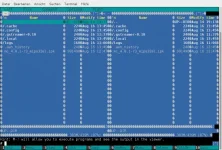
Installing mc (midnightcommander) breaks the image, enigma will not come up any more. mc can be started but looks weird. Aside from this issue, great job, image runs very well :thumbsup:
 
please look:
Code:
root@vuultimo:~# opkg info mc
Package: mc
Version: 4.8.1-r3
Depends: libglib-2.0-0 (>= 2.30.3), libncursesw5 (>= 5.9), libtinfo5 (>= 5.9), ncurses-terminfo, libc6 (>= 2.13)
Provides:
Status: unknown ok not-installed
Section: console/utils
Architecture: mips32el
Maintainer: OE-Core Developers <[email protected]>
MD5Sum: d86d3ef1b4acd1ad9397ba10fbd7cd43
Size: 991490
Filename: mc_4.8.1-r3_mips32el.ipk
Source: http://www.midnight-commander.org/downloads/mc-4.8.1.tar.bz2
Description: mc version 4.8.1-r3
 Midnight Commander is an ncurses based file manager.
Code:
root@vuultimo:~# opkg download mc
Downloading http://enigma2.world-of-satellite.com/feeds/3.0/vuultimo/mips32el/mc_4.8.1-r3_mips32el.ipk.
Downloaded mc as ./mc_4.8.1-r3_mips32el.ipk.
I think, it's one of the dependencies, which breaks the image

I did not make any changes to the feed configs and did not restore any settings but the channellist.
 

Attachments

Last edited by a moderator:
Hi Rob,
it is a "Norton Commander" for Telnet. So connect with telnet and type mc. I use it very often.

ciao
 
Yes, now it works :confused:
There must have been something gone wrong this morning at my first try ... but, please look at the screenshot, it looks not ok, mouse and most function keys do not work. It was ok in 2.4
 

Attachments

  • Bildschirmfoto vom 2012-08-16 14:47:37.webp
    Bildschirmfoto vom 2012-08-16 14:47:37.webp
    59.3 KB · Views: 62
.profile is missing in roots home
Solution:
touch .profile
insert
Code:
export TERMINFO=/etc/terminfo
export TERM=xterm
logout and login, ready :)
 
Hi guys, thanks for new image. I have found a little problem when trying to setup an nfs share in mount editor there is no facility to change the ip address from 192.168.0.0 . I can highlight each segment of the address but cannot alter it.
 

Attachments

  • mount editor.webp
    mount editor.webp
    35.1 KB · Views: 63

OpenViX Feeds Status

Back
Top