Superb quality and spec AB-Com PULSe 4K SE. Crazy offer! Only £99! FREE UK DELIVERY! 4K UHD, Enigma 2, Multiboot 4 images & more!...
Superb quality and spec AB-Com PULSe 4K Rev II Twin Satellite tuner only £149! FREE UK DELIVERY! 4K UHD, Enigma 2, SATA HDD facility, Multiboot 4 images & more!...

[VU+ Solo] swap file for solo & duo - grrr giving me a headache

tagteam3283

New member
Joined
Oct 18, 2010
Messages
220
Reaction score
0
Points
0
Age
54
Location
Liverpool
Evening all,

I have been searching the forum for a few days now and tried all sorts to create a swap file using the latest VIX image.

I have tried formatting the USB stick in my PC using all three NTFS, ExFat, Fat32 then moving the stick to the Dou & Solo to initialise the disk and convert Ext3/4. The stick shows as mounted as Ext4 R/W & I have changed the mount to sda1/ usb and HDD and neither provide me with an option to "create" a swap file. there is only options to "activate" and "auto-start".

The only way I can create a swap file is by 1) flashing my Duo with the new blackhole image, 2) using the format option to format a USB 2GB stick, 3) moving the USB stick to the Solo and mounting it as USB, 4) create the swap file, active then autostart.

I have just bought 3x4GB USB sticks for both solos and my duo to replace the single 2GB USB stick I have using the above method on my solo. Unfortunately, I have reflashed VIX back on my Duo so no longer have the format function to follow that process.

Can anyone prove me with some direction on how to go about doing this please? Or a linky to a previous post onsite.

Regards,
Tagteam
 
format the stick as fat on.pc.

stick it in box and reboot.

initialise in HDD menu
blue button/VIX/swap manager

Sent from my GT-I9305 using Tapatalk 4
 
When you go into mount manager what is the USB showing as and format type?
 
After following your instruction:

Format using Win7 64bit: FAT [not FAT32], allocation unit size 64 KiloBytes

Insert USB into rear lower USB slot then reboot.

Check Mount Manager
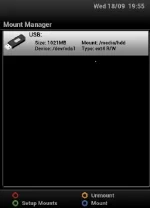
Size: 3.95GB
Mount: /media/hdd
Device: /dev/sda1
Type: vfat R/O

Goto menu->Setup->Settings->Hard Drive->initialise

Press remote Blue->VIX->Swap Manager->still no "Create"

Check Mount Manager
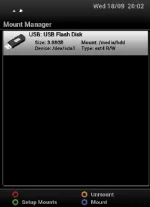
Size: 3.92GB
Mount: /media/hdd
Device: /dev/sda1
Type: ext4 R/W

Then changed the mount to /media/USB and rebooted and still no "create" option
 
right so now I have used an older 1GB stick, formatted FAT, same as before then inserted.

Checked mounts and mounted as:
media/hdd, vfat R/W and now I have the "Create" option in Swap Manager

There is no "Hard Drive" option in the settings to Initialise the drive until I reboot then I see the Hard Drive option, I initialise but then the "Create" option has gone.
 
Last edited:
Then when I repeat the process on the 1GB stick again, the "Create" option is no longer there.
 
Last edited:
The create swap file should only show up if you have an et3/4 device connected, as swap file can only be created on these devices.
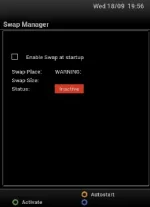
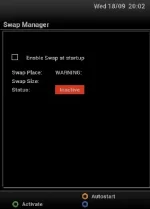
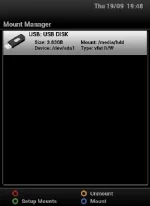
Can you upload a screenshot of your mounted devices,
Menu -> Setup -> ViX -> Mount Manager &
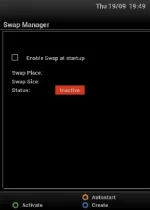
Menu -> Setup -> ViX -> Swap Manager
 
How long are you waiting between intiliase and trying to create?
Give it a couple of minutes, progress is normally shown when you press blue button.

Sent from my GT-I9305 using Tapatalk 4
 
screenshot (1).webpscreenshot (2).webp
@judge: this is the 1GB stick

@stan: yes, i wait until the initialisation has completed i.e. press blue after exiting the initialise menu and wait for it to complete.

just to confirm, I am formatting on the PC using FAT, not FAT32?

Also, if a swap file was created previously on another stick and the file was not deleted before trying to create a swap file on another stick, would that make any difference. So basically what I am asking is does the image remember previous swap files and therefore wont create anymore?
 
Last edited:
No idea, Create showing up fine here, although I'm using internal HDD & no USB stick.

swap.webp

Maybe unmount the stick (yellow button in mount manager)
Then format again using Initalisation in the Hard disk setup screen & see if it works then.

If you have a swap file on another USB, it should still work.
 
Maybe unmount the stick (yellow button in mount manager)
Then format again using Initalisation in the Hard disk setup screen & see if it works then.

Nope, still get the same.

Any other ideas?

Another weird thing is that if I press yellow to AutoStart, it becomes ticked - surely if there is no swap created, this options should not work!
 
Last edited:
No idea so.
What actual build are you on?
 
right so I have now done a fresh install via USB stick using latest image to test if this has something to do with previous swap files staying in the memory settings somewhere.

I formatted the same 4GB USB stick using FAT32 and installed then rebooted after removing the stick. I renamed the VuSolo folder on my pc then reinserted the USB stick back into the front of the Duo.

Here are the new screen shots which show that th VIX image is at least showing me the "create" option under swap manager file using the stick formatted using FAT32 [vfat R/W] set to mount as /media/hdd without initialising the stick. Although when I try to create I get the BAU error "you cant do this with xxxxx". Then when I initialise the stick, the "create" option goes missing again.

screenshot (1).webpscreenshot.webp
 
Last edited:
OMG - I have tried to install BH galaxy and the Duo wont read any USB sticks now. It starts up, flashed on "reading USB" then starts up as normal.

I have tried different USB formats, different USB slots and all the same.

this is doing my frikkin head in

when i check my filezilla /mnt folder it is showing a hdd, usb and usb2 mount when there is no stick or HDD connected

is there another method to flash or force flash?
 
Last edited:
update - I'v using SmartDisk32 format utility software to reformat all of the USB pens they are all taking now.

Could there be something wrong when mounting these onto the VIX image? Is it changing something on the USB sticks?
 
Im having the same problem on the Technomate Nano build 742. The create option shows up when the filesystem is FAT but doesnt when it is in ext3/4.

I spent a whole day trying to do something so simple only to find out other people have the same issue.

I also tried telnet command to do it but no use.
 
Last edited by a moderator:
Edit: I have managed to create a 128mb swapfile via telnet using the following process, however, when I go to swap manager, it is inactive without the option to activate it.

Code:
dd if=/dev/zero of=/media/hdd/swapfile bs=1024 count=131072

I then set up a linux swap area
Code:
mkswap /media/hdd/swapfile

Tried to activate it
Code:
swapon /media/hdd/swapfile

Still no luck
 

OpenViX Feeds Status

Back
Top