M
mecit
Guest
Daha sonra kullanım google translate lütfen.
we use only English in this forum so please try to do this.
Img VIX1.2. Opens the front USB hdd. The rear does not open the hdd.


Daha sonra kullanım google translate lütfen.
we use only English in this forum so please try to do this.
Hey guys,
I also upgraded to v 1.2 only hours after getting the good news it was online, but I am ashamed to say i just downgraded back.Had freezes every so many minutes and i had the box record a channel for me while i went down to the store, When i returned i thought something was wrong with my dish because the recording froze and pixelated a few times a minute. The strange thing was the recording would seem frozen , but if i just rewinded a few seconds it would play the freeze point back without a hitch (at least for a few seconds again) When i downgraded back to v1.1 i seemed to lose my settings,( and resending them via ftp to the box didnt change anything, eventhough the box aknowledged getting the data) i could only see the number of channels i had set up as fav (with that i mean i only saw the channel nr, every nr was followed by N/A and a warning to check my tuner settings which offcourse i then did (a few times)) ANd if u hit software upgrade in v1.1 it brings you back to v1.2 .I too saw the massive amount of updates ( i got like 77) so i know the issues are being worked on. I sadly had to downgrade back to a dream elite image, which i was very content with till i found v1.1 I am not that content anymore so i hope it all gets sorted out soon because i reallyyyyyyyyyy loved v 1.1
ok, time to go back to vix 1.1. getting freezing every ten or 15 minutes on new image even though my system has the card in it. i have never had such an issue with vix 1.1. sorry to detract from this image but there are issues with 1.2 yet to be resolved. has anyone seen similar issues

Dunno why you're getting them. Not got any frozen messages here...
Maybe your cccam is actually freezing!? Could be one of the settings or something?!

please explain solution to swapfile. many users interetsed


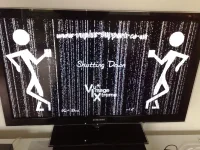


Also it seems like theres a glitch in The Matrix:

I TOTALLY missed that! *yikes & blush*...*brrrrr*lol, I hope this is just a joke... Have you read the first post? Have a look at the picture underneath "Shutdown Screen". Looks to me like the image is working perfectly

lol, I hope this is just a joke... Have you read the first post? Have a look at the picture underneath "Shutdown Screen". Looks to me like the image is working perfectly
*ahh*...a shoulder! :amen:Told you someone would think there was something wrong :lol3:
Told you someone would think there was something wrong :lol3:

Any chance you can post the error logs you got when setting it up???
If the hdd is not showing any error logs, then do the following (assuming that there are no recordings, playback, or other access to the hdd):
telnet in to the box
type the command: "umount /media/hdd"
ftp in to the box. you should have the files in /media/hdd
transfer the crashlogs to the pc
exit ftp
type in telnet the command: "mount /dev/sd*1 /media/hdd"
exit telnet
zip up the logs
post logs in the advanced reply
regarding the mount command above, the sd*1 is the device where your hdd is located. This will usually be sda1. It's best to check by going in to the mount manager, and seeing what location it says your hdd mount is using...
Thanks again

