Superb quality and spec AB-Com PULSe 4K SE. Crazy offer! Only £99! FREE UK DELIVERY! 4K UHD, Enigma 2, Multiboot 4 images & more!...
Superb quality and spec AB-Com PULSe 4K Rev II Twin Satellite tuner only £149! FREE UK DELIVERY! 4K UHD, Enigma 2, SATA HDD facility, Multiboot 4 images & more!...

[VU+ Duo2] Autotimer not working

  • Thread starter Thread starter dallast
  • Start date Start date
D

dallast

Guest
VU+ Duo2
VIX 3.0 Build 790
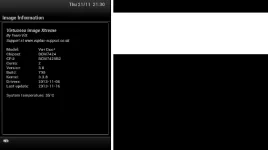
version.webp

I am having an issue with VIX that I have noticed for the past few builds. I am finding that setting an autotimer seems to do nothing. Right now I am trying to set up an auto timer to record Everybody Loves Raymond and Frasier, on C4 every morning.

I bring up epg, go to c4, scroll right til I get to tomorrow mornings listings and highlight the shows.
Press Blue (add autotimer)
Press green twice
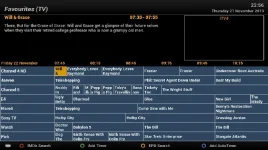
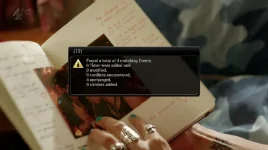
This brings me back to epg. The show listings have not gone red. When I exit out of epg I see the attached image.
4.webp

etc/enigma/autotimers.xml lists the timers. When I bring up the timers dialog (press green) I can see the shows with a timer status of "waiting". But nothing gets recorded in the mornings. I have tried deleting the autotimers.xml file and starting again but the above still happens.

Has anyone else experienced similar issues ?
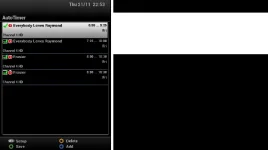
 
The above countdown shows that the timers were already added & didn't need to be added again.
What are you expecting to go red?
 
As per my post above
Normally, the show listing in the epg screen would go from green to red indicating that the show has a timer associated with it.
Also, the summary dialog that you get after exiting epg makes no sense. It says it found a total of 4 matching events, but 0 timers were added. Why does it say that it added 0 timers ?
Finally, no shows get recorded. When I get home in the evening and check my recordings, there are none.
 
It's saying 4 matching events, none changed as they were already added.
Do the timers show as completed in your timer lists?

Can you take a screenshot of your auto timer & timers screen?
Also, one of your EPG.

What state is the box in when the timers are supposed to kick in?
 
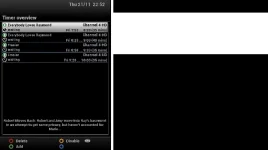
Hi and thanks for replying. I put the box in deep standby when going to bed. I have been recording Frasier for months from deep stand by, these latest issues are very recent. Only started happening about 3 weeks ago. Here's a few screenshots

auto timers.webp

epg.webp

timers list.webp

I'm gonna have another go at deleting autotimers.xml, rebooting and start again.
 
another thing I notice, when I delete the auto timers, and then delete the timers, autotimer.xml is not cleared. It reads as follows

Code:
<?xml version="1.0" ?>
<autotimer version="7">

 <timer name="Everybody Loves Raymond" match="Everybody Loves Raymond" enabled="yes" from="06:55" to="09:25" searchType="exact" searchCase="sensitive" overrideAlternatives="1">
  <serviceref>1:0:19:52D0:814:2:11A0000:0:0:0:</serviceref> <!-- Channel 4 HD -->
  <include where="dayofweek">4</include>
 </timer>

 <timer name="Everybody Loves Raymond" match="Everybody Loves Raymond" enabled="yes" from="07:25" to="10:00" searchType="exact" searchCase="sensitive" overrideAlternatives="1">
  <serviceref>1:0:19:52D0:814:2:11A0000:0:0:0:</serviceref> <!-- Channel 4 HD -->
  <include where="dayofweek">4</include>
 </timer>

 <timer name="Frasier" match="Frasier" enabled="yes" from="08:00" to="10:30" searchType="exact" searchCase="sensitive" overrideAlternatives="1">
  <serviceref>1:0:19:52D0:814:2:11A0000:0:0:0:</serviceref> <!-- Channel 4 HD -->
  <include where="dayofweek">4</include>
 </timer>

 <timer name="Frasier" match="Frasier" enabled="yes" from="08:00" to="10:30" searchType="exact" searchCase="sensitive" overrideAlternatives="1">
  <serviceref>1:0:19:52D0:814:2:11A0000:0:0:0:</serviceref> <!-- Channel 4 HD -->
  <include where="dayofweek">4</include>
 </timer>

</autotimer>
 
Try leaving the box in standby rather than deep standby tonight & see if the timers work in the morning.
 
Please also enable debug logs, Menu -> Setup -> System -> Logs -> Settings -> Enable debug log = yes.
Then restart E2 so the logs are generated.
That should give a much better idea the next time your issue happens.
 
IRC, you can't have multiple AutoTimer with same names, try changing the name of the 2nd AT.
 
IRC, you can't have multiple AutoTimer with same names, try changing the name of the 2nd AT.
Hmmm, not sure about that.
I happen to have multiple AT's all the time (as going through the list I don't always remember already having set an AT), and I didn't notice any issues due to that.
 
Hmmm, not sure about that.
I happen to have multiple AT's all the time (as going through the list I don't always remember already having set an AT), and I didn't notice any issues due to that.

both with same date/time, he has different ones, IRC it will only use the first one detected. but not tested recently.
 
Right, first thanks for all the replies. So last night I put the box into standby, not deep standby. Got home tonight and checked the timers, and my shows were recorded. So tonight I'll try deep standby and see what happens.
 
Please have debug logs enabled first & upload them here if you still have recording issues from deep standby.
 
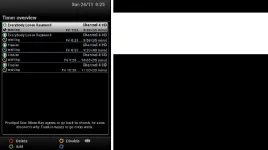
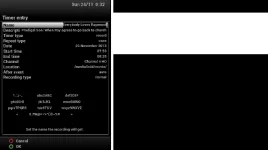
Ok, last night I put the box in deep standby and got nothing recorded this morning. Also, I notice that when press the timers button (green) I see there are some timers waiting but for next Friday (29th November) even though there are events tomorrow morning and every morning next week. I've been experiencing weird stuff with timers over the last few builds. All very weird. Also, I enabled logs last night like you advised and attached are the logs over past 24 hours.

timers.webp
timers detail.webp

View attachment logs.zip
 
Last edited by a moderator:
Ok, last night I put the box in deep standby and got nothing recorded this morning. Also, I notice that when press the timers button (green) I see there are some timers waiting but for next Friday (29th November) even though there are events tomorrow morning and every morning next week. I've been experiencing weird stuff with timers over the last few builds. All very weird. Also, I enabled logs last night like you advised and attached are the logs over past 24 hours.

View attachment 30600
View attachment 30602

View attachment 30601

please post your autotimer.xml file


try changing search type to partial also make sure the time frame is correct. and it looks like you are only searching on THURSDAYS

Code:
 <timer name="Frasier" match="Frasier" enabled="yes" from="08:00" to="10:30" searchType="exact" searchCase="sensitive" overrideAlternatives="1">  <serviceref>1:0:19:52D0:814:2:11A0000:0:0:0:</serviceref> <!-- Channel 4 HD -->
[B]  <include where="dayofweek">4</include>[/B]
 </timer>
 
I didnt specify anything specific. I just setup autotimer with default settings. I didnt tell the autotimer to choose Thursdays or Fridays. Ive no idea where that kinda specific criteria is coming from.
 
I didnt specify anything specific. I just setup autotimer with default settings. I didnt tell the autotimer to choose Thursdays or Fridays. Ive no idea where that kinda specific criteria is coming from.
Apparently you used the quick-AT-entry.
You can change the defaults for that to match your preference. Or you can use the normal AT-entry: that way you go through all the settings.
 

OpenViX Feeds Status

Back
Top