
Superb quality and spec AB-Com PULSe 4K SE. Crazy offer! Only £129! FREE UK DELIVERY! 4K UHD, Enigma 2, Multiboot 4 images & more!...
Superb quality and spec AB-Com PULSe 4K Rev II Twin Satellite tuner only £179! FREE UK DELIVERY! 4K UHD, Enigma 2, SATA HDD facility, Multiboot 4 images & more!...
You are using an out of date browser. It may not display this or other websites correctly.
You should upgrade or use an alternative browser.
You should upgrade or use an alternative browser.
[ViX_Misc] Installing "Skins and Picons"
- Thread starter tomos
- Start date


abu baniaz
Moderator
Menu > Plugins > Green (for Download)
You can only save picons to storage mediums that are in linux file system. Fastest location is internal flash. The Duo2 has plenty of it.
Once you have installed the skin, you have to select it.
Menu > Setup > System > User Setup > Skin Setup
A reboot will be required.
I shall attempt to move your thread. You are asking for support on the image, so thread belongs in the image support section. No harm done, just bear in mind for future.
You can only save picons to storage mediums that are in linux file system. Fastest location is internal flash. The Duo2 has plenty of it.
Once you have installed the skin, you have to select it.
Menu > Setup > System > User Setup > Skin Setup
A reboot will be required.
I shall attempt to move your thread. You are asking for support on the image, so thread belongs in the image support section. No harm done, just bear in mind for future.
abu baniaz
Moderator
Try a few until you find one you like most.
Ocram, nephilm, mmcmedia, rats,
Ocram, nephilm, mmcmedia, rats,
N
netguy46
Guest
hi guys how do i put rats picons on vix image i have latest image can i put them on my hdd and how do i do it cheers
abu baniaz
Moderator
Worst place to put it is the HDD.
As with any picon pack, they can go in a folder called "picon" on the root of the internal memory, or USB flash drive.
As with any picon pack, they can go in a folder called "picon" on the root of the internal memory, or USB flash drive.
N
netguy46
Guest
so i use dcc and go to picons and put them there
abu baniaz
Moderator
Sort of. You are unlikely to have a folder already called picon.
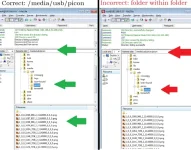
Folder must be called "picon" and the little pictures must be in there. No other folders in it.
Following locations are wrong:
picon/picon
picons
Picon
Any ftp program will do. If you use DCC, then that is fine.
EDIT:
An examaple with USB as storage device.
Folder must be called "picon" and the little pictures must be in there. No other folders in it.
Following locations are wrong:
picon/picon
picons
Picon
Any ftp program will do. If you use DCC, then that is fine.
EDIT:
An examaple with USB as storage device.
Attachments
Last edited:
N
netguy46
Guest
cheers am trying the image came from bh see what this one like can u change bootlog too and if so where i find different bootlog images thanks
abu baniaz
Moderator
Best not to ask different issues in one thread. Makes searches and finding solution for others difficult. You found this thread becasue title said skin and picons.
See this section
http://www.world-of-satellite.com/forumdisplay.php?168-Linux-Receiver-Bootlogo-s
See this section
http://www.world-of-satellite.com/forumdisplay.php?168-Linux-Receiver-Bootlogo-s
Worst place to put it is the HDD.
As with any picon pack, they can go in a folder called "picon" on the root of the internal memory, or USB flash drive.
Hi,
I don't mean to hijack this thread, but i have a question regarding the storage of picons. When you say it's not a good idea to store in the hdd, why is that? Because I have set up PTS and therefore the harddrive is always spinning when the box is running. I also have a swap file, so that must mean that the hdd is in constant use. Only when the box is in standby the hdd is off.
Thanks

marty
ViX Beta Tester ,
Hi,
I don't mean to hijack this thread, but i have a question regarding the storage of picons. When you say it's not a good idea to store in the hdd, why is that? Because I have set up PTS and therefore the harddrive is always spinning when the box is running. I also have a swap file, so that must mean that the hdd is in constant use. Only when the box is in standby the hdd is off.
Thanks
If you have PTS on then I don't see why not put your picons on the HDD (I did it this way for 2+ years with no issues)
These days I have mine on a USB stick only because I found I didn't use PTS so it seemed a waste to have it enabled

If you have PTS on then I don't see why not put your picons on the HDD (I did it this way for 2+ years with no issues)
These days I have mine on a USB stick only because I found I didn't use PTS so it seemed a waste to have it enabled
Thank you for your reply!
Just one more question, where can I find the picons and where do I put them?
Thanks
abu baniaz
Moderator
Yes, if HDD is in use then that is fine. Internal flash is still fastest.
The image will look for a folder called picon on any storage device. There is also a specific location on internal memory, but this is in addition to the root of internal memory.
If you manually download, eg from a website, transfer to storage device by whatever method suits you. FTP is simplest.
You can also download through plugin menu. Storage options listed will be those that are in Linux file system.
The image will look for a folder called picon on any storage device. There is also a specific location on internal memory, but this is in addition to the root of internal memory.
If you manually download, eg from a website, transfer to storage device by whatever method suits you. FTP is simplest.
You can also download through plugin menu. Storage options listed will be those that are in Linux file system.
Yes, if HDD is in use then that is fine. Internal flash is still fastest.
The image will look for a folder called picon on any storage device. There is also a specific location on internal memory, but this is in addition to the root of internal memory.
If you manually download, eg from a website, transfer to storage device by whatever method suits you. FTP is simplest.
You can also download through plugin menu. Storage options listed will be those that are in Linux file system.
The only problem is I can't use the internal memory as my duo suffers from a memory leak and also it doesn't have enough flash memory.
I used the plugin menu to download a picon set however there are so many, which one should I choose?
I ended up downloading sandmans picon set however there seems to be many missing picons e.g: Nickelodeon +1 , sky showcase, film4hd
Is there a specific one I should download and also do these update the selves when the name of the channel changes?
Thanks
abu baniaz
Moderator
You can try Ocrams, mmcmedia, rats.
I use Lraizer's autobouquets. It has autopicons. That keeps my picons up to date barring new channels.
I use Lraizer's autobouquets. It has autopicons. That keeps my picons up to date barring new channels.

Rob van der Does
ViX Beta Tester
You confuse flash with RAM: picons go to flash and a memory leak (if any) affects RAM.The only problem is I can't use the internal memory as my duo suffers from a memory leak and also it doesn't have enough flash memory.
Anyway: even though the DUO is a bit low on flash, you must have installed quite a lot if picons don't fit any more. Especially a well organised package (such as Ocram) isn't very big, as they use symlinks.
You can try Ocrams, mmcmedia, rats.
I use Lraizer's autobouquets. It has autopicons. That keeps my picons up to date barring new channels.
I've loaded ocrams. Thanks for that Abu!
I use the normal abm. If one channel name changes, how can I update the picons? Reinstall the same picon in plugins or....? I'm not sure how it works?
Thanks
Rob van der Does
ViX Beta Tester
If Ocram is properly installed it will show as an available update when there is one.
You confuse flash with RAM: picons go to flash and a memory leak (if any) affects RAM.
Anyway: even though the DUO is a bit low on flash, you must have installed quite a lot if picons don't fit any more. Especially a well organised package (such as Ocram) isn't very big, as they use symlinks.
Ohhhh....sorry about that, still a noob

This is the first time I have ever stored picons on my box, and by the way I'm using my hdd. I installed sandmans picons first but then I deleted them, and now I have ocrams installed. So there should be nothing on the flash (I hope)

