Superb quality and spec AB-Com PULSe 4K SE. Crazy offer! Only £99! FREE UK DELIVERY! 4K UHD, Enigma 2, Multiboot 4 images & more!...
Superb quality and spec AB-Com PULSe 4K Rev II Twin Satellite tuner only £149! FREE UK DELIVERY! 4K UHD, Enigma 2, SATA HDD facility, Multiboot 4 images & more!...

Some ideas to improve the Graphical EPG screen

+-24 can be already be used with the chan up/down buttons

Those buttons would be better for page up & down, wouldn't you agree?
That's what this thread is all about customising the buttons to individual tastes., via the menu whilst in G-Epg.


Sent by pressing the screen on 1 of my Apple devices, cuz that's how I roll.
 
Im currently expeimenting with matts epgselection.py file and seeing what changes i can make, not that good at python thru.

One thing i would like to get into that options list is the increasing and decreasing the timeline for the epg or to simply say zoom in which previously was using 1 and 3 keys.
 
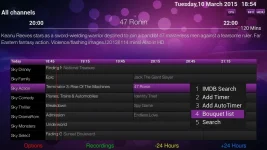
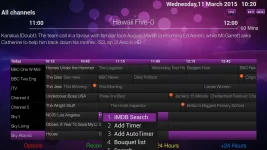
Modified the bello skin to reflect what the changes would look like with this skin, also added the bouquet list to the options.

bello-with-new-options-menu2.webp
 
Modified the bello skin to reflect what the changes would look like with this skin, also added the bouquet list to the options.

View attachment 41113
Glad you finally sorted the code. Could you post the xml file for this and I can compare it to mine and to see where I went wrong when I tried to change but failed :)
 
Glad you finally sorted the code. Could you post the xml file for this and I can compare it to mine and to see where I went wrong when I tried to change but failed :)

Do u mean just the skin xml file or the py file as well.
 
I meant just skin xml but the epgselection.py would be good as well so I can work out how it was done.

Thanks

sure no probs attached below.

By the way in the bello skin the only way to modify the list font and item height is in the skin.xml file look for this code below.

HTML:
<alias name="ChoiceList" font="menulist" size="42" height="60" />

Also the screen name 'OptionDialog' controls the options list for the red button.
 

Attachments

Im currently expeimenting with matts epgselection.py file and seeing what changes i can make, not that good at python thru.

One thing i would like to get into that options list is the increasing and decreasing the timeline for the epg or to simply say zoom in which previously was using 1 and 3 keys.

You do know you can change the timeline from within the epg menu?


Sent by pressing the screen on 1 of my Apple devices, cuz that's how I roll..
 
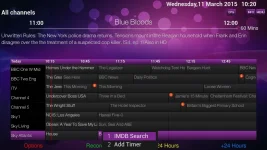
Discovered a possible bug for the options menu whether this is skin related im not sure but have a look at the two screen grabs below.
bello-with-new-options-menu4.webp

bello-with-new-options-menu3.webp
 
I think if we ever implement this we need to make the positioning of the list to be positioned anywhere the skin author wants it to be at the moment its taking its position from the g-epg element as you can see in the post above #170.
It would be ideal if the list could be positioned on the left no matter where the pointer is in the guide.
 
Just added 'Jump to date/time' to the red options list as this no longer exists now that number presses jump to specific channels rather than do other things (tbh I didn't even know it existed).

I noticed that, on bluehd skin anyhow, it displays only 4 options on any one options page and you have to scroll down to get options 5 and 6.

Even on the very bottom line of the EPG, the options display is still fine and shows just upto 4 options on any one page. If this was increased to accomodate more than 4 options then this would be off-screen similar to your post 170 markus.

Is it not easy to program options to display in the centre of the screen?
 
Have you managed to get what was previously 1 and 3 keys to +- the time line.
 
It's the choicelist in the fonts section of the skin.xml that controls the font size and list height.
HTML:
<alias name="ChoiceList" font="menulist" size="42" height="60" />

You could remove or alter this but other screens use this on the bello skin and they would also be effected.
I think if we remove this line we can then adjust the font type and size locally within the screen.
 
It's the choicelist in the fonts section of the skin.xml that controls the font size and list height.
HTML:
<alias name="ChoiceList" font="menulist" size="42" height="60" />

You could remove or alter this but other screens use this on the bello skin and they would also be effected.
I think if we remove this line we can then adjust the font type and size locally within the screen.


that line cannot be removed afaik, code relies on the params now and not locally within the screen.
it controls all the choicelist/box options throughout the image


you can give it a try though of course, just giving u a heads-up.
 
that line cannot be removed afaik, code relies on the params now and not locally within the screen.
it controls all the choicelist/box options throughout the image


you can give it a try though of course, just giving u a heads-up.

Yeh thanks for confirming that, looks like if I did want to just control one screen thst uses the choicelist I'd have to recode every screen that uses it too.
 
the options dialog screen in the skin is what you'll need to edit to make the pop up menu bigger, it will have the size of the window defined

always make the window height multiples of the itemheight, so itemheight = 60, make the window size 300 for 5 rows, 360 for 6 etc.

on the other hand the window should me made to adjust the size of the menu dynamically preferably.
 
I actually wanted to reduce the list item height and reduce the font size as it looks too big in the g-epg.
But as said earlier it's appears to be the choicelist font settings that controls this.
 
Have you managed to get what was previously 1 and 3 keys to +- the time line.
I think this is the code (taken from line 1496 of attached code):
Code:
if number == 1:
timeperiod = int(config.epgselection.infobar_prevtimeperiod.value)
if timeperiod > 60:
timeperiod -= 60
self['list'].setEpoch(timeperiod)
config.epgselection.infobar_prevtimeperiod.setValue(timeperiod)
self.moveTimeLines()
........
However, I'm doing something wrong because when I copied and pasted this (except first line) and defined a new function called "ReduceTimeScale" it refuses to boot. I've attached the .py code so if someone could point out where I'm going wrong I'd be grateful.

The last option on Matt red button multioption i've added to it so that it calls function "ReduceTimeScale" and if I comment out most lines in the function then box is fine and doesn't crash so I know it's something related to that function. The function is near end of file.

View attachment my modded EPGSelection (for testing).rar
 
Last edited:
Just by looking at the code you pasted in, there are no indentations after the If statement.

Unless the original code does have intendation and just the pasted version does not
 
Last edited by a moderator:

OpenViX Feeds Status

Back
Top