Superb quality and spec AB-Com PULSe 4K SE. Crazy offer! Only £129! FREE UK DELIVERY! 4K UHD, Enigma 2, Multiboot 4 images & more!...
Superb quality and spec AB-Com PULSe 4K Rev II Twin Satellite tuner only £179! FREE UK DELIVERY! 4K UHD, Enigma 2, SATA HDD facility, Multiboot 4 images & more!...

New skin: Simple Ten Eighty

Dear all

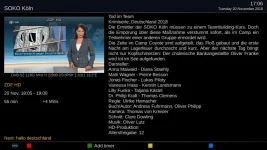
I have a minor issue with this skin: The font size for long EPG text is for me too small. I have a 32in TV screen.

This is how it looks like
Font_size_long_EPG.webp

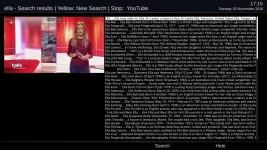
and the Wikipedia search result ist

Wikipedia_search_result.webp

Thanks for having an eye on it.
nekrub2
 
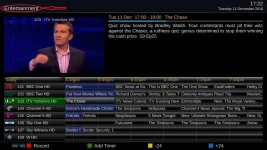
Hi where can I find the bouquet name on graphical epg in the skin.xml? This is I had a look at <screen name="GraphicalEPGPIG" in vix_skin.xml but I cant seem to edit that. Pic attached

1080BouquetName.webp
 
Hi where can I find the bouquet name on graphical epg in the skin.xml?
It looks as though it might be part of the generic "TopTemplate" screen (in skin_templates.xml).
The <widget source="Title" render="Label"... part. Which is a generic Title to most screens.

Note that you do not need to edit this file (which will be overwritten at most updates).
You can out a skin_user_Simple_Ten_Eighty.xml file into /etc/enigma2 and make you personal changes there - which will survive updates*. You'll need to copy out the whole of the section where you wish to make a change (so all of <screen name="TopTemplate">...</screen> here) AND include it within <skin>...</skin> tags.

* Although you should check after updates whether the part you are modifying has changed in the master file and, if it has, copy over any changes.

EDIT: Checking this assumption now...
....and it looks like I was correct, as commenting out that widget removes the bouquet name.
BUT note that any changes to this will change the Title on many of the menu screens too.
 
Last edited:
There's no wonder all my attempts to work out even the simplest of changes have failed miserably!! :)
 
It looks as though it might be part of the generic "TopTemplate" screen (in skin_templates.xml).
The <widget source="Title" render="Label"... part. Which is a generic Title to most screens.

Note that you do not need to edit this file (which will be overwritten at most updates).
You can out a skin_user_Simple_Ten_Eighty.xml file into /etc/enigma2 and make you personal changes there - which will survive updates*. You'll need to copy out the whole of the section where you wish to make a change (so all of <screen name="TopTemplate">...</screen> here) AND include it within <skin>...</skin> tags.

* Although you should check after updates whether the part you are modifying has changed in the master file and, if it has, copy over any changes.

EDIT: Checking this assumption now...

I use user_skin files for other skins. I'll check it out thanks.

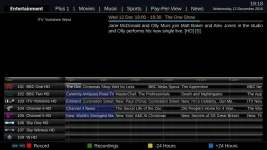
Edit that worked.

1080EpgMod.webp
 
Last edited:
Hi anyone know why when I press information about it’s just blank
Thanks
 
Hi!
I'm very happy about this skin "Simple Ten Eighty", It's really nice, and have used it since I upgraded to 5.2.034 on my Duo4K and Ultimo4k.

There is one thing I miss:
I have not seen that there is any flashing or fixed notification that there is an upgrade available,
Isn't it working with this skin or is it any setting I haven't done?
 
We'll need to add the update notification. It isn't present. I am not keen on the globe though.
 
Can anyone please post a fool proof guide on how to enable tabs at top to show our bouquets on the screen please ... I would greatly appreciate it

Sent from my SM-N960F using Tapatalk
 
I know that, I'm coming from an openatv image that had kiddac sky q skin with tabbed bouquets, it's a lot tidier, I see it can be done with this skin also, as I'm now on vix image,.. Thought I'd ask

Sent from my SM-N960F using Tapatalk
 
Kiddac's skins are not on openatv.. The customised "builds" on other forums use scripts to install them and other tweaks to make it easier for users.

The tabbed bouquets was part of the epg mod. With the exception of people using HDMI-CEC and replacement remotes like Harmonies, I don't see the point of replacing the existing function showing bouquets. You then scroll through them until you land on the one you want. You can't skip a bouquet, you have to scroll through them, one by one. Apart from looking like a Sky receiver, I don't see the added benefit.

On Tetris, you can toggle showing the next block. It is pointless toggling what you will see if you rotate left or rotate right.

TV = open lists of bouquets
> (next to 0) = Jump to next bouquet.
< (next to 0) = Jump to previous bouquet.

Up/down/left/right = move within EPG

8 = Page down
2 = Page up
4 = Page left
6 = Page right

CH+ = Forward 24 hours
CH- = Back 24 hours

7 = increases/decreases number of items

5 = Jump to current time
9 = Jump to prime time. Prime time is configurable

1 = Reduce timescale
3 = Increase timescale

0 = move to home of list, i.e first channel of current bouquet

EPG = Show Single EPG for current channel

Text = Go to specific date/time

Blue (short) = Add auto timer for highlighted event
Blue (long) = Show autotimer list

Red (short) = IMDB search for current event
Red (long) = Sort EPG list

Green (short) = Add/remove timer for highlighted event
Green (long) = Show Timer list

Yellow (short) = Search for similar events

Record (short) = Add record timer for highlighted event
Record (long) = Add zap timer for highlighted event

More details here
https://www.world-of-satellite.com/showthread.php?48142-EPG-Screens-and-Navigation

The EPG mod thread is here.
https://www.world-of-satellite.com/...ome-ideas-to-improve-the-Graphical-EPG-screen
People supplying modified code are politely requested t ensure they add debug code to distinguish that users are using a modified epgselection.py

Please keep this thread specific to this skin.

Simple1080 was modified from the PLi skin which does not have our epgselection py. Some of those EPG navigations do not work as the stock skin.
 
Last edited:
You can still use TV button to bring up bouquets in epg or have bouquets on launch.

The code just give a visual of the next bouquets without the code you can use < and > to switch bouquets you just can't see what the next bouquet is.

But yes I do agree it should be in it's own thread. You will still need to amend this skin for it to show tabs.
 
Last edited:
I think its a nice feature. Should be an optional feature imo. We should be encouraging not discouraging improvements.


Sent from my iPhone using Tapatalk
 

OpenViX Feeds Status

Back
Top