
Superb quality and spec AB-Com PULSe 4K SE. Crazy offer! Only £99! FREE UK DELIVERY! 4K UHD, Enigma 2, Multiboot 4 images & more!...
Superb quality and spec AB-Com PULSe 4K Rev II Twin Satellite tuner only £149! FREE UK DELIVERY! 4K UHD, Enigma 2, SATA HDD facility, Multiboot 4 images & more!...
You are using an out of date browser. It may not display this or other websites correctly.
You should upgrade or use an alternative browser.
You should upgrade or use an alternative browser.
Unicable tune fail error
- Thread starter thedoc11
- Start date


Hi, i had this same problem last year, i was informed in that post by abu baniaz that Gigablue had a bug with the drivers, i asked Gigablue about that but never received a satisfactory answer, i bought a Vu+ ultimo 4k, problem solved, not saying you should do that but informing you about my experience.

abu baniaz
Moderator
What do you mean by "connect"?
A. The option in the menu
or
B "Physically connect wire"
A. The option in the menu
or
B "Physically connect wire"
abu baniaz
Moderator
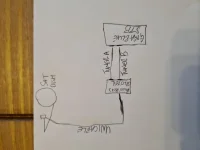
Please re-describe the wiring. I.e how you have hooked up the cables. Please be explicit/detailed as possible. (Might be just a repeat of post 18.)
Last edited:
abu baniaz
Moderator
Fantastic. Getting a diagram from some users is harder than getting blood out of stone. So thanks for the picture.
Just for reference, "Connected" in unicable language means "sharing signal wire from another tuner"
In terms of point of failures (POF):
1. LNB
2. Downlead from LNB to splitter
3. Splitter
4. Downlead from Splitter to Tuner A
5. Downlead from splitter to Tuner B
6. Configuration(software settings)
Firstly double check that the SCR/channels you can select match the LNB. If they don't we are on a wild goose chase and box will be trying to communicate on wrong frequency with LNB
I think we can rule out POF 1&2. Can you remove the splitter and "hook up" the signal cable to Tuner A. Check F- plug for loose strands too.
Apart from A, change all the tuner settings so that you are connected/sharing from Tuner A. Then try recordings, we will do further fault finding if required.
Just for reference, "Connected" in unicable language means "sharing signal wire from another tuner"
In terms of point of failures (POF):
1. LNB
2. Downlead from LNB to splitter
3. Splitter
4. Downlead from Splitter to Tuner A
5. Downlead from splitter to Tuner B
6. Configuration(software settings)
Firstly double check that the SCR/channels you can select match the LNB. If they don't we are on a wild goose chase and box will be trying to communicate on wrong frequency with LNB
I think we can rule out POF 1&2. Can you remove the splitter and "hook up" the signal cable to Tuner A. Check F- plug for loose strands too.
Apart from A, change all the tuner settings so that you are connected/sharing from Tuner A. Then try recordings, we will do further fault finding if required.
your very welcome with the diagram even though it looked like a child had drawn it lol
Can you remove the splitter and "hook up" the signal cable to Tuner A. Check F- plug for loose strands too. i have already done this to no avail
Can you remove the splitter and "hook up" the signal cable to Tuner A. Check F- plug for loose strands too. i have already done this to no avail
abu baniaz
Moderator
You may need to get a power inserter to stop LNB from sleeping

You may need to get a power inserter to stop LNB from sleeping
Why? This LNB works perfectly on my Giga4K.
your very welcome with the diagram even though it looked like a child had drawn it lol
Can you remove the splitter and "hook up" the signal cable to Tuner A. Check F- plug for loose strands too. i have already done this to no avail
So we know you get signal on input B so connect cable only to B and connect C-> H to B , disable A just for the minute and see what happens
abu baniaz
Moderator
@thedoc11
I uploaded a video to demonstrate the issue I and others are experiencing here:
https://www.world-of-satellite.com/...LNB-Switch-Off&p=506453&viewfull=1#post506453
It may be possible that the power remains on from Tuner B, I have not tried it yet. I don't have any other receivers utilising the LNB, so it goes to sleep soon after my GB UE 4K stops using 28.2.
I uploaded a video to demonstrate the issue I and others are experiencing here:
https://www.world-of-satellite.com/...LNB-Switch-Off&p=506453&viewfull=1#post506453
It may be possible that the power remains on from Tuner B, I have not tried it yet. I don't have any other receivers utilising the LNB, so it goes to sleep soon after my GB UE 4K stops using 28.2.
Sorry no I have the 2 legacy ports on the lNB connected via a shotgun cable to the receiver, and a single cable for the unicable as well I have disconnected the unicable while i am recording until I get the unicable side of things fixed. Will get change later this evening to try all suggested fixes  sorry my setup is gigablue quad 4k and a opticum robust 2 red
sorry my setup is gigablue quad 4k and a opticum robust 2 red
Last edited:
Sorry no I have the 2 legacy ports on the lNB connected via a shotgun cable to the receiver, and a single cable for the unicable as well I have disconnected the unicable while i am recording until I get the unicable side of things fixed. Will get change later this evening to try all suggested fixes
So you have a plugin dvb-s2x tuner for legacy??
yes the original tuners that came with my quad stb then i added a cable tuner to the second slot
So quad stb tuners are usb tuners or ? ........can you define exactly what tuners you have and the type.... I am getting totally confused as to the actual config of this box
Similar threads
- Replies
- 10
- Views
- 1K
- Replies
- 24
- Views
- 1K

- Replies
- 12
- Views
- 1K
- Replies
- 5
- Views
- 3K

- Replies
- 24
- Views
- 5K