Superb quality and spec AB-Com PULSe 4K SE. Crazy offer! Only £129! FREE UK DELIVERY! 4K UHD, Enigma 2, Multiboot 4 images & more!...
Superb quality and spec AB-Com PULSe 4K Rev II Twin Satellite tuner only £179! FREE UK DELIVERY! 4K UHD, Enigma 2, SATA HDD facility, Multiboot 4 images & more!...

PiP issue with 0 button move PiP to main picture

Willo3092

ViX Beta Tester
Joined
Oct 1, 2016
Messages
1,235
Reaction score
25
Points
48
Location
East Midlands
I've set the 'Behaviour of 0 key in PiP mode' to move Pip to main picture.
Does this actually move PiP to main picture and close PiP or is it running in the background?

Quite often I will be watching a recording later on and I get a message 'Incorrect service type for PiP' when, as far as I'm aware PiP isn't running.

If I just press 'OK' the message goes away but if I try and use PiP later on I just get a black screen and PiP doesn't show a picture until I do a full reboot. GUI restart doesn't sort it.
If I press the blue extensions button I can disable PiP and everything is okay.

I just assumed that moving PiP to the main picture would then exit PiP altogether or is that not the case?

This is on a Vu+ Uno 4K running ViX 5.4.013.
 
Yep. I get an issue too with 5.4.13 on more than one image of Vix. The Pip seems to randomly start even though nothing has asked it to! This only seems to occur with multi tuner setups with me.
 
I only really watch the Vu+ Uno 4K SE so can't comment on if it's happening on any of my other boxes. It has a twin FBC sat tuner with 5 scr's allocated to 28.2 and 3 to 19.2.
 
Yep. I get an issue too with 5.4.13 on more than one image of Vix. The Pip seems to randomly start even though nothing has asked it to! This only seems to occur with multi tuner setups with me.

Would this happen when the OpenTV EPG reader is running, by any chance? This runs at an interval of 6, 9 or whatever hours you have configured. I have noticed that, if I am viewing the recordings list or viewing the EPG, and I exit the particular menu that the PiP will remain on-screen as a black rectangle on the right0hand side if OpenTV reader is running. The rectangle will clear after the reader is finished (2-3 minutes). It doesn't normally cause an issue if I am watching in full screen mode.
 
It's a possibility because I do use the openepg reader. Not quite sure it would give the message about the service type being incorrect for PiP though.
I will disable it and go back to EPGimport and see if that cures it.
 
Possible it is the plugin. Just need to check the log when it appears.

I have seen this too, but only when the box is tuned to an IPTV service.

If we can find the condition possibly we can switch to "fake" recording in those instances.
 
Last edited:
Code:
< 79337.0132> 21:45:48.3255 [InfoBarGenerics] Key: 7 (Make) KeyID='KEY_6' Binding='('6',)'.
< 79337.0201> 21:45:48.3324 [InfoBarGenerics] Key: 7 (Break) KeyID='KEY_6' Binding='('6',)'.
< 79337.0249> 21:45:48.3372 [opentv_zapper] forced download.
< 79337.0251> 21:45:48.3373 [opentv_zapper] start_download.
< 79337.0816> 21:45:48.3939 [opentv_zapper]currentlyPlayingNIM None
< 79337.0818> 21:45:48.3941 [opentv_zapper]available tuners [0, 1, 3, 4, 5, 6, 7, 9]
< 79337.0825> 21:45:48.3948 [Skin] Processing screen 'PictureInPictureZapping', position=(870, 45), size=(180 x 39) for module 'PictureInPictureZapping'.
< 79337.1352> 21:45:48.4475 [Skin] Processing screen 'Dishpip', position=(30, 90), size=(130 x 202) for module 'Dishpip'.
< 79337.1439> 21:45:48.4561 [Skin] Processing screen 'PictureInPicture', position=(400, 60), size=(240 x 192) for module 'PictureInPicture'.
< 79337.2325> 21:45:48.5447 [PictureInPicture] playing pip service 4097:0:1:***********************************************
< 79337.2326> 21:45:48.5449 [eServiceMP3] construct!
< 79337.2327> 21:45:48.5450 [eServiceMP3] playbin uri=http://*********************************************
< 79337.2336> 21:45:48.5459 [eServiceMP3] stop http://***************************************************
< 79337.2336> 21:45:48.5459 [eServiceMP3] stop state:NULL pending:VOID_PENDING ret:SUCCESS
< 79337.2340> 21:45:48.5463 [eServiceMP3] destruct!
< 79337.2342> 21:45:48.5464 [Notifications] RemovePopup, id = ZapPipError
< 79337.2343> 21:45:48.5465 [Notifications] AddPopup, id = ZapPipError
< 79337.2362> 21:45:48.5485 [Skin] Processing screen 'MessageBoxSimple' from list 'MessageBoxSimple, MessageBox', position=(480, 532), size=(960 x 15) for module 'MessageBox'.
< 79337.2536> 21:45:48.5659 [Screen] Warning: Skin is missing element 'icon' in <class 'Screens.MessageBox.MessageBox'>(Incorrect service type for PiP!).
< 79337.2544> 21:45:48.5667 [Pixmap] setPixmapNum(3) failed! defined pixmaps: []
< 79337.2547> 21:45:48.5670 [MessageBox] Timeout set to 5 seconds.
< 79337.2561> 21:45:48.5684 [Skin] Processing screen 'MessageBoxSimple_summary' from list 'MessageBoxSimpleSummary, MessageBoxSummary, ScreenSummary, MessageBoxSimple_summary, MessageBox_summary, SimpleSummary', position=(0, 0), size=(800 x 480) for module 'ScreenSummary'.
< 79337.2583> 21:45:48.5705 [PictureInPicture] playing pip service 1:0:1:105D:7D4:2:11A0000:0:0:0:
< 79337.2584> 21:45:48.5706 [servicedvb][eDVBServicePlay] now running: m_is_streamx set by M_is_stream 0
< 79337.2584> 21:45:48.5707 [servicedvb][eDVBServicePlay] now running: m_is_pvr set to; 0
< 79337.2586> 21:45:48.5708 [servicedvb][eDVBServicePlay][start] m_is_stream set to: 0
< 79337.2586> 21:45:48.5709 [servicedvb][eDVBServicePlay][start] m_is_pvr set to; 0
< 79337.2588> 21:45:48.5710 [eDVBResourceManager] allocate channel.. 07d4:0002
< 79337.2588> 21:45:48.5711 [eDVBFrontend1] opening frontend
< 79337.2590> 21:45:48.5713 [eDVBFrontend] opened frontend m_filename: /dev/dvb/adapter0/frontend1
< 79337.2590> 21:45:48.5713 [eDVBFrontend] opened frontend m_fd: 34
< 79337.2681> 21:45:48.5804 [eDVBFrontend1] setVoltage FE_ENABLE_HIGH_LNB_VOLTAGE 0 FE_SET_VOLTAGE 2
< 79337.2797> 21:45:48.5920 [eDVBFrontend1] tune
< 79337.2798> 21:45:48.5921 [eDVBSatelliteEquipmentControl] RotorCmd ffffffff, lastRotorCmd ffffffff
< 79337.2799> 21:45:48.5922 [eDVBFrontend1] prepare_sat System 0 Freq 11778000 Pol 1 SR 27500000 INV 2 FEC 2 orbpos 282 system 0 modulation 1 pilot 2, rolloff 0, is_id -1, pls_mode 1, pls_code 0, t2mi_plp_id -1 t2mi_pid 4096
< 79337.2799> 21:45:48.5922 [eDVBFrontend1] tuning to 1178 mhz
< 79337.2800> 21:45:48.5922 [eDVBChannel] OURSTATE: tuning

So the service playing was 4097, which does not use the default player. So maybe try to check which player is in use before starting the download.

For sure it is a player problem because if you are playing a 4097 service and you press BLUE BLUE to open pip you get the same message.
 
I usually see the message when playing a downloaded file which I usually play with ext3player.
 
But I'm getting the service type incorrect for PiP message when I'm not using PiP :confused:
Unless of course the openepg downloader uses PiP?
 
So, if you are using ext3player pip is not available. If something (e.g. OpenTvZapper) tries to use the pip (e.g. to download the EPG) you will get that message.
 
Yes I am using extplayer3 also for my IPTV services. Could there not be a menu item workaround that permanently disables the blue button (PIP enable/disable) and the possibility of PIP startup when we are using an external player?
 
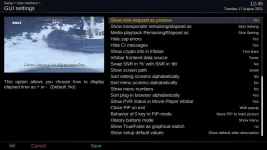
Ok, so we know the cause now. If this bothers anyone just turn on "Hide zap errors" in "GUI Settings".
 
Sorry, looking after a 2 year old :zoom:

Yes it is, I still get the message with hide zap errors enabled.

Notifications.AddPopup(text=_("Incorrect service type for PiP!"), type=MessageBox.TYPE_ERROR, timeout=5, id="ZapPipError")
 
Ok, I can't explain that then. There is an if clause that should only show if "hide" is disabled.
 
Just an update for anyone experiencing similar problems. Disabling OpenTV EPG Downloader and just using EPGimport cured it.
 

OpenViX Feeds Status

Back
Top