Superb quality and spec AB-Com PULSe 4K SE. Crazy offer! Only £129! FREE UK DELIVERY! 4K UHD, Enigma 2, Multiboot 4 images & more!...
Superb quality and spec AB-Com PULSe 4K Rev II Twin Satellite tuner only £179! FREE UK DELIVERY! 4K UHD, Enigma 2, SATA HDD facility, Multiboot 4 images & more!...

[GiGaBlue UHD QUAD 4K] Missed 6 Recordings Overnight 30/31 Aug

CRMS

Forum Supporter
Donated Member
Joined
Jun 18, 2020
Messages
342
Reaction score
2
Points
18
What type of support thread are you creating?
Possible bug
What OpenViX Image build number are you using?
6.7.008
Have you tried re-flashing WITHOUT settings restore?
NO
Have you tried re-flashing WITH a settings restore?
NO
After weeks of behaving and recording everything asked of it, last it failed to record 6 items until I manually switched on from DS. I had put the box into Standby the previous evening, during which it had also successfully woken up for a timer recording.
I haven't touched any settings for months. Power timer daily 1740, ABM 1750 and first programme record starts 1757.
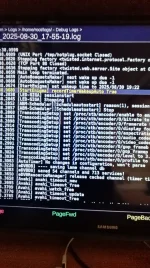
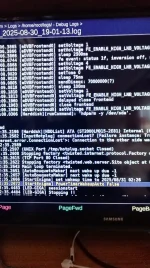
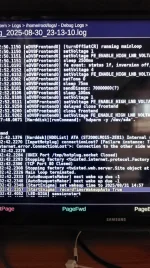
I've been trawling through the logs looking for [Start Enigma] and found these entries, 2 look fine but the PowerTimer seems to be out of place and is possibly why the box failed to do anything at 0226.

I must admit I find the logs rather baffling. I think one starts when the box starts from a fully off state and from deep standby and seem to stop when the box goes into deep standby.
There are time jumps when a new log starts on the previous running time and then gets an update from the satellite.
A guide on them and what to look for would be useful.

IMG_20250831_131213.webpIMG_20250831_131254.webpIMG_20250831_131339.webp
 
So I asked ChatGPT:

Thanks for providing the details (the Gigablue UHD Quad 4K with Enigma2-based firmware, and the debug log snippet).
Here’s what’s going on under the hood:

Difference between recordTimer and powerTimer

recordTimerWakeupAuto True → This is the expected flag when the box is woken up specifically to start a recording timer. Enigma2 sets it when the wakeup reason in NVRAM matches a recording event.

PowerTimerWakeupAuto False → This indicates the receiver woke up for a power timer (for example, scheduled standby, deep standby, auto-boot at a certain time, or manual wakeup), not for a recording. In that state, the recording timers were not “armed” as wakeup triggers, so the box didn’t enter the correct mode to record.

Why it happens

A few common reasons why Enigma2 systems boot with a PowerTimer instead of a recordTimer:

Timer conflict or overlap → If multiple recordings overlap and tuner resources are insufficient, Enigma2 can silently “downgrade” a timer, cancelling or not assigning a wakeup flag.

Wrong timer type → If a recording was accidentally created as a PowerTimer instead of a RecordTimer (possible via the timers menu), the system will wake up but not record.

Deep standby interaction → If the box was in deep standby, the wakeup cause is stored in /proc/stb/fp/wakeup_time. If that gets set by a PowerTimer instead of the recording subsystem, the wrong flag is logged.

Firmware / image bug → Some images (OpenATV, OpenViX, etc.) have had bugs where wakeup causes were mis-classified, especially if multiple timers existed at the same time.

NVRAM or RTC issue → If the front panel clock (RTC) or NVRAM gets corrupted, the wrong wakeup reason can be registered, even though a recording was scheduled.

Things to check

In the Timers list, verify that your failed events are shown as “Record” timers, not “Power timers.”

Check whether the box was in deep standby before the recordings. If it was, see if Menu → Timers → PowerTimers contains an entry around the same time (could have been set unintentionally).

Look in /etc/enigma2/timers.xml — this file lists all timer definitions. See if the failed entries are <timer type="record"> or something else.

If you’re on an older image, consider updating your firmware (OpenATV, OpenViX, etc.) — several users reported exactly this symptom being fixed in later builds.

👉 In short:
Your recordings didn’t fire because the receiver thought it was woken by a PowerTimer instead of a RecordTimer. This usually points to either (a) the timers being mis-classified, or (b) a firmware bug with wakeup handling.

Would you like me to walk you through how to inspect your timers.xml so you can confirm whether those 6 missed events were stored as record or power timers? That would narrow it down.

You said:
The timers were all record timers. I have one power timer at 1740 daily, this failure occured in the night when it didn't wake up for 0226 recording.
OpenVix 6.7.008.
ChatGPT said:

Got it — thanks, that rules out “user accidentally set PowerTimers instead of RecordTimers.” Since you’re on OpenViX 6.7.008 and the only PowerTimer you knowingly have is the 17:40 daily one, here’s what likely happened with the 02:26 missed recording:

Why it reported PowerTimerWakeupAuto at 02:26

Enigma2 stores the next wakeup reason and time in the front panel controller (FP).
When it goes into deep standby, it only remembers one wakeup reason at a time. If something overwrites the wakeup reason after your record timers were written, the FP will wake for that reason instead — even if the record timer is still listed in the GUI.

The clue is:

[StartEnigma] PowerTimerWakeupAuto False


That means the box did wake itself, but the FP thought it was for a PowerTimer (or a manual wakeup), not a recording.

Possible causes

Wakeup reason overwritten

If another timer (e.g. your 17:40 PowerTimer) was re-saved or updated after the record timers were set, it could overwrite the FP’s wakeup reason.

Sometimes an EPG update, AutoTimer search, or plugin can also trigger a setWakeupTime() call and overwrite the recording wakeup.

RTC / FP bug

Gigablue front panels are known to occasionally misreport the wakeup reason if multiple timers are queued.

Seen in OpenViX and OpenATV changelogs: “fixed wrong wakeup reason (PowerTimer instead of RecordTimer).”

Standby state mismatch

If the box went into idle standby (not deep standby), the recording should still work. If it was in deep standby, it relies entirely on the FP wakeup cause.

If the FP reason was wrong, it boots without arming the recording.

Things you can try

Check /etc/enigma2/settings for lines like:

config.misc.prev_wakeup_time=...
config.misc.prev_wakeup_reason=...


That tells you what Enigma2 thought the last wakeup reason was.

Look at /etc/enigma2/timers.xml for the 02:26 timer — confirm it’s <disabled>0</disabled> and afterevent isn’t set to “nothing” (which sometimes prevents wakeup).

Update OpenViX — there was a fix in some recent 6.7.x nightlies for Gigablue FP wakeup misreporting.

Workaround:

Don’t rely on deep standby for critical overnight recordings — instead use standby mode.

Or, if you want deep standby, set a “dummy PowerTimer” to wake the box ~5 min before your overnight recordings. That way it’s definitely awake, and the recordTimer can fire normally.

✅ So in your case: the 02:26 record timer was stored correctly, but the front panel wakeup reason got clobbered by a PowerTimer entry (either a bug or overwritten setting), so Enigma2 didn’t boot into record mode.

Software writers??
 
That is just nonsense. PowerTimerWakeup false means it was not woken by a power timer.
 
OK. But the PowerTimerWakeUp False in pic 2 is a future event and not in the past.
So you mean it will not be woken up by a power timer??
But the nub of the problem is why was a power timer set, when it was not required, and not the recordTimerWakeUpAuto True??
 
Power timer False means no power timer is set.
 
Yes I understand that.
But "recordTimerWakeUpAuto True" should have been set for 2025/08/31 02:26 in pic 2, just like the timers in pic 1 and 3.
Instead a not needed power timer was set??
Why was that?? Why did the box decide to do that??
So, no programmes recorded.
 
Yes I understand that.
But "recordTimerWakeUpAuto True" should have been set for 2025/08/31 02:26 in pic 2, just like the timers in pic 1 and 3.
Instead a not needed power timer was set??
Why was that?? Why did the box decide to do that??
So, no programmes recorded.
If the box is awake at the time it will record. Why it woke up is irrelevant.
 
Thanks. Agree if it is awake it should record. But it clearly wasn't awake.
I've just discovered that my daily reboot timer at 1840 is now 0225. And scrolling back through the logs it seems to have changed on 25/26 August.
Quite why I have no idea. I haven't touched any power timers for months, only added individual and auto timers, and Mrs S doesn't know how to and no one else around.
Is there a particular line in the logs that I should be looking for??
 
I suspect your receiver when booted on some particular occasion, failed to establish the correct time at startup, perhaps because it was off-line from the internet. In that instance it would have set the "fake hw-clock" time (from when it last entered deep standby). Any initial scheduled tasks like ABM or EPG update would not have happened and it's possible that the PowerTimer entry was messed up as a result. I have seen this happen recently on one of my boxes where it booted with the fake hw-clock time and failed to get the actual NTP time at startup. It's a risk one runs with having a box which spends most of its time in deep standby and also has unreliable internet access.
 
My box has no internet access for the majority of the time. It gets times from the satellite.
I suppose not helped by no RTC in the box.
I guess check power timer.
Or an alternative box with RTC and small screen??
 
Yes I understand that.
But "recordTimerWakeUpAuto True" should have been set for 2025/08/31 02:26 in pic 2, just like the timers in pic 1 and 3.
Instead a not needed power timer was set??
Why was that?? Why did the box decide to do that??
So, no programmes recorded.
It just says "PowerTimer False" so the person reading the log knows the wakeup was not from a power timer, irrespective of if one was set or not for some point in the future.
 
My box has no internet access for the majority of the time. It gets times from the satellite.
I suppose not helped by no RTC in the box.
I guess check power timer.
Or an alternative box with RTC and small screen??
Ok - if your box has no access to the internet, and only boots briefly (say for an hour or so) once each day, to run EPG update or ABM, then these scheduled jobs will not run. I have two test receivers which only boot once per day from deep around 17.45. Then they run ABM and EPG update and shut down 20 minutes later. If the receiver fails to get internet time during boot, then the ABM and EPG jobs fail to execute. This is because their start time (set to 17.50 and 18.00 respectively) is calculated using a relative interval timer which is started just after enigma loads but BEFORE the default start service (BBC 1) is tuned from satellite. The box time when these two jobs are initially checked reads as 18.05 on the previous day (when the box last shut down), so a start interval timer of some 23 hours and 45 minutes commences for ABM and 23 hours and 55 minutes starts for EPG update. The box gets its time from BBC 1 shortly after and the time is corrected maybe 20-30 seconds after the initial ABM and EPG interval timers have been started. But those interval timers are never re-evaluated. Actual recordings don't seem to be affected as they seem to work off actual clock time so, providing the time is set correctly by using a reliable start-up service like BBC etc., the recording will start on time. This is not a widespread issue as I think most people have the box powered on 24/7 and use normal standby which keeps the clock running. I appreciate your situation where every watt counts, so you need to keep the box in deep standby most of the day. I purchased a VU+ Uno 4K SE in January mostly for its 4K abilities and also for its FBC abilities which give me 8 virtual tuners on my two satellite feed cables. A bonus was the fact that the box has a pseudo RTC (real time clock) which runs all the time the box is in deep standby, so it always has the correct time at boot providing the 1W supply is not interrupted.

You could potentially try OpenATV which I found to have a more robust method of correcting timers at boot (no guarantees that it will fix your issues) but the settings are more complex and the user interface is quite different.
 
Thanks. I use the box for a few hours each evening and an hour of that is BBC1. If I'm watching a recording, then the selected TV channel remains BBC1 - if that makes any difference to its internal workings??
I do notice that the old shutdown time is initially shown at start up, but it pretty soon updates to the current time - as you wrote 20 seconds or so.
I think in this case, a programme autotimer time and the power timer time somehow got transposed.
Onboard, I don't really need the daily power timer as the box is switched on physically. So, I'll delete as it seems to be just something else to go wrong.
The main impact is leaving it at mainland home if we go away and it has just about always failed to record autotimer programmes.
I guess leaving it in just standby would improve matters??
And the mice can always watch the clock.
 
When using afloat, probably best to manually run ABM occasionally or OpenEPG updates (or use Freesat EPG which will auto-update after about 20 mins of viewing on BBC and also give you radio EPG). I'm using Freesat EPG on one of my test boxes as I'm recording BBC Radio3 regularly during this Proms season and so far the EPG has kept up to date without scheduled PowerTimers since July as I'm recording something every day or so. I manually run ABM occasionally.
As regards mice doing any clock-watching, my Vu+ doesn't actually display anything during deep standby - just a white LED illuminating the power button. Your GB may be different.
 
I think the Vu+ has a RTC? so is OK in DS.
A GB in DS is apparently a pretty shoddy time keeper without a RTC.
The Freesat EPG has been fine and always updates..
 
See #12. Pseudo RTC in the Vu+. It's not battery backed, so won't survive mains off, but its great in DS. I have never had an issue with my 11 year old GB Quad+ losing or gaining time while in DS. 99.9% of the time it boots when it should. Although the countdown timer to next boot works reliably in my GB, it doesn't have a time value (returns zero) when it boots, so is absolutely dependent on internet time to update the clock properly when it boots to run solely ABM or EPG update. Booting from DS to record something is always ok once it picks up the time from the satellite or terrestrial service.
 
... it doesn't have a time value (returns zero) when it boots, so is absolutely dependent on internet time to update the clock properly when it boots to run solely ABM or EPG update.
But if it is using transponder time (as the OP says it is) the clock should be set OK shortly after enigma2 starts (as the OP says it does).
 
But if it is using transponder time (as the OP says it is) the clock should be set OK shortly after enigma2 starts (as the OP says it does).
It certainly does that (set the clock) and subsequent recording timers are fine but if you have ABM or OpenEPG scheduled timers set, these are evaluated before enigma time is set in the event of no NTP sync and an incorrect relative timer is started and not re-evaluated when the actual correct time is obtained either from the transponder or from a successful NTP update. You and I have discussed this in the past when I was having start-up issues and I discovered that a relative timer which should have had a time of 10 minutes set actually had 23 hours and 55 minutes set because the fake hw-clock was 23 hours and 45 minutes in the past. The (relatively) recent changes to the boot start sequence scripts to facilitate slow wifi setup has mostly eliminated the issue for my test rigs, but if the box never gets an NTP sync before enigma start, then it can cause issues for users like @CRMS who keep their receivers mostly in deep standby and have scheduled tasks set other than recordings.
 
And it's recording timers we're talking about here.
The OP has had continuing issues over a long history with scheduled ABM / EPG timers. He understands the context of my advice. Long term failures to run EPG updates (like OpenTV EPG) will ultimately lead to loss of EPG data and failure to set future recording timers. His unique situation where the receiver is being used on a boat exacerbates the issue. The scheduled timer code which is common to ABM and OpenTV EPG calendars causes failure to run when the fake hw-clock is in the past. I presume the recording timers are triggered directly by enigma constantly checking the system time each minute (or whatever), whereas ABM / EPG schedule is using an interval timer calculated once when the clock is wrong and before it is subsequently corrected.
 

OpenViX Feeds Status

Back
Top