Superb quality and spec AB-Com PULSe 4K SE. Crazy offer! Only £129! FREE UK DELIVERY! 4K UHD, Enigma 2, Multiboot 4 images & more!...
Superb quality and spec AB-Com PULSe 4K Rev II Twin Satellite tuner only £179! FREE UK DELIVERY! 4K UHD, Enigma 2, SATA HDD facility, Multiboot 4 images & more!...

[Freeware] Enigma2 Player 2.2.4 for Windows – multiview with up to 9 pictures, picture-in-picture and recordings

zakomania

New member
Joined
Oct 4, 2026
Messages
11
Reaction score
5
Points
3
Hi everyone,

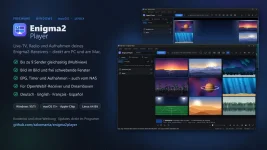
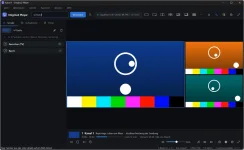
I've developed a Windows program for Enigma2 receivers and I'm sharing it here for free: Enigma2 Player 2.2.4. It lets you watch live TV, radio and recordings from your receiver right on your PC, with several channels at once if you like.

What it does​

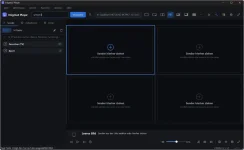
  • Multiview: 2, 3, 4, 6, 8 or 9 pictures at the same time
  • Picture-in-picture with 1 to 8 small pictures over the main picture
  • Detach pictures into separate windows, spread them across your screen (always on top) and dock them back
  • Audio from exactly one picture, switched with one click
  • Drag & drop: drop channels and recordings onto a picture, swap pictures
  • Saved views (layout and channels), loaded again with one key press
  • Smart search across the TV guide of all channels, e.g. “football now” or “crime tonight”
  • Collapsible bouquets with picons, channel numbers as on your receiver, channel list on the left or right
  • Recordings from the receiver with resume and a seek bar
  • EPG, timers, virtual remote control, local recordings and screenshots
  • Open stream or file: play stream links or video and music files from your PC or NAS
  • Finds your receiver automatically on the network, login with encrypted password
  • English, German, French and Spanish, updates right inside the program

Requirements​

  • Windows 10 or 11 (64-bit), no administrator rights needed, VLC is already built in
  • Enigma2 receiver with OpenWebif on the same network (tested with openATV 7.6 on GigaBlue UHD Quad 4K Pro, Zgemma H7 and Octagon SF8008)
  • Dreamboxes with DreamOS (e.g. One, Two, DM920) and older Dreambox images are supported from version 2.2 through the Dreambox web interface, which the player detects automatically. Feedback from Dreambox users is very welcome.
  • How many different channels can play at once depends on your receiver's free tuners. Channels on the same transponder need no extra tuner; an antenna icon in the channel list marks them.

Download​

Download Enigma2 Player

This link never changes and always delivers the latest version. More info: github.com/zakomania/enigma2player

Note: on first start Windows may show “Windows protected your PC” because the program isn't signed yet. Click “More info”, then “Run anyway”.

The program is freeware. I'd love to hear your feedback, bug reports and ideas, here in the thread or by email to [email protected].


Enjoy!
Zakomania
 

Attachments

  • 4-leer.webp
    4-leer.webp
    34.3 KB · Views: 9
  • 3-bilder.webp
    3-bilder.webp
    34.9 KB · Views: 9
I have just tried this and it works really well for me. Thank you Zakomania
 
Thank you, Sicilian, glad to share it here!

Thanks gws, great to hear it works well for you!

If you have any feedback or ideas, just post them here.

Zakomania
 
@ zakomania - now if you could only do a linux version!
 
Hi twol, you're not the first to ask! 😉 No promises yet, but I'm considering it.

Zakomania
 
Hallo zusammen,

eine kurze Info für alle, die nach einer Linux-Version gefragt haben: Der Enigma2 Player für Linux ist in Arbeit und nach vielen Tests fast fertig. Ein paar letzte Tests mache ich noch, dann ist es bald soweit.

Sobald die Linux-Version verfügbar ist, gebe ich hier Bescheid.

Viele Grüße
Zakomania
 
Translation:
Hi everyone,A quick update for those who asked about a Linux version: The Enigma2 Player for Linux is in the works and—after extensive testing—is nearly ready. I’m just running a few final tests, so it won't be long now.I’ll let you know here as soon as the Linux version is available.Best regards,Zakomania
 
  • Like
Reactions: gws
Hi everyone,

as announced, Enigma2 Player is now also available for Linux! 🐧

Download (always the latest version):

How to get started:
1. Install VLC from your package manager (not as Snap or Flatpak):
- Ubuntu / Linux Mint / Debian: sudo apt install vlc
- Fedora: sudo dnf install vlc vlc-plugin-ffmpeg
2. Make the downloaded file executable:
chmod +x Enigma2Player-x86_64.AppImage
3. Start it by double-clicking or with ./Enigma2Player-x86_64.AppImage

Tested on Ubuntu 22.04, Linux Mint 21, Debian 12 and current Fedora versions.

Thanks to everyone who asked for a Linux version! I'd love to hear how it works for you.

Best regards
Zakomania
 
  1. Make the downloaded file executable: Right-click → Properties → “Run as a program” or in a terminal: chmod +x Enigma2Player-x86_64.AppImage
  2. Start it by double-clicking or with ./Enigma2Player-x86_64.AppImage
 
Hi everyone,

I've developed a program for Enigma2 receivers and I'm sharing it here for free: Enigma2 Player 2.5.3 for Windows and Linux. It lets you watch live TV, radio and recordings from your receiver right on your PC, with several channels at once if you like.

What it does​

  • Multiview: 2, 3, 4, 6, 8 or 9 pictures at the same time
  • Picture-in-picture with 1 to 8 small pictures over the main picture
  • Detach pictures into separate windows, spread them across your screen (always on top) and dock them back
  • Audio from exactly one picture, switched with one click
  • Info bar like on the receiver: start and end with a progress bar, time left and the next programme right in the picture, also in full screen
  • Drag & drop: drop channels and recordings onto a picture, swap pictures
  • Saved views (layout and channels), loaded again with one key press
  • Smart search across the TV guide of all channels, e.g. “football now” or “crime tonight”
  • Collapsible bouquets with picons, channel numbers as on your receiver, channel list on the left or right
  • Recordings from the receiver with resume and a seek bar
  • EPG and timers (running recordings and timers marked, edit timers, even extend a running recording), virtual remote control, local recordings and screenshots
  • Open stream or file: play stream links or video and music files from your PC or NAS
  • Finds your receiver automatically on the network, login with securely stored password
  • English, German, French and Spanish, updates right inside the program

Requirements​

  • Windows 10 or 11 (64-bit), no administrator rights needed, VLC is already built in; also available as a portable version (e.g. for a USB stick)
  • Linux (64-bit): Ubuntu 22.04, Linux Mint 21, Debian 12, Fedora and newer – a single AppImage file, no installation and no root rights needed. VLC must be installed from your package manager (e.g. “sudo apt install vlc”, Fedora: “sudo dnf install vlc vlc-plugin-ffmpeg”, Arch: “sudo pacman -S vlc”); VLC as a Snap or Flatpak is not enough
  • Enigma2 receiver with OpenWebif on the same network (tested with openATV 7.6 and 8.0 on GigaBlue UHD Quad 4K Pro, Zgemma H7 and Octagon SF8008)
  • Dreamboxes with DreamOS (e.g. One, Two, DM920) and older Dreambox images are supported from version 2.2 through the Dreambox web interface, which the player detects automatically. Feedback from Dreambox users is very welcome.
  • How many different channels can play at once depends on your receiver's free tuners. Channels on the same transponder need no extra tuner; an antenna icon in the channel list marks them.

Download​

Windows: Download Enigma2 Player for Windows
Linux: Download Enigma2 Player for Linux (AppImage)

On Linux, make the file executable (right-click → Properties → “Run as a program”, or in a terminal “chmod +x Enigma2Player-x86_64.AppImage”) and double-click it to start.

These links never change and always deliver the latest version. More info: github.com/zakomania/enigma2player

Note: on first start Windows may show “Windows protected your PC” because the program isn't signed yet. Click “More info”, then “Run anyway”.

The program is freeware. I'd love to hear your feedback, bug reports and ideas, here in the thread or by email to [email protected].


Enjoy!
Zakomania
 
Nachtrag: Den Enigma2 Player gibt es jetzt auch für den Mac! 🍏

Download (immer die neueste Version):

Voraussetzung: macOS 15 Sequoia oder neuer, Mac mit Apple-Chip (M1 oder neuer).

Falls macOS das Öffnen beim ersten Start blockiert: Systemeinstellungen → Datenschutz & Sicherheit → „Trotzdem öffnen“.

Über Rückmeldungen von Mac-Nutzern freue ich mich sehr!

Gruß Zakomania
 

Attachments

  • Enigma2Player-Werbebild-de.webp
    Enigma2Player-Werbebild-de.webp
    71.5 KB · Views: 2
Nachtrag: Den Enigma2 Player gibt es jetzt auch für den Mac! 🍏

Download (immer die neueste Version):

Voraussetzung: macOS 15 Sequoia oder neuer, Mac mit Apple-Chip (M1 oder neuer).

Falls macOS das Öffnen beim ersten Start blockiert: Systemeinstellungen → Datenschutz & Sicherheit → „Trotzdem öffnen“.

Über Rückmeldungen von Mac-Nutzern freue ich mich sehr!

Gruß Zakomania
English translation:


Update: Enigma2 Player is now also available for Mac! 🍏Download (always the latest version):https://github.com/zakomania/enigma.../download/Enigma2Player-macOS.dmgRequirements: macOS 15 Sequoia or later, Mac with an Apple silicon chip (M1 or newer).If macOS blocks the app from opening the first time you launch it: System Settings → Privacy & Security → "Open Anyway".I would love to hear feedback from Mac users!Best regards, Zakomania
 
Thanks for sharing, works well, Thgough It does not play or see any of my IPTV channels, it only see's the IPTV bouquet Name ie,"IPTV" but none of the groups or channels within the groups.
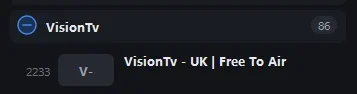
IPTV/UK|Movies/Film 4 is an example of one of my Iptv channels but the app shows IPTV and the sub groups but the sub groups ie UK|Movies does not expand to show the 84 channels within the group, it trys to play the group marker which obviously fails.
 
Thanks for sharing, works well, Thgough It does not play or see any of my IPTV channels, it only see's the IPTV bouquet Name ie,"IPTV" but none of the groups or channels within the groups.
IPTV/UK|Movies/Film 4 is an example of one of my Iptv channels but the app shows IPTV and the sub groups but the sub groups ie UK|Movies does not expand to show the 84 channels within the group, it trys to play the group marker which obviously fails.
Sorry forgot to mention This is the windows version and I am connecting to 1 of 4 Octagon SF8008 running openvix 6.9.003, but all 4 react the same
 
Thanks for sharing, works well, Thgough It does not play or see any of my IPTV channels, it only see's the IPTV bouquet Name ie,"IPTV" but none of the groups or channels within the groups.
IPTV/UK|Movies/Film 4 is an example of one of my Iptv channels but the app shows IPTV and the sub groups but the sub groups ie UK|Movies does not expand to show the 84 channels within the group, it trys to play the group marker which obviously fails.
Screenshot 1.webpScreenshot 2.webp
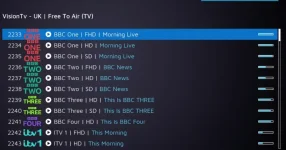
The first is a screen grab from the Enigma app which shows an empty Category, the 2nd is a screen grab from webif which shows the category populated with the 1st 11 channels within that same group.
The
 
Thanks for sharing, works well, Thgough It does not play or see any of my IPTV channels, it only see's the IPTV bouquet Name ie,"IPTV" but none of the groups or channels within the groups.
IPTV/UK|Movies/Film 4 is an example of one of my Iptv channels but the app shows IPTV and the sub groups but the sub groups ie UK|Movies does not expand to show the 84 channels within the group, it trys to play the group marker which obviously fails.
Hi,

thanks for the detailed report, that helps a lot!

It looks like the player doesn't handle groups inside a bouquet (sub-bouquets) correctly yet. It shows the group, but treats it like a channel instead of opening it. I'll fix that in one of the next updates.

To reproduce it exactly: which plugin did you use to create the IPTV bouquet (e.g. e2m3u2bouquet, Jedi Maker Xtream, Bouquet Maker Xtream or similar)?

Best regards
Zakomania
 
Hi,

thanks for the detailed report, that helps a lot!

It looks like the player doesn't handle groups inside a bouquet (sub-bouquets) correctly yet. It shows the group, but treats it like a channel instead of opening it. I'll fix that in one of the next updates.

To reproduce it exactly: which plugin did you use to create the IPTV bouquet (e.g. e2m3u2bouquet, Jedi Maker Xtream, Bouquet Maker Xtream or similar)?

Best regards
Zakomania
I am using the system app m3uiptv but it is exactly the same if the bouquets are created with BouquetMakerXtreme or Xtreamity
 
Hi,

thanks for the detailed report, that helps a lot!

It looks like the player doesn't handle groups inside a bouquet (sub-bouquets) correctly yet. It shows the group, but treats it like a channel instead of opening it. I'll fix that in one of the next updates.

To reproduce it exactly: which plugin did you use to create the IPTV bouquet (e.g. e2m3u2bouquet, Jedi Maker Xtream, Bouquet Maker Xtream or similar)?

Best regards
Zakomania
To be fair the boxes epg-importer doesn't handle it well either, it does not show the iptv groups, just the provider, but if I open bouquets (Favourites button) then they show correctly, If run an iptv channel and then open epg it will show me the epg of the group that the channel was selected from and I can go to the other groups with the before after buttons, The only way I have found to get round this is for the EPG importer to be set to 'All Channels' but then I just get a list of 10'000 channels not grouped.
 

OpenViX Feeds Status

Back
Top