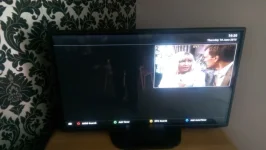
Hi hope someone can help when i use the built in software update i loose my epg (crossepg) and i cant get it back on reflashed back to 10 and it works update to 12 and its gone
i thought i could just delete it and reinstall it but have been informed that because its now part of the image i cant do that i was updating to hades 12 so i could have snp picons working on my duo2 lcd screen after updating the epg is just blank no channels no information its just a black screen with epg at the top.
When you fresh flash you will need to remount the device storing the epg and tell the epg settings to use this device. Once that is done it should work
There was a change in the mount paths code if a USB device and HDD are connected. Your storage devices changing mount paths after the upate may be the issue.
hi thanks for the help,
i had everything working fine on vix hades 10 i then used software update to update to hades 12 after doing this there was no information on the screen when i pressed the epg button (nothing at all just the program i am watching in the small screen at the top right the rest is black.
if i press ok i get now and next no problem if i press tv i get the bouquets which then display the channels fine with picons so i guess its able to access the harddrive data.
i have just re-done everything on the tutorial you sugested and everything is still the same.
i hope i have made it clear enough for some help.
you should not have to press blue to see the bouquets list maybe you have the same problem as i have and not noticed.
i fresh flashed hades 11 and restored settings only and now runs great.
Bouqets back
I then tried running it again and restoring plugins too and was back to having no bouquets/graphical epg, so i guess its a conflict on one of my plugins.
I will reinstall them one at a time and try work out which one it is.
Thanks again for the help.
This site uses cookies to help personalise content, tailor your experience and to keep you logged in if you register.
By continuing to use this site, you are consenting to our use of cookies.