

outrage_uk
Member
- Joined
- Jun 21, 2014
- Messages
- 112
- Reaction score
- 0
- Points
- 16
Hello. I'm using a Gigablue Quad Plus with Vix Apollo 115 (clean install).
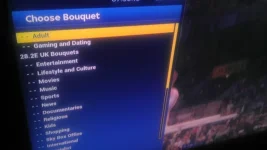
Ever since a few months ago, the --Adult and --Gaming categories appear at the top of the Choose Bouquet list.
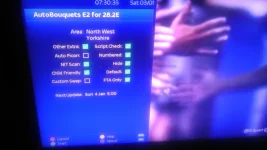
I've enabled 'Child Friendly' on the options but this has made no difference.
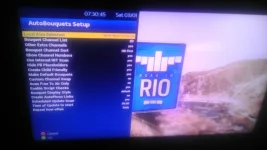
Also the only way for local SD channels to be listed first (101, 102, 103 etc), is if 'Bouquet Channel Sort' is set to 'HD First'.
Also, 'Scan Free to Air Only' is set to 'No', but the check box on the plugin info screen is checked.
As said, around 3 months ago, everything was fine. I also have a Gigablue HD800UE Plus and this doesn't happen.
I've tried uninstalling and reinstalling the AB E2 plugin with and without a clean install of Vix and manually moving or deleting the --Adult and --Gaming categories to the bottom of the bouquet list but every update it just reverts back to how it was.
Anyone know why and how I can fix it? Thanks.
Ever since a few months ago, the --Adult and --Gaming categories appear at the top of the Choose Bouquet list.
I've enabled 'Child Friendly' on the options but this has made no difference.
Also the only way for local SD channels to be listed first (101, 102, 103 etc), is if 'Bouquet Channel Sort' is set to 'HD First'.
Also, 'Scan Free to Air Only' is set to 'No', but the check box on the plugin info screen is checked.
As said, around 3 months ago, everything was fine. I also have a Gigablue HD800UE Plus and this doesn't happen.
I've tried uninstalling and reinstalling the AB E2 plugin with and without a clean install of Vix and manually moving or deleting the --Adult and --Gaming categories to the bottom of the bouquet list but every update it just reverts back to how it was.
Anyone know why and how I can fix it? Thanks.
Last edited:
 using Ocram SHD picons on internal flash /picons


