Superb quality and spec AB-Com PULSe 4K SE. Crazy offer! Only £99! FREE UK DELIVERY! 4K UHD, Enigma 2, Multiboot 4 images & more!...
Superb quality and spec AB-Com PULSe 4K Rev II Twin Satellite tuner only £149! FREE UK DELIVERY! 4K UHD, Enigma 2, SATA HDD facility, Multiboot 4 images & more!...

[ViX_Misc] "Automatic Collections" option has some issues that could do with looking at

smipx

Forum Supporter
Donated Member
Joined
Nov 30, 2019
Messages
475
Reaction score
9
Points
18
What type of support thread are you creating?
Possible bug
What OpenViX Image build number are you using?
6.8.007
Have you tried re-flashing WITHOUT settings restore?
YES
Have you tried re-flashing WITH a settings restore?
YES
In another place I created a thread about movieorganisor. That thread has reached a natural conclusion but mixed in with it were some results of my using the "Automatic Collections" option in the PVR section.

I am encountering a number of issues that I wanted to document here so that they can be looked into in isolation of movieorganisor as "Automatic Collections" is the preferred and supported way to organise recordings in OpenVIX and as such may benefit from some attention.

Issue #1
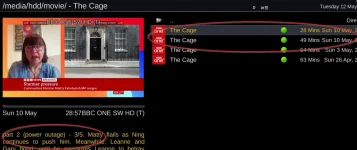
If there is a power cut and a program recording is restarted it is appended with _001 in the file name (and 002, 003 etc). In the Meta Data file it is appended with "part 2 (power outage)", "part 3 (power outage)" etc... Problem is that when the automatic collections looks at these it is seeing them as a seperate program and not adding them to the virtual folder of the series:

1778536051818.webp

Issue #2

I set the option on my box to remove the term "New: " from the EPG:
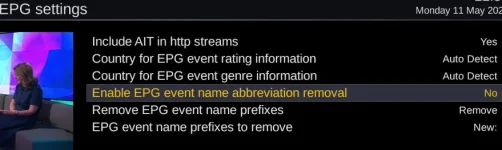
1778536587582.webp

I also renamed all of my old recordings to remove the term "New " in the filename and "New: " in the meta files associated with the old recordings (to set things up nicely for the next episode recording). I also tweaked all of my Autotimers to remove the word "New: " from the recording name:
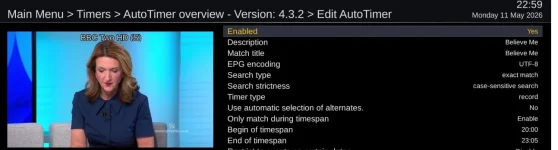
1778536777376.webp

This has not worked as I expected as in the EPG the word "New: " has been removed and the amended autotimer is picking up the new (minus "New: " name). e.g. This is next weeks episode as shown in the EPG (with "New: " removed as expected) - cant see this weeks as its gone from the EPG:
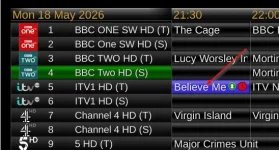
1778536475019.webp
.....but when the recording is made the word "New: " is stil in the meta file and the file name description (when saved) is still prefixed with "New ". The EIT file has the word "New: " removed correctly.
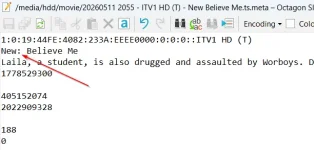
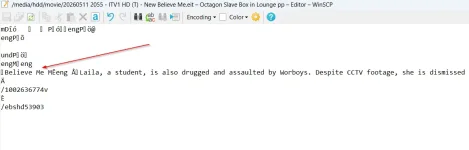
1778536363946.webp
1778536383209.webp
1778536421299.webp


Issue #3 - this is a request more than a bug - putting it here because it was already mentioned in the other thread:
I like to see my series groupings first (or last) and then all individual programs underneath (or above) with the newest individual programs in date order

e.g.:

1778162504435.webp


In "automatic collections" there is no sort order that can acheive this view. The closest I can get is sort order "Short-Long" or "Long Short" which groups all of the series together at the top or bottom but all of the individual programs at the bottom (or top) are not in date order. there is no other sort type that groups the series apart from these two.

This is as close as I can get:
1778161579424.webp


Thats it for now. If I see any other issues I will add them to this thread.

Thanks all,

Paul
 
Last edited:
Issue #2

... I also tweaked all of my Autotimers to remove the word "New: " from the recording name:

No, you didn't. As that is not actually an option.
The "Description" is the description of the AutoTimer (what it shows up as in the AutoTimer list).
The "Match title" is a string that is matched in the title when it searches (and I see that you have left "exact match" on, so you won't even get a timer set for any "New: Believe Me" broadcasts).
The actual recording name will be what the EPG has for the description at the time it records.
 
I like to see my series groupings first (or last) and then all individual programs underneath (or above) with the newest individual programs in date order
...
In "automatic collections" there is no sort order that can acheive this view. The closest I can get is sort order "Short-Long" or "Long Short" which groups all of the series together at the top or bottom but all of the individual programs at the bottom (or top) are not in date order. there is no other sort type that groups the series apart from these two.

I have mine so that they are listed by title name (in alphabetically sorted order) and for entries within that they are ordered by date.

That comes about by using "5 alphabetic then oldest first".

Won't put grouping at the top (but then, if it did, you'd have the oddity that a grouping would be at the top until you deleted all but the lats entry, then it would move to somewhere else).
You can tell groupings by their different icon.
 
No, you didn't. As that is not actually an option.
The "Description" is the description of the AutoTimer (what it shows up as in the AutoTimer list).
The "Match title" is a string that is matched in the title when it searches (and I see that you have left "exact match" on, so you won't even get a timer set for any "New: Believe Me" broadcasts).
The actual recording name will be what the EPG has for the description at the time it records.
OK. Bit confused then because it recorded the event. I guess some legacy timers remained after my changes with "New:" and I'm guessing that the timers don't look at the event names at the time the recording starts but at the time they're created (and it was saved with the old name).

Do I need to delete all old timers and autotimers if the change to remove "new:" from the epg is made. If so then that's the mistake I made.
That being the case then what seems to have happened is that the name of the recording is whatever the timer has in it as it doesn't care about the epg, but only cares about the service Id and the time of the recording (and the eventual title in the meta file is also generated by this data in the timer and not by the epg title ) and the content of the eit file will be whatever is on the epg at the moment the recording starts. If not then I don't understand how my recording actually recorded and still had "New:" in it (and "New" in the file name) as this was correctly removed in the Epg data (as seen in next week's episode). I also deleted and recreated the Epg data after the change and checked that "New:" had been expunged.

Is that right?
 
Last edited:
Issue #1
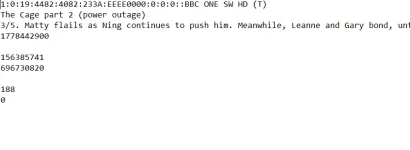
If there is a power cut and a program recording is restarted it is appended with _001 in the file name (and 002, 003 etc). In the Meta Data file it is appended with "part 2 (power outage)", "part 3 (power outage)" etc...
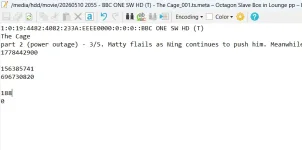
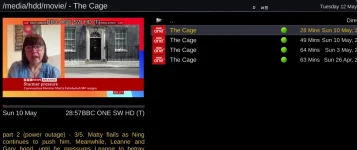
This could be fixed by changing the placement of the words "part x (power outage)" in the meta file when the additional recordings are made. At the moment it is in the title area but move it to the long description line below and it is worted into the right folder and when you hover over it you can still see that it is part 2.

Meta File "as-is":
1778574619473.webp

Meta file tweak that fixes issue:
1778574670612.webp

This is how it looks in the PVR with the tweak:
1778574782929.webp

Paul
 

Attachments

  • 1778574725563.webp
    1778574725563.webp
    51.5 KB · Views: 1
I have mine so that they are listed by title name (in alphabetically sorted order) and for entries within that they are ordered by date.

That comes about by using "5 alphabetic then oldest first".

Won't put grouping at the top (but then, if it did, you'd have the oddity that a grouping would be at the top until you deleted all but the lats entry, then it would move to somewhere else).
You can tell groupings by their different icon.
True :-) I was trying to emulate what Moveieorganisor did but I have seen the light and having everything in date order (apart from my own personal downloads) like this is more logical. The only enhancement would be to have my own folders (Which I have wrapped in "DL") to be at the very end of the list so that if there are lots then I will still see the proper recordings withuout them being bumped onto page 2 - but this is not a biggie:
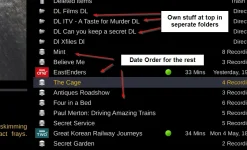
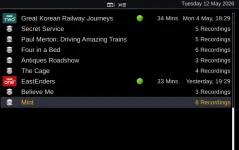
1778575007133.webp

What I can do is get all the newest stuff at the bottom and the oldest stuff at the top (including my folders) which is good but if the following sort order could be in reverse that would be some icing on my cake (ps. Mint was the latest thing to record):

1778575638828.webp
 
Last edited:
That being the case then what seems to have happened is that the name of the recording is whatever the timer has in it as it doesn't care about the epg, but only cares about the service Id and the time of the recording (and the eventual title in the meta file is also generated by this data in the timer and not by the epg title ) and the content of the eit file will be whatever is on the epg at the moment the recording starts.
The data in the timer will be generated from the EPG at the time that it is created.

Bear in mind that I could set up an AutoTimer to record all programs containing "news" in the title, so I;d get all BBC News and Newsnight., etc... So the recording name can't be what is set in the AutoTimer but has to be what is in the EPG when it is found.
 
What I can do is get all the newest stuff at the bottom and the oldest stuff at the top (including my folders) which is good but if the following sort order could be in reverse that would be some icing on my cake (ps. Mint was the latest thing to record):
The problem there is that if you reverse that sort order you'd end up with the reversed sort order within the collections too.
And the sorting doesn't know about collections - the grouping comes after the sorting.
 
The data in the timer will be generated from the EPG at the time that it is created.

Bear in mind that I could set up an AutoTimer to record all programs containing "news" in the title, so I;d get all BBC News and Newsnight., etc... So the recording name can't be what is set in the AutoTimer but has to be what is in the EPG when it is found.
I think we are agreeing - my rookie mistake was not to delete the timers created before I changed the EPG settings. This is why I ended up with a recording with the "New: " prefix. I have manually adjusted the file name and the meta file so they are are being virtual folderised properly now
:)
 
The problem there is that if you reverse that sort order you'd end up with the reversed sort order within the collections too.
And the sorting doesn't know about collections - the grouping comes after the sorting.
I guess what I could do is "touch" all of my folders and give them a date in the far future. I wonder if that might work. I suspect not though as the date of the folder will change to todays date as soon as I add something new to it so I'd forever have to be "touching" the folder.
Like I said - not life changing and I can totally live with it as it is :-)
 
that just leaves issue #1
So the collection is looking for identical on line 2 in the meta file. As long as that is correct nothing else matters... or does it also take line one into account?
 
Last edited:
So the collection is looking for identical on line 2 in the meta file. As long as that is correct nothing else matters... or does it also take line one into account?
I already proposed the solution.
This could be fixed by changing the placement of the words "part x (power outage)" in the meta file when the additional recordings are made. At the moment it is in the title area but move it to the long description line below and it is worted into the right folder and when you hover over it you can still see that it is part 2.

Meta File "as-is":
View attachment 68767

Meta file tweak that fixes issue:
View attachment 68768

This is how it looks in the PVR with the tweak:
View attachment 68770

Paul
Like this. the "part 2 (power outage)" words moved down a line and it means that all episodes are collected together even if there is a power cut and the recording resumes.
 
Where is the "power outage" notice coming from?

If I start a timer and then disconnect the power, on boot enigma restarts the recording and it appears in the collection with the first section.

And searching the repo I don't find it anywhere.
 
Ahh. Okay. If its coming from movieorganisor then I hopefully won't see it again as I've removed that now. Looks like movieorganisor has been causing more issues than anyone (Me) knew.

Glad it's gone following that little nugget tbh. Movieorganisor - what's that - it's dead to me.

Sorry to have caused all the mayhem. I feel a bit embarrassed.

I'll monitor and report back if anything changes (apart from the passing of my embarrassment of course)🫣
 

OpenViX Feeds Status

Back
Top