Superb quality and spec AB-Com PULSe 4K SE. Crazy offer! Only £129! FREE UK DELIVERY! 4K UHD, Enigma 2, Multiboot 4 images & more!...
Superb quality and spec AB-Com PULSe 4K Rev II Twin Satellite tuner only £179! FREE UK DELIVERY! 4K UHD, Enigma 2, SATA HDD facility, Multiboot 4 images & more!...

Bluetooth remote keymapping

lincsat

ViX Beta Tester
Joined
May 3, 2011
Messages
874
Reaction score
19
Points
18
I've just paired a BT remote (RCU 4K Pro-BT) with the box and the keymapping isn't correct. Most buttons work but not the up/down/left/right

Co-Pilot has come up with several suggestions but as it didn't know how to put the remote into pairing mode I'm a bit reluctant to follow it's modifications for the keymap.xml

Does anyone have a working keymap for this remote that wouldn't break anything else?
 
Don't touch keymap.xml. There is another file for remapping. I will have a look later if I remember.

But making changes is going to affect the standard remote. Normally remap is used for missing keys.
 
I've just paired a BT remote (RCU 4K Pro-BT) with the box and the keymapping isn't correct. Most buttons work but not the up/down/left/right

Co-Pilot has come up with several suggestions but as it didn't know how to put the remote into pairing mode I'm a bit reluctant to follow it's modifications for the keymap.xml

Does anyone have a working keymap for this remote that wouldn't break anything else?
I don,t remember that issue… not at home to later, but will check.
There were other issues with BT, but think I would have noticed(?) those keys
 
Grok suggested I tried EVTEST, this is the result with hitting the direction keys in the order UP-RIGHT-DOWN-LEFT
 

Attachments

Asked @dimitar and we both had connection issues but not this…but been using normal remote for last few months.
Will try when I get home later tonight
 
Got home, took me 5 minutes to remember how to connect blue tooth!
The arrow buttons work fine using my BT remote and the Gigablue Pro receiver….and the connection seems solid
….this is a OE_A 6.0 build, but don,t think that should make a difference

When you tried this, what was the test ? I just had the bouquet list displayed and flipped up down and paged using the keys
 
Using the 6.8.008.004 image already on the box I went into the BT manager plugin and paired the remote. Pressed menu and tried up/down on there. All those buttons just displayed the X on the top right for an invalid command

I did also try a raw 6.9 image without a restore but needed to install the BT driver pack to get it to detect the remote. It was the same with that.

Copilot and Grok believe the image is detecting the remote as a keyboard and not mapping the buttons correctly
 
Using the 6.8.008.004 image already on the box I went into the BT manager plugin and paired the remote. Pressed menu and tried up/down on there. All those buttons just displayed the X on the top right for an invalid command

I did also try a raw 6.9 image without a restore but needed to install the BT driver pack to get it to detect the remote. It was the same with that.

Copilot and Grok believe the image is detecting the remote as a keyboard and not mapping the buttons correctly
You don,t need to install any bluetooth driver - its part of giga build
preesing menu and then keys works fine.
what else do you have installed?
 
The 6.9 build didn't detect any BT devices. I installed the extrahw-bluetooth plugin and then the BT manager found devices. That was the raw image without any restore or extra setup.

I removed the extrahw-bluetooth plugin from the 6.8 image and it was still the same
 
The 6.9 build didn't detect any BT devices. I installed the extrahw-bluetooth plugin and then the BT manager found devices. That was the raw image without any restore or extra setup.

I removed the extrahw-bluetooth plugin from the 6.8 image and it was still the same
The OE-A 6.0 build installs everything needed and the remote connects and works fine without key issues
I will flash an OE-A 5.6 image later and try it, just to check,
 
Installed OE-A 5.6 image on Pro, did not restore settings or plugins, just setup AV settings.
Bluetooth Devices Manager in plugins by default.
hit scan for BT devices.
Held Menu/OK buttons until flashing light on remote.
Remote found amongst several other devices in House - pressed Connect and about 10 seconds later showed connected.
All keys work fine.

Actually remote now seems to work as it should - compared to several months ago.
 
@linksat can you try with good quality new batteries in the remote please.
 
Messing around with remote, still seems to have issue with disconnect, where it hangs the box, but once re connected seems OK …… I restored settings and plugins on this image and that killed the connect(although said it was connected) , but as I haven,t used blue tooth for some months it probably was connected to my other bluetooth Pro remote at that time
 
Remote has brand new duracell batteries and I did check the voltage.

I have built a new 6.9.000.010 and will try that later. I will even try a fresh 6.8 without restore as well

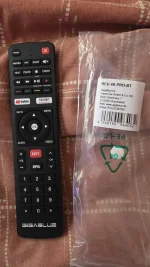
The new remote uses Info+OK to enter pairing mode
20260513_130419[1].webp
 
“The new remote uses Info+OK to enter pairing mode“ - where did you find that info as the previous Pro BT remote worked with menu + OK.
That worked on other 4K boxes, but if it has changed thats the 3rd way depending which Gigablue BT remote you are using
 

GigaBlue RCU/Fernbedienung Universal 4K PRO-BT - that is what gigablue call it on their web site and it says​

Kompatibilität:
UHD Trio 4K Pro (mit Bluetooth Funktion)
 
“The new remote uses Info+OK to enter pairing mode“ - where did you find that info as the previous Pro BT remote worked with menu + OK.
That worked on other 4K boxes, but if it has changed thats the 3rd way depending which Gigablue BT remote you are using

I found the pairing info on linuxsat. The remote came from Kuul who said it works with the Quad Pro. I'm wondering if I've been sold a clone as the model number inside the Remote cover is - WH‑415C0
 
I found the pairing info on linuxsat. The remote came from Kuul who said it works with the Quad Pro. I'm wondering if I've been sold a clone as the model number inside the Remote cover is - WH‑415C0
Trio 4K Pro and UHD4K Pro are different remotes
So just with "Pro" can be an issue
 
I found the pairing info on linuxsat. The remote came from Kuul who said it works with the Quad Pro. I'm wondering if I've been sold a clone as the model number inside the Remote cover is - WH‑415C0
That is wrong remote for quad pro

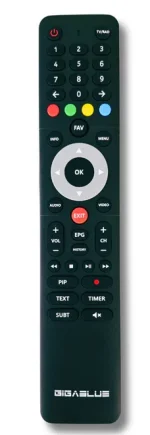
GigaBlue RCU PRO BT-IR remote control for Quad Pro​

€29.00 EUR

Capture.webp
Key features:


  • Compatibility: Designed for GigaBlue UHD Quad 4K PRO
  • Dual mode: Bluetooth and IR function for maximum flexibility
  • Bluetooth connection: Control possible without direct line of sight
  • IR connection: Classic operation with line of sight
  • Ergonomic design: Fits comfortably in the hand
  • Intuitive operation: Clearly structured and easily accessible buttons
  • Original product: Perfect coordination and guaranteed functionality
and the one you bought

GigaBlue 4K PRO-BT Universal Control Remote / RCU


The replacement GigaBlue remote control is intended for the GigaBlue models listed below.


Your GigaBlue receiver becomes a whole lot more convenient with the remote control.


The quick button takes you to your YouTube or favourite channel list at any time, so you can browse straight away.


The new design makes the remote control much more pleasant to use and can be operated more conveniently.


  • All functions (channel settings, menu functions, etc.) available
  • With Bluetooth function.
  • The device is automatically recognised by the GigaBlue receiver.


Compatibility:


  • UHD Trio 4K Pro (with Bluetooth function)


Without Bluetooth function:


  • UHD Quad 4K
  • UHD UE 4K
  • UHD IP 4K
  • UHD Trio 4K (Gen1.)
  • UHD UE 4K Cable
  • + All older HD models
 

OpenViX Feeds Status

Back
Top