
Superb quality and spec AB-Com PULSe 4K SE. Crazy offer! Only £129! FREE UK DELIVERY! 4K UHD, Enigma 2, Multiboot 4 images & more!...
Superb quality and spec AB-Com PULSe 4K Rev II Twin Satellite tuner only £179! FREE UK DELIVERY! 4K UHD, Enigma 2, SATA HDD facility, Multiboot 4 images & more!...
You are using an out of date browser. It may not display this or other websites correctly.
You should upgrade or use an alternative browser.
You should upgrade or use an alternative browser.
Bootlogo change
- Thread starter bellejt
- Start date


adm
Forum Supporter

now I get that black and white logo at start of the box for lots off seconds.Is it possible to change that in another bootlogo ( frozen )witch I had on my duo2 ?
You probably need to find a frozen.mvi file that has been converted/remaned to bootlogo.mvi , perhaps from your duo2 or an archive of posted bootlogos.
The following will give you clues about where to copy it to for the frozen bootlogo screen to appear.
On re booting my Nano2 super this screen come up which I would like to change, does anyone know how to do this? as I don't like the picture that is shows.
- twh
- Replies: 4
- Forum: ViX Team Skinning Discussion

Willo3092
ViX Beta Tester
The very first screen is the splash screen (splash_auto.bin).

I made my own

I made my own
Willo3092
ViX Beta Tester
You need a 720x480 24 bit bmp picture and rename it to splash_auto.bin.
Some boxes use 720x576 24 bit bmp. If it doesn't look right, change the resolution.
It is flashed by USB using the same procedure as flashing an image.
Use the same folder structure on the USB as an image flash.
I've attached my home-made one.
Some boxes use 720x576 24 bit bmp. If it doesn't look right, change the resolution.
It is flashed by USB using the same procedure as flashing an image.
Use the same folder structure on the USB as an image flash.
I've attached my home-made one.
Attachments

Where on the receiver down you put that file? What happens on reflash?
On my box it shows the standard blue Vu logo.
On my box it shows the standard blue Vu logo.

malcolmp
Forum Supporter
- Joined
- Aug 30, 2013
- Messages
- 357
- Reaction score
- 1
- Points
- 18
If you google and install this, the software does it all for you. all you need to find is a picture (png or jpeg) it will covert to mviBoot Logo Changer by xorion
have you heard of this?
Willo3092
ViX Beta Tester
Just checked and it's a 720x576 24 bit bmp. You just change the extension from bmp to bin for flashing.
It's a standard file in the ViX image download.
You just use a fat32 formatted flash drive with a 'vuplus' folder > inside that is the 'duo4kse' folder and the splash_auto.bin goes in there.
You only need that one file if you're only flashing the splash logo.
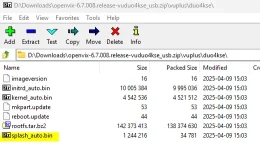
It's a standard file in the ViX image download.
You just use a fat32 formatted flash drive with a 'vuplus' folder > inside that is the 'duo4kse' folder and the splash_auto.bin goes in there.
You only need that one file if you're only flashing the splash logo.
So what happens next time you flash?
Willo3092
ViX Beta Tester
You have to replace it with your custom one if you flash from USB.
That file isn't flashed using Image Manager, only from USB. Updates don't affect it either.
That file isn't flashed using Image Manager, only from USB. Updates don't affect it either.
Similar threads
- Replies
- 1
- Views
- 104
- Replies
- 10
- Views
- 344


