Superb quality and spec AB-Com PULSe 4K SE. Crazy offer! Only £99! FREE UK DELIVERY! 4K UHD, Enigma 2, Multiboot 4 images & more!...
Superb quality and spec AB-Com PULSe 4K Rev II Twin Satellite tuner only £149! FREE UK DELIVERY! 4K UHD, Enigma 2, SATA HDD facility, Multiboot 4 images & more!...

[VU+ Duo] Browsing through channel list = Random Crash

I'm not using the hd skin mate, just the standard one and the lag is present (build 97)

this makes it more confusing if you are getting lag on normal skins too.
hmmmmmmmmmmmmmmmmmmmmmmmmmmmmmmmmmmmmm
 
Or not. As you couldn't find any skin related issue.
And I haven't been able to experience any lag on any of my boxes, using 720 or 1080 skin, so it seems more like user setting related.
 
Well I own duo2 and solo2, don't use hd skins and I have noticed the lag when scrolling from epg page to epg page and I Defo noticed it happened when the images where merged.
 
have you tried to fresh flash and fresh setup? or fresh flash and restored settings?
 
this makes it more confusing if you are getting lag on normal skins too.
hmmmmmmmmmmmmmmmmmmmmmmmmmmmmmmmmmmmmm
Mine is normal (default on installation) skin and lag is there.

Or not. As you couldn't find any skin related issue.
And I haven't been able to experience any lag on any of my boxes, using 720 or 1080 skin, so it seems more like user setting related.
That maybe true but it didn't exist on build 090 or prior to that.

Could it be ABM related? Was there any code change to ABM or OpenTV (where I get my epg source from) after build 090?
 
new Member, asked permission take learning
o.png
 
Last edited by a moderator:
this makes it more confusing if you are getting lag on normal skins too.
hmmmmmmmmmmmmmmmmmmmmmmmmmmmmmmmmmmmmm

Yep, I don't understand why I'm getting lag if my current setup is the same as before.:confused: As other users have also mentioned, it's when the code bases from openvix and openvixHD were merged, this is where the lag has begun.
 
Vix Image Build Number: 19
Vix Build Version: Openvix 3.2
Flash Without Settings Restore:Yes
Flash With Settings Restore: No

Hi guys,

I had this problem appear again today. I was scrolling up the channel list and got a crash. I know I need to update my duo to the latest build but could someone please look at the crash log provided and tell me what exactly went wrong?

I have got a swap file activated and the cache flush plugin enabled. I have also included a screenshot of my memory info via telnet.

Thanks for your time.

Regards,

Avi.

View attachment Vu duo memory info.txtView attachment vuduoenigma2_crash_1451157973.log
 
Vix Image Build Number: 32
Vix Build Version: Openvix 3.2
Flash Without Settings Restore:No
Flash With Settings Restore: No

I am also experiencing this problem on my VuDuo2 - scrolling through epg results in crash - sometimes i lose EPG info and have to download again. Have got Cache plugin running but still happening .

thanks
 
Last edited by a moderator:
Vix Image Build Number: 32
Vix Build Version: Openvix 3.2
Flash Without Settings Restore:No
Flash With Settings Restore: No

I am also experiencing this problem on my VuDuo2 - scrolling through epg results in crash - sometimes i lose EPG info and have to download again. Have got Cache plugin running but still happening .

thanks

Where are you saving your epg data to? Is is internal HDD or a USB?

Plus you shouldn't need to run the cacheflush plugin as the duo2 has enough memory whereas the duo is very old and therefore needs it (well in my case it does)
 
Saving to usb drive. issue seems to have gone away over last few days - not sure why but no crashes since last weekend. Thanks anyhow.
 
Saving to usb drive. issue seems to have gone away over last few days - not sure why but no crashes since last weekend. Thanks anyhow.

Spoke to soon - just crashed again on epg when looking through

:rolleyes:
 
I haven't come across this on my solo2 - my epg is stored on internal hdd.

Can i suggest you telnet in and use "init 4" command to put box to sleep and then proceed to delete epg.dat and the "crossepg" folder of where you have your epg stored then restart box with telnet command "init 6".

Also, I haven't got cacheflush as it's not normally needed on modern boxes with sufficient flash and memory like ours.

What do you use for bouquets, is it ABM or other custom bouquets?
 
Last edited:
Spoke to soon - just crashed again on epg when looking through

:rolleyes:

Reporting a crash without uploading the crash log is pretty useless. Even if you've uploaded a previous one.
 
Okay I may have spoken too soon. Whilst I was looking for missing picons, my solo2 crashed.

I'm using a fresh install of 3.2 032 with no restore of settings.

All I did was press arrow down to bring up channel bouquet sections and select "All Channel" bouquet section and then just kept scrolling down and down (whilst checking for misssing picons as I mentioned). I got passed the Music section and then crash happened.

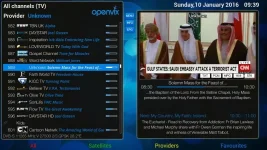
After it rebooted itself, I went back into this same screen but i've now got a few channels actually listed as "Unknown" whereas these weren't beforehand. Example of channels listed now as "Unknown" are: Sky Living, ITV2, CBS Action, OH TV, CNN, GB Shop, EWTN Catholic, etc. Actually viewing these channels brings the channel name back.

Attached is crashlog and screenshot of an example of a channel now listed as "Unknown"

It must be an intermittent error because I tried to re-create it and it was fine. I deleted bouquets (via menu) and re-ran ABM (custom N/W) and the "Unknown" channels had gone.

If it happens again, I'll enable debug logs and see if I can re-create it :)

View attachment enigma2_crash_2016-01-10_09-21-46.log

UnknownChannels.webp
 

OpenViX Feeds Status

Back
Top