Superb quality and spec AB-Com PULSe 4K SE. Crazy offer! Only £99! FREE UK DELIVERY! 4K UHD, Enigma 2, Multiboot 4 images & more!...
Superb quality and spec AB-Com PULSe 4K Rev II Twin Satellite tuner only £149! FREE UK DELIVERY! 4K UHD, Enigma 2, SATA HDD facility, Multiboot 4 images & more!...

[GI-XPEED LX3] Cable some channels blocky low SNR

nsw9154

V.I.P,
Joined
Feb 19, 2014
Messages
2,008
Reaction score
6
Points
0
Location
Hartlepool
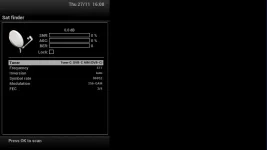
I have finaly got cable running on my LX3 and it is running almost perfect with a strong SNR of 99% on some channels but some are fluctuating between 24% to 54%, on the higher signal they are working ok but when it drops down to 24% they are very blocky and unwatchable, but their are a few channels that drop down to 24% and are perfect do i need to fit an attenuator or something to boost the signal or could it be the splitter, i am using a genuine virgin cable modem/set top box splitter and extension cables with the LX3 using the set top box feed

The strange thing is, I tried connecting the cable feed direct without the splitter and it seemed to get worse the channels that fluctuated between 24 & 54% stayed at 24% or just did not show a picture at 0% :confused:
 
I played with attenuators but I was the other way and needed a powered splitter now all my channels are 99% Snr
 
OK I realize now I feel so thick :o but all I can seem to find are powered splitters for TV or satellite, surely cable will be a different signal as I want to make sure that I get the right one
ideally one with 5 outputs just in case I decide to upgrade to a mutant receiver
 
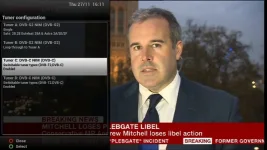
I received a second DVB-C/T2 tuner from the sponsors today and after fitting it my original DVB-C/T2 tuner no longer works I am not getting any signal on it although it was working perfect until I fitted the second tuner

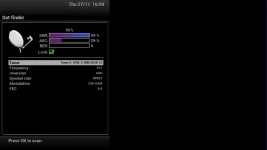
The New tuner is working perfect and I am getting 99% SNR on most of the cable channels as I sat and ran through every one from BBC1 NE&C back to BBC1 NE&C :eek:
so flushed with success i decided to plug the cable in to my old tuner to compare the signals easy pees y :rolleyes: but i got nothing :confused: plugged back in to the new tuner and got full SNR 99% I have tried resetting the receiver and retuning but just get 0 channels found, I am at a loss the only thing I can think to do is disconnect them and swap them round

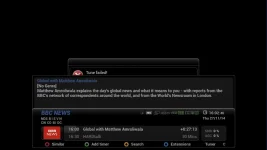
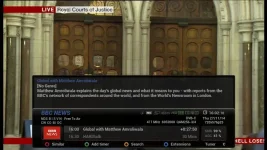
cable old tuner.webp cable new tuner.webp cable old tuner 2.webp cable new tuner 2.webp cable new tuner 3.webp
 
Have you tried a fresh re-flash and setup?

Are both tuner settings the same?

Try recording one DVB-C channel then switching to another.
 
Have you tried a fresh re-flash and setup?

Are both tuner settings the same?

Try recording one DVB-C channel then switching to another.

Thanks for the Quick reply Sicilian,I think I will try a fresh re-flash as now that you mention it I can not seem to get both tuners to show the same settings

scrub that just tried the settings again and they are now both the same :confused: so a fresh re-flash with Apollo 090 is now in progress
 
Well I did a clean fresh re-flash without restore and still the same,so I changed them round as originally the old tuner was in "D" and the new tuner was put in to "C" to replace a DVB-S
now the old tuner that I put in to "C" worked and the new tuner did not :confused: so now I am thinking that it's the motherboard's "D" tuner connection, so I took "C" out and "D" worked so I put "C" back in and "D" did not work again

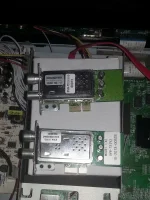
looking at the tuners they are the correct model number but the old one says Samsung but their is no name on the new one so I do not know if that is also a Samsung, all that I can think is that they are incompatible with each other as they both work perfect on their own but will not work together the old one says LX2 but that should not make a difference

I will try doing another fresh flash without system restore and without DVB-S and see if I can get them both to work and if not I will order another one from WOS and try the 2 new ones together :rolleyes: here is a pic

LX3 DVB-C Tuners.webp
 
I have a lx3 to with one t2-tuner and when i got it i had problem to.
For me it helped to losen the 2 screws on tuner.
When the 2 screws were tightened the legs of the tuner was a bit bent upwards.

Maybe the same for you?

Regards, Leif.
 
Well that was interesting I did a clean install of Apollo 090 and only set the cable side up but this time I could not get the EPG or ABM to load in and kept getting "time out for tuner lock"
no mater what I tried no joy so I set the sat side up and got the same problem :eek: I was pulling my hair out as no mater what I tried I could not get ABM to do a complete scan
even after setting the EPG up and doing a full CrossEPG taking 30mins about 3 times still no joy

so I admitted defeat and loaded in my saved image and backup of Apollo 090 :smash: guess what that still would not let me do a ABM scan numerous resets and reboots later i decided to try fitting a loop lead, so I made one out of half a TV Video lead with the female plug end, and various cable plug adapters (It is quite a bodge job but it works) and guess what the tuner that was not working kicked in and I was able to watch a cable channel while doing 3 recordings but one problem that I noticed is that if I have virgin as the 1st provider in the list the scan fails :confused: so i set ROI as 1st provider and every thing seems to be working ok for the time being so i think that it is now time for Bed :sleep:

Cable ABM.webp
 
Well that was interesting I did a clean install of Apollo 090 and only set the cable side up but this time I could not get the EPG or ABM to load in and kept getting "time out for tuner lock"
View attachment 38836

Thats the message i kept getting.... sounds similar to problem i was having with my mutant box...

http://www.world-of-satellite.com/showthread.php?42310-Tuner-D-not-showing

As anyone got 2 cable and 2 sat tuners showing up and configured correctly with vix image loaded?

In my case after swapping tuners around i found every tuner worked ok,but none would show up in tuner D slot.

Hope you get sorted matey... mines gone back..
 
Last edited:
All my tuners are showing up correctly see pic 5 post 5, my problem was that tuner "D" would not work with tuner "C" installed and ABM would not complete a scan but since I fitted the loop cable between C & D and set ROI as the 1st provider everything seems fine now

I will do a few more tests and might even try another clean install with the loop cable in place and ROI as 1st provider as it was getting late and I needed some sleep
 
"UPDATE"

I purchased a new 4 way - 1 in 4 out splitter and appropriate connectors made a proper loop through cable then found one in my Duo2 Box that would do the job :rolleyes:

I upgraded to Apollo 096 and I still can not get tuner "D" to work on it's own, so I disconnected the loop through cable and fitted a direct cable from the splitter to tuner "D" and it still would not work on it's own :confused: changed cables over and still the same, but the 2 separate tuners seem to be working fine together, both settings are the same for both tuners so in theory they should both work independent of each other but they don't

but as they stand they are working perfect I can now watch a cable channel while recording another which is nice but there are limitations just like the sat side
I only manager to get 4 recordings going at the same time but only 2 where what I intended to record the other 2 where dependent on what channels where available similar to the transponder limitations in the sat side
but if for instance their are 4 sports events on at the same time you should be able to record 3 and watch a 4th

So all in all I am very pleased with my LX3 running 2 cable tuners and my sat side running free sat but their is my predicament now I want more cable tuners, what do I do should I try a USB tuner or upgrade to a Mutant :confused: the logical thing is to try a USB tuner, the Sundtek seems Expensive but compared to changing receivers is it worth it, and seeing as my LX3 is working faultlessly I might try one any suggestions anyone :D
 

OpenViX Feeds Status

Back
Top