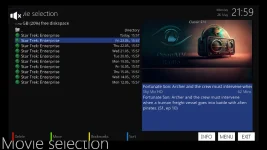
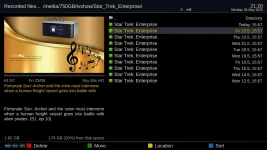
Superb quality and spec AB-Com PULSe 4K SE. Crazy offer! Only £99! FREE UK DELIVERY! 4K UHD, Enigma 2, Multiboot 4 images & more!...
Superb quality and spec AB-Com PULSe 4K Rev II Twin Satellite tuner only £149! FREE UK DELIVERY! 4K UHD, Enigma 2, SATA HDD facility, Multiboot 4 images & more!...

Extra line of text in Movie Center program description

FlexMcMurphy

Member
Joined
Sep 29, 2013
Messages
38
Reaction score
1
Points
8
Hello,

Zgemma H7S
OpenATV 6.4
Metrix HD

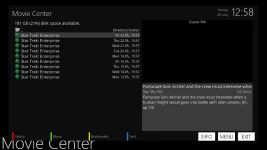
When I view a TV recording in the Movie Center there is an extra line of text in the program description.

Please see attached screenshot.
See how the line of text: "Fortunate Son: Archer and the crew must intervene when" appears twice?

Can I change something, maybe in the Metrix HD skin, to remove the first line of text?
It doesn't seem like it should be there.
I want that program description box to just have this content:

Sky Mix HD 62 mins
Fortunate Son: Archer and the crew must intervene when a
human freight vessel goes into battle with alien pirates. (S1,
ep 10)

I have disabled the EMC, only using the regular "Movie Center".
I cannot find anywhere to disable "Short Description".
If I disable "Extended/Long Description" then no description is shown at all.
I had a look at some of the Skin xml files in /usr/share/enigma2 but I don't know what I'm doing.

Cheers,

Flex
 

Attachments

  • Movie_Center_Extra_Text.webp
    Movie_Center_Extra_Text.webp
    44.2 KB · Views: 14
If you dont get answer, try the OpenATV forum. However, you are unlikely to get a fix/change ( if required) on a discontinued image version.
 
In my Zgemma H7S I also have OpenPLi 9.1 and OpenATV 7.5.1 and I see to have the same issue in both of those images, see attached.

I have disabled the EMC so am only using the default "Media Center".
If I disable "extended descriptions" I don't see any program description at all, not the extra line at the top or the program description.

I asked them over on opena.tv but got nothing very helpful other than it could be a short vs long descriptions thing or some interaction between the "Movie Center" settings and the Metrix HD skin. Maybe I should try another skin, would you have any recommendations? I bet there is some small edit needed to be done to one of the Metrix HD skin xml files.

Are you using "Media Center" in your enigma2 image? Do you have this issue?

Cheers,
Flex
 

Attachments

  • Movie_Center_Extra_Text_Open_ATV_7.5.1.webp
    Movie_Center_Extra_Text_Open_ATV_7.5.1.webp
    63.3 KB · Views: 5
  • Movie_Center_Extra_Text_Open_PLi_9.1.webp
    Movie_Center_Extra_Text_Open_PLi_9.1.webp
    79 KB · Views: 4
In my Zgemma H7S I also have OpenPLi 9.1 and OpenATV 7.5.1 and I see to have the same issue in both of those images, see attached.

I have disabled the EMC so am only using the default "Media Center".
If I disable "extended descriptions" I don't see any program description at all, not the extra line at the top or the program description.

I asked them over on opena.tv but got nothing very helpful other than it could be a short vs long descriptions thing or some interaction between the "Movie Center" settings and the Metrix HD skin. Maybe I should try another skin, would you have any recommendations? I bet there is some small edit needed to be done to one of the Metrix HD skin xml files.

Are you using "Media Center" in your enigma2 image? Do you have this issue?

Cheers,
Flex
This is the OpenViX forum and this seems to be an OpenPLi/OpenATV question.
 
In case anyone lands here with the same problem... the developer of the Metrix HD skin created a solution for me which is explained here.

In Summary
You have to update...
Code:
/usr/share/enigma2/MetrixHD/skinfiles/skin_movieplayer.xml
In the <screen name="MovieSelection_PIG"...>...... </screen> tab you comment out the <widget>...</widget> for the ShortDescription and then adjust the positions of the next three <widget>s up and increase the vertical size of the <widget> that displays the ExtendedDescription.

After that you go in to the Plugin Browser and in MyMetrixLite press the Green Button to "Apply Changes" then restart the GUI.
 

OpenViX Feeds Status

Back
Top