Superb quality and spec AB-Com PULSe 4K SE. Crazy offer! Only £129! FREE UK DELIVERY! 4K UHD, Enigma 2, Multiboot 4 images & more!...
Superb quality and spec AB-Com PULSe 4K Rev II Twin Satellite tuner only £179! FREE UK DELIVERY! 4K UHD, Enigma 2, SATA HDD facility, Multiboot 4 images & more!...

[ViX_Misc] [gAccel] alloc failed & [gSurface] ERROR: accelAlloc failed

Orlandox

ViX Beta Tester
Joined
Nov 6, 2020
Messages
1,287
Reaction score
36
Points
48
Location
Finland
Hello,

what does those mean ? They are repeatedly in the log.

For example :

< 27468.5066> 13:54:01.1135 [gAccel] alloc failed
< 27468.5067> 13:54:01.1135 [gSurface] ERROR: accelAlloc failed
< 27528.5063> 13:55:01.1132 [gAccel] alloc failed
< 27528.5063> 13:55:01.1132 [gSurface] ERROR: accelAlloc failed
< 27588.5064> 13:56:01.1132 [gAccel] alloc failed
< 27588.5064> 13:56:01.1133 [gSurface] ERROR: accelAlloc failed
< 27648.5067> 13:57:01.1135 [gAccel] alloc failed
< 27648.5067> 13:57:01.1136 [gSurface] ERROR: accelAlloc failed
< 27708.5067> 13:58:01.1135 [gAccel] alloc failed
< 27708.5067> 13:58:01.1136 [gSurface] ERROR: accelAlloc failed
< 27768.5065> 13:59:01.1133 [gAccel] alloc failed
< 27768.5065> 13:59:01.1134 [gSurface] ERROR: accelAlloc failed

Is there a way to get rid of them by fixing something?
 
I get this occasionally on my XTrend 8500. I think it's related to the box running low on some graphics memory - the message isn't exactly informative as to what we might do when that happens. The good news is that it doesn't seem to have any nasty side effects though.
 
Seen this with skin/picon issues - which skin are you using?

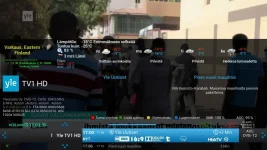
I have modified YouViX-Blue to YouViX-Blue-Mod. I have added weather forecast with weather symbols. It might be the reason. I'm using png with 96*96, 8 bits and png 40*40, 32 bits.

0.webp
humidity_icon.webp

SecondInfoBar.webp

Which format is supported ?
 
try running with normal skin and see if you have same issue
 
At 1 per second it will fill up debug logs.
They're usually in response to drawing on screen. In my ET8500's case, they only appear in a burst of 10 or so lines when I've got subtitles on and I open another screen.

The message is a bit uninformative though, and certainly doesn't need to be spread across 2 lines.
 
Is this related ? Found at the beginning of the log.

< 9541.6399> 12:10:01.3533 [Skin] Processing screen 'SecondInfoBar', position=(0, 0), size=(1920 x 1080) for module 'SecondInfoBar'.
< 9541.8464> 12:10:01.5598 [Harddisk] [diskSize]: stat.f_blocks: 234122718 stat.f_bsize: 4096
< 9542.1137> 12:10:01.8271 [gRC] main thread is non-idle! display spinner!
libpng warning: iCCP: profile 'Photoshop ICC profile': 'RGB ': RGB color space not permitted on grayscale PNG

With Simple_Ten_Eighty skin I get it also, but not so often.
 
Last edited:
It must have something to do with subtitles:

< 14073.1119> 13:25:32.8253 [eSubtitleWidget] add 54 342 424 48
< 14073.1120> 13:25:32.8253 [eSubtitleWidget] add 54 390 432 54
< 14074.8542> 13:25:34.5676 [gAccel] alloc failed
< 14074.8546> 13:25:34.5680 [gSurface] ERROR: accelAlloc failed
< 14074.8548> 13:25:34.5682 [gAccel] alloc failed
< 14074.8551> 13:25:34.5684 [gSurface] ERROR: accelAlloc failed
< 14076.8329> 13:25:36.5463 [eSubtitleWidget] add 54 438 328 48
< 14076.8334> 13:25:36.5467 [eSubtitleWidget] add 54 486 486 54
< 14080.5009> 13:25:40.2143 [gAccel] alloc failed
< 14080.5013> 13:25:40.2147 [gSurface] ERROR: accelAlloc failed
< 14082.4737> 13:25:42.1871 [eSubtitleWidget] add 54 390 450 54
< 14083.4183> 13:25:43.1317 [gAccel] alloc failed
< 14083.4187> 13:25:43.1321 [gSurface] ERROR: accelAlloc failed
< 14083.4189> 13:25:43.1323 [gAccel] alloc failed
< 14083.4191> 13:25:43.1325 [gSurface] ERROR: accelAlloc failed
< 14085.3950> 13:25:45.1084 [eSubtitleWidget] add 54 342 352 48
< 14085.3951> 13:25:45.1085 [eSubtitleWidget] add 54 390 414 54
< 14087.4589> 13:25:47.1722 [gAccel] alloc failed
< 14087.4593> 13:25:47.1726 [gSurface] ERROR: accelAlloc failed
< 14087.4595> 13:25:47.1729 [gAccel] alloc failed
< 14087.4597> 13:25:47.1731 [gSurface] ERROR: accelAlloc failed
 
I made a clean installation of 6.0.006 through OpenMultiboot.
When using S1080 as a skin, not even one time those errors, but when using my skin the errors begin.

I have used Paint 3D to stretch and shrink existing icons, infobars etc. and saving has converted them to 32 bit.
My best guess it that my boxes don't like 32 bit icons only 8 bit. Next question for testing that theory is how to convert those 32 bit pics to 8 bit ones ?
 
Last edited:
My Ultimo4K and ET10K both with Simple_1080 come up with loads of [eSubtitleWidget] add 0 xxx 1920 58, but no Accel errors.
 
I've done some clarifications and those errors are related how for example infobar is made and saved. Some of them are made and saved with Photoshop: Bit Depth=8, color type=RGB with Alpha, Colorspace=Not calibrated etc.

libpng warning: iCCP: profile 'Photoshop ICC profile': 'RGB ': RGB color space not permitted on grayscale PNG --> this has something to do with the program used to create the pic.

Some of those are causing these errors. Does someone know what format is supported ? *.png with RGB, 8 bit, RGB 24 bit, RGB 32 bit ? Is some special program needed when doing pics?
 
Hello,

problem is solved!
It was caused by picons and other elements of skin (*.png). Picons I used, were saved as Color Type = RGB with Alpha. When changing that to RGB (only), no more above errors.

By the way saving picon with IrfanView did the trick ;) Thanks everybody !
 
Last edited:
.. thanks for the feedback, always nice to know solution
 
.. thanks for the feedback, always nice to know solution

Looks like (when reading the exif-data from *.png) shows that they are made with old Adobe ImageReady that saves the transparency to Alpha.
 

OpenViX Feeds Status

Back
Top