Superb quality and spec AB-Com PULSe 4K SE. Crazy offer! Only £129! FREE UK DELIVERY! 4K UHD, Enigma 2, Multiboot 4 images & more!...
Superb quality and spec AB-Com PULSe 4K Rev II Twin Satellite tuner only £179! FREE UK DELIVERY! 4K UHD, Enigma 2, SATA HDD facility, Multiboot 4 images & more!...

[GiGaBlue QUAD] Gigablue Quad possible bug Apollo 24

  • Thread starter Thread starter Predator5
  • Start date Start date
P

Predator5

Guest
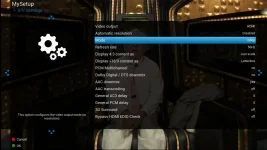
HDMI does not recognize 1080p!!!only 720i 576i 1080i possible bug?
 
I don't have the option of 1080p on my quad either...What is the difference between 1080i and p?
 
I don't have the option of 1080p on my quad either...What is the difference between 1080i and p?

Progressive is normally used for film originated material. TV data is interlaced. It's a hangover from older cathode ray tube (CRT) TVs where scan lines were traced on the tube - odd line numbers in one field and even line numbers in the next making up one complete frame every 25th of a second (in Europe) and every 30th of a second in US and other countries. Most flat screen TVs (plasma, LCD) are inherently progressive displays and TV signals are de-interlaced into progressive frames either by the TV itself or by the box (or AV amplifier if you are using one). Usually, if you are using a high-end TV it is better to let it de-interlace. The quality of de-interlacers in sat boxes is variable - you have to try them out and see if it's better to use 1080i or 1080p (or 720p in Germany particularly). Some boxes will not support 1080p at all. Thing is, the Quad+ was supporting 1080p up to this point. Maybe the newer drivers have disabled this mode or the ViX image is not handling it properly. I've reported it in the bugs section.
 
Thanks for the excellent explanation fat-tony. i never knew this and have always had mine on 1080i..I have a led Samsung so will try it on 1080p if it gets sorted...Always thought 1080p was used when using a pc through the tv, not sure where i read that
Thanks Again
 
Progressive is normally used for film originated material. TV data is interlaced. It's a hangover from older cathode ray tube (CRT) TVs where scan lines were traced on the tube - odd line numbers in one field and even line numbers in the next making up one complete frame every 25th of a second (in Europe) and every 30th of a second in US and other countries. Most flat screen TVs (plasma, LCD) are inherently progressive displays and TV signals are de-interlaced into progressive frames either by the TV itself or by the box (or AV amplifier if you are using one). Usually, if you are using a high-end TV it is better to let it de-interlace. The quality of de-interlacers in sat boxes is variable - you have to try them out and see if it's better to use 1080i or 1080p (or 720p in Germany particularly). Some boxes will not support 1080p at all. Thing is, the Quad+ was supporting 1080p up to this point. Maybe the newer drivers have disabled this mode or the ViX image is not handling it properly. I've reported it in the bugs section.

Thanks!


with the image of Apollo 23 was fine the 1080p and the other resolutions!!
 
You on build 024? Definitely not working on my Quad+. Was ok up to build 023. I think it's the new drivers.

oops, i was using my own build of apollo24 but now im using my own build with new kernel and drivers.
 
@Predator5 - I'm testing the new OE 2.3 version of ViX on the Quad Plus. It will be released as image version 025, probably tomorrow (Sat.) if all goes well with the builds. The 1080p setting is available in this build.
 

OpenViX Feeds Status

Back
Top