C
Clyde
Guest
Hi all I have a solo2 running on vix 3.0 build 808
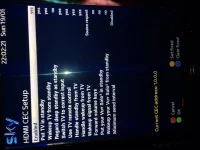
Just wondering how to setup up Hdmi Cec so when I turn on the solo2 the tv recognises Hdmi 1 and displays the channel on the solo2 without having to press av on the remote.
I had black hole 2.0.8 image on the solo 2 and had it setup like this
Press tv
The tv and solo 2 both switched on and Hdmi was recognised and displayed the last channel I was watching.
Just wondering how to setup up Hdmi Cec so when I turn on the solo2 the tv recognises Hdmi 1 and displays the channel on the solo2 without having to press av on the remote.
I had black hole 2.0.8 image on the solo 2 and had it setup like this
Press tv
The tv and solo 2 both switched on and Hdmi was recognised and displayed the last channel I was watching.