Superb quality and spec AB-Com PULSe 4K SE. Crazy offer! Only £129! FREE UK DELIVERY! 4K UHD, Enigma 2, Multiboot 4 images & more!...
Superb quality and spec AB-Com PULSe 4K Rev II Twin Satellite tuner only £179! FREE UK DELIVERY! 4K UHD, Enigma 2, SATA HDD facility, Multiboot 4 images & more!...

How to apply 1080P skins?

  • Thread starter Thread starter user68
  • Start date Start date
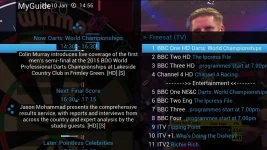
I've updated too but it still hasn't fixed the problem I have with 1080P skins. The right is on the left and the left is on the right. I've attached a screen print.

1_0_19_1B1D_802_2_11A0000_0_0_0.webp
 
Different skins have different layouts with details in different places.

It is not a matter of correct or wrong, it is just how the skinner has made the skin.
 
I appreciate the skin may have been designed this way but does it look right to you in the screen print? It looks to me as if the positioning of the skin is shifted to the right and has reentered from the left of the screen. This surely isn't how it was designed to be viewed, is it? Could anyone who uses this skin please confirm if they see the same thing? Thanks
 
I've updated too but it still hasn't fixed the problem I have with 1080P skins. The right is on the left and the left is on the right. I've attached a screen print.

View attachment 40009
Did you do a full fresh usb flash to build 121 with no settings restore and after going through installation, can you try the 1080 skins, before doing any usual change of settings/setting up?

It's just really weird as I have Solo2 and I never had this problem of screen looking off like this. This is on several TV's
 
Last edited:
I've been doing updates but will try a usb flash as you have suggested later today and will update the thread.
 
I've been doing updates but will try a usb flash as you have suggested later today and will update the thread.
Ok let us know how you get on. I'm hoping that a fresh/clean usb flash to build 121 with no settings restored and after the initial setup process install a 1080 skin (before other plugins and/or settings are set) will make a difference. If not, it at least narrows it down to one less thing that it can be.

No.Trace reported his problem has been solved with this build and it's new drivers. I personally, haven't got this problem on my solo2.
 
Trying to flash now. I'm not pleased. I cannot move past the first wizard page to select HDMI/SCART etc.... VIX won't respond to any selection from the remote. (I've checked the batteries). WFT? :mad:
 
I've now completed the USB flash and this has fixed the problem with the 1080P skins. They look really good.
 
Trying to flash now. I'm not pleased. I cannot move past the first wizard page to select HDMI/SCART etc.... VIX won't respond to any selection from the remote. (I've checked the batteries). WFT? :mad:


It turned out that the remote code had somehow changed - identified by Abu - that was stopping me completing the set up. It got her moaning again about how many times I play with the receiver while she wants to watch some crap on the telly... :argue:
 
It turned out that the remote code had somehow changed - identified by Abu - that was stopping me completing the set up. It got her moaning again about how many times I play with the receiver while she wants to watch some crap on the telly... :argue:
Same problem here as well haha.

I've now completed the USB flash and this has fixed the problem with the 1080P skins. They look really good.
I'm glad you're sorted now.
 
Last edited:
this problem I have also previously mentioned it was due to overscanning but no joy for me
 
do HD skins work on Miraclebox Ultra getting mine later on today
No idea to be honest but if it does you will find them in the feeds, so it will be easy enough to find out when you setup

Sent from my SM-G900F using Tapatalk
 
No idea to be honest but if it does you will find them in the feeds, so it will be easy enough to find out when you setup

Sent from my SM-G900F using Tapatalk


just for info yes it does take 1080 skin BELLO is great
 

OpenViX Feeds Status

Back
Top