Superb quality and spec AB-Com PULSe 4K SE. Crazy offer! Only £99! FREE UK DELIVERY! 4K UHD, Enigma 2, Multiboot 4 images & more!...
Superb quality and spec AB-Com PULSe 4K Rev II Twin Satellite tuner only £149! FREE UK DELIVERY! 4K UHD, Enigma 2, SATA HDD facility, Multiboot 4 images & more!...

[VU+ Solo2] How to see HDD and USB Format?

Euphoria

New member
Joined
Feb 21, 2013
Messages
7
Reaction score
0
Points
0
Hi, im clean install the openvix appollo.021 and use the device manager for inicialize the hdd and usb drive but im have no idea how to see the format. im try to use the sfdisk -l /dev/sda but only see the drive and usb have gpt partition (id ee)

Thx. in advance
 
Last edited:
Hi, im clean install the openvix appollo.021 and use the device manager for inicialize the hdd and usb drive but im have no idea how to see the format. im try to use the sfdisk -l /dev/sda but only see the drive and usb have

The mount command (without parameters) shows you the formats of mounted partitions. Just find the /dev/sda1 and /dev/sdb1 from the output. For me the relevant lines show as

/dev/sda1 on /media/hdd type ext4 (rw,relatime,barrier=1,data=ordered)
/dev/sdb1 on /media/usb type vfat (rw,relatime,fmask=0000,dmask=0000,allow_utime=0022,codepage=cp437,iocharset=iso8859-1,shortname=mixed,errors=remount-ro)

So, my hdd is type ext4 and my usb stick is type vfat.
 
The mount command (without parameters) shows you the formats of mounted partitions. Just find the /dev/sda1 and /dev/sdb1 from the output. For me the relevant lines show as

/dev/sda1 on /media/hdd type ext4 (rw,relatime,barrier=1,data=ordered)
/dev/sdb1 on /media/usb type vfat (rw,relatime,fmask=0000,dmask=0000,allow_utime=0022,codepage=cp437,iocharset=iso8859-1,shortname=mixed,errors=remount-ro)

So, my hdd is type ext4 and my usb stick is type vfat.

Thx. soo much is work for me. im have a hdd and usb (for picons, egp.dat, etc...) and inicialize with the menu, here my info:

/dev/sda1 on /media/hdd type ext4 (rw,relatime,barrier=1,data=ordered)
/dev/sdb1 on /media/usb type ext4 (rw,relatime,barrier=1,data=ordered)

Thx. again for help.
 
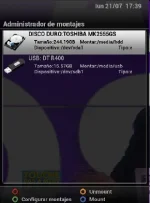
By default the Initialize option in ViX will format the device to EXT4. you can check the format of all connected devices by going into the mount manager.

Blue button> ViX> Mount manager.
 
By default the Initialize option in ViX will format the device to EXT4. you can check the format of all connected devices by going into the mount manager.

Blue button> ViX> Mount manager.

Thx. im try this but only see type: e

mount.webp

Thx.
 
That may be a issue in translation but I'm sure the last time I checked on one of my receivers it did show the format in the same window you have in your picture.

Sent from my SM-G900F using Tapatalk
 
So its likely a translation error for your language file.

Sent from my SM-G900F using Tapatalk
 

OpenViX Feeds Status

Back
Top