


abu baniaz
Moderator
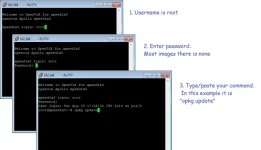
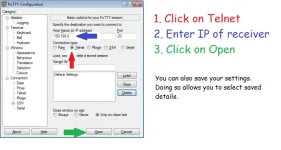
A pictorial guide on how to use Putty for Telnet commands
You can download Putty from
You can right click, then paste the command to avoid errors!
Some commands:
Show storage devices, filesystem and type
Put enigma to sleep (required before deleting files normally re-written at restart such as epg.dat)
Stop Enigma2 and then restart in console mode with debug
Stop Enigma2 and then restart in console mode with debug( On PLi, you have to issue as two separate commands)
Stop Enigma2, restart and write debug log to /hdd
(Will still work if you only have a USB stick connected)
Set a Pasword
List available updates. Useful if you always have pending update.
Perform an update
Check who is connected to your receiver.
Show your tuner configuration. This will also create a file in /tmp/ called "mytunerconfig.txt" Upload/attach it to your thread if asked to.
Find box details
Find maximum front ends (supports tuners)
Force stop Enigma2 then restart it
Flash by command line using ofgwrite. Unzip image and transfer to receiver first.
Flash by command line using Grog68's script. Requires boxbranding, so will not work on PLi, ATV 7.0. This will not create a settings backup.
List number of vtuners
Dreambox - Activate rescue mode
You can download Putty from
Code:
https://www.chiark.greenend.org.uk/~sgtatham/putty/latest.htmlYou can right click, then paste the command to avoid errors!
Some commands:
Show storage devices, filesystem and type
Code:
df -ThPut enigma to sleep (required before deleting files normally re-written at restart such as epg.dat)
Code:
init 4Stop Enigma2 and then restart in console mode with debug
Code:
init 4 && ENIGMA_DEBUG_LVL=4 /usr/bin/enigma2Stop Enigma2 and then restart in console mode with debug( On PLi, you have to issue as two separate commands)
Code:
init 4
ENIGMA_DEBUG_LVL=4 /usr/bin/enigma2
Stop Enigma2, restart and write debug log to /hdd
(Will still work if you only have a USB stick connected)
Code:
init 4 && enigma2 &> /media/hdd/Enigma2_debug_$(date +%Y-%m-%d_%H-%M-%S).logSet a Pasword
Code:
passwdList available updates. Useful if you always have pending update.
Code:
opkg update && opkg list-upgradablePerform an update
Code:
init 4 && opkg update && opkg upgrade && init 6Check who is connected to your receiver.
Code:
netstatShow your tuner configuration. This will also create a file in /tmp/ called "mytunerconfig.txt" Upload/attach it to your thread if asked to.
Code:
cat /etc/enigma2/settings | grep config.Nims > /tmp/mytunerconfig.txtFind box details
Code:
grep -r "" /proc/stb/infoFind maximum front ends (supports tuners)
Code:
grep -r "" /proc/stb/frontendForce stop Enigma2 then restart it
Code:
killall -9 enigma2
init 3
Flash by command line using ofgwrite. Unzip image and transfer to receiver first.
Code:
init 4
ofgwrite -r -k /folder_of_unzipped_image
Flash by command line using Grog68's script. Requires boxbranding, so will not work on PLi, ATV 7.0. This will not create a settings backup.
Code:
wget --no-check-certificate -O flash-vix.sh http://www.willobuild.net/files/scripts/flash-vix.sh && bash flash-vix.shList number of vtuners
Code:
python -c "from glob import glob; print(len(glob('/dev/misc/vtuner*')))"Dreambox - Activate rescue mode
Code:
echo "rescue" >> /proc/stb/fp/boot_mode
reboot
Attachments
Last edited:
