Superb quality and spec AB-Com PULSe 4K SE. Crazy offer! Only £99! FREE UK DELIVERY! 4K UHD, Enigma 2, Multiboot 4 images & more!...
Superb quality and spec AB-Com PULSe 4K Rev II Twin Satellite tuner only £149! FREE UK DELIVERY! 4K UHD, Enigma 2, SATA HDD facility, Multiboot 4 images & more!...

[VU+ Duo4K] IPTV sound

danped

Member
Joined
Jun 9, 2011
Messages
101
Reaction score
0
Points
16
What type of support thread are you creating?
Possible bug
What OpenViX Image build number are you using?
6.8.006
Have you tried re-flashing WITHOUT settings restore?
NO
Have you tried re-flashing WITH a settings restore?
YES
Hi,
I have a VU duo 4k running OpenVix 6.8.006. I upgraded a week ago from 6.4 (I think) to try and resolve this however it has not helped. My IPTV channels generally don't have sound but I know the feed is good. This started happening recently on a few channels in the last few months but now seems to affect all of the channels. To resolve this if I go to audio settings, and cycle AC3 downmix through the options and back to passthrough and then cycle 3D surround speaker position from centre then the sound usually comes on. I haven't refined this to something that always works but generally it does. So I'm pretty sure it is a box issue. Is there a way I can solve this permanently?

Thanks,
Dan
 
Not sure if this will help but here is an AI answer:

This specific audio issue on the
VU+ Duo 4K
running OpenViX 6.8—where sound only triggers after cycling AC3/3D settings—is a known handshake or driver-level bug often related to how the box handles multi-channel audio streams in IPTV.
To solve this permanently, try the following steps in order:

1. Enable Global AAC Downmix
Many IPTV providers use AAC audio, which can struggle with passthrough on Enigma2 boxes if the handshake fails.
  • Go to Menu > Setup > Audio & Video > Audio Settings.
  • Find AAC Downmix and set it to On.
  • Ensure AC3 Downmix is also set to On unless you are specifically outputting to a high-end surround system that requires raw passthrough.


2. Disable "New GStreamer Playback"
A specific setting in recent OpenViX builds can cause playback and audio initialization failures for IPTV streams.
  • Check your service settings or IPTV plugin settings for an option called "Enable new GStreamer playback".
  • Ensure this is set to Off/No. This option is known to be broken for many IPTV setups on the Duo 4K.


3. Switch Service Type (ServiceApp)
The default internal player (GStreamer) often has issues with modern IPTV codecs. Using exteplayer3 is a more robust permanent solution.
  • Install the ServiceApp plugin from the plugin feed (Green Button > Download Plugins > systemplugins).
  • Go to Menu > Setup > Usage & GUI > ServiceApp.
  • Change Enigma2 Playback System from "Original" to serviceapp.
  • Set Player to exteplayer3.
  • Restart the GUI. This player handles codec handshaking much more reliably than the default system player.


4. Fresh Flash without Settings Restore
If you upgraded from 6.4 to 6.8 using a settings restore, old configuration files or incompatible driver stubs may have carried over.
  • Perform a fresh flash of OpenViX 6.8.006 using a USB stick.
  • Crucial: Do not restore your settings or plugins during the wizard. Reconfigure your audio and IPTV bouquets from scratch to ensure no legacy AC3/Surround configurations are causing the conflict.
 
Enable new GStreamer playback is not working option. I think it should be removed.
As for the missing sound when passthrough that is known problem on Vu+ boxes but it was not a problem on Duo4K. Only on Duo4KSE and Ultimo4K.
I guess the problems is change in the drivers. I dont know what that drivers got updated. But its generally issues with the drivers that are fixed on Duo4KSE with that additional options to enable passthrough fix in audio settings. But that is not available in Duo4K so i am not sure what is going on. It is possible your iptv provider to changed something in audio parameters. Can you specify what type of audio comes from the stream?
 
Thanks for the replies so far.
Option 1 isn;t an option as I need raw passtbhrough for my sound system.
Option 2 ruled out as above
Option 3 - I can't see any serviceApp in the store or already installed - not sure if AI is hallucinating here.
Option 4 - This problem existed before I upgraded, however I may have to try a full rebuild with no settings restore to try and resolve this.

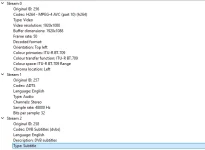
Dimitar - How would I identify the type of audio coming from my stream?
 
You can play the stream via vlc on pc and check the track infos. Or you can open the audio selection screen and see what is written as codec. But in the box you can get codec only and no additional info...
 
Yes. Not sure is this Adts is really supported by the drivers of duo4k. Maybe that is the problem that recently audio got changed and that cause issues
 
But it does work just fine after the cycling. So I don't see it as a driver issue more likely a software bug/recognition issue I would think.
 
No its not software. Passthrough is hardware/driver thing. Its nothing software related.
 

OpenViX Feeds Status

Back
Top