Superb quality and spec AB-Com PULSe 4K SE. Crazy offer! Only £129! FREE UK DELIVERY! 4K UHD, Enigma 2, Multiboot 4 images & more!...
Superb quality and spec AB-Com PULSe 4K Rev II Twin Satellite tuner only £179! FREE UK DELIVERY! 4K UHD, Enigma 2, SATA HDD facility, Multiboot 4 images & more!...

Kingston Datatraveler not seen in VIX 1.3

It should say as below.... See example...

Device Boot Start End Blocks Id System
/dev/sdb1 1 7624 1951728 6 FAT16


Where the column is labelled 'Sytem' that will be what you are looking for.
 
It should say as below.... See example...

Device Boot Start End Blocks Id System
/dev/sdb1 1 7624 1951728 6 FAT16


Where the column is labelled 'Sytem' that will be what you are looking for.

I think that just says "Linux system"... Doesn't distinguish between ext2/3/4...
 
It will say what it is once you have applied the creation of a new partition.

My stick currently has a fat16 system.
 
All I get is the following:-

Code:
Disk /dev/sdb: 8019 MB, 8019509248 bytes
247 heads, 62 sectors/track, 1022 cylinders
Units = cylinders of 15314 * 512 = 7840768 bytes

   Device Boot      Start         End      Blocks  Id System
/dev/sdb1               1        1022     7825453+ 83 Linux

But I'm not sure if that is EXT2 or EXT3
 
If you type "mount", then it will tell you the filesystem you've mounted ;) Knew I knew it was available somewhere, just couldn't remember straight away :p

e.g. I get:

Code:
/dev/sda1 on /media/hdd type ext3 (rw,data=ordered)
/dev/sda2 on /media/hdd2 type ext3 (rw,data=ordered)
/dev/sdb1 on /media/usb type ext2 (rw)
 
Thanks Poo

Code:
/dev/sdb1 on /media/usb type ext3

Should that be any problems with a Swap file then?
 
Thanks Poo

Code:
/dev/sdb1 on /media/usb type ext3

Should that be any problems with a Swap file then?

Wouldn't think so, just that ext2 is generally a little faster for usb devices ...
 
Just I'm having problems getting the swap to work at the moment.
Code:
http://www.vuplus-support.co.uk/showthread.php?4514-Creating-Swapfile-(am-I-doing-something-wrog)-Vix1.3&p=34497#post34497

I think I'll just reformat as suggested.
 
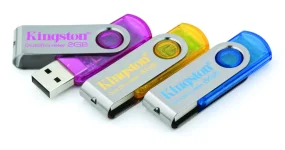
Issue here too with a Kingston 16GB Datatraveler (the one with folding metal cover).
20081125174108.jpg


The Usb attached on the back was at first initialized in ext using VuDuo vix 2.3 and it seemed to work. I put on it picons and set the path for timeshift.
After two days my Duo become soooo slow and the vix logo started spinning on every command issued. I discovered the USB stick went bed.
I've tried every tool to try resurrect it but noting worked (Gparted, HDD low level format, removing partition) every tools reported the Filesystem was gone. Luckyly I succeded to have it replaced.

Once back at home as soon as I connected the pendrive (FAT32 formated) was recognized ok, but the VIX refused to mount it in the mount manager... so I went in the hard disk configuration and tried to ext format it. Nothing! I got a timeouot error.
Sure it was screwed once again I tried that pen on my Mac and it was not automaticaly mounted. Launched in diskutility the partition was greyed out but recognized in ext filesystem. With my great reliefe I was able to remove the partition and make a new one.
 

Attachments

  • 20081125174108.webp
    20081125174108.webp
    69.3 KB · Views: 1

OpenViX Feeds Status

Back
Top