markus625
ViX Beta Tester
- Joined
- Dec 8, 2011
- Messages
- 1,104
- Reaction score
- 23
- Points
- 0
- Age
- 56
Hey guys been working on a mod for the Dreamplex skin for Rossie's Youvix skin.
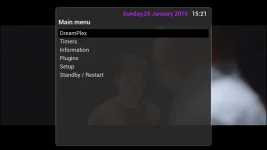
If you have alook at the screenshot below the selection bar which is semi transparent shows the tv background and no matter what color i use for the <color name="ListboxSelectedBackground" color="menubackground" /> element does not do what i want it to i,e show the transparent layer over the fanart.
So basically i want the element <color name="ListboxSelectedBackground" color="" /> to have no color but show the layer below it.
Ive tried the below colors
<color name="background2" value="#51010101"/>
<color name="outlinemenubackground" value="#2462625d" />
<color name="menubackground" value="#24161515" />
<color name="menubackground2" value="#17000000"/>
<color name="menubackground3" value="#30000000"/>
<color name="windowbackground" value="#24161515" />
<color name="transparent" value="#ffffffff" />

If you have alook at the screenshot below the selection bar which is semi transparent shows the tv background and no matter what color i use for the <color name="ListboxSelectedBackground" color="menubackground" /> element does not do what i want it to i,e show the transparent layer over the fanart.
So basically i want the element <color name="ListboxSelectedBackground" color="" /> to have no color but show the layer below it.
Ive tried the below colors
<color name="background2" value="#51010101"/>
<color name="outlinemenubackground" value="#2462625d" />
<color name="menubackground" value="#24161515" />
<color name="menubackground2" value="#17000000"/>
<color name="menubackground3" value="#30000000"/>
<color name="windowbackground" value="#24161515" />
<color name="transparent" value="#ffffffff" />