

S
silverfox0786
Guest
i had difficulty setting up my Harmony on Apple TV so im gonna make this tutorial for ya
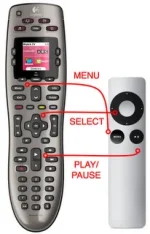
First you need to Unpair your Apple TV remote (if it has been paired intentionally or accidently) so that the One can control it.
Open Harmony Software and add device
The Device to choose is Computer then Media Centre PC once done choose Apple then type in Apple TV
This will be your basic setup with the controls pic as above
a warning will apear as bellow
This is a procedure to follow if you have pairing issues
If you are asked about power then set that to power is always on
The standard setup for the Apple TV sets the Apple TV input to "front row." Turn that off. [Not Mandatory]
First you need to Unpair your Apple TV remote (if it has been paired intentionally or accidently) so that the One can control it.
Open Harmony Software and add device
The Device to choose is Computer then Media Centre PC once done choose Apple then type in Apple TV
This will be your basic setup with the controls pic as above
a warning will apear as bellow
Code:
If after updating your Harmony Remote the Apple TV does not respond, please follow these steps:


   1. Press the Device button on your Harmony.
   2. Select the Apple TV. It will be listed as a Media Center PC.
   3. Hold the Harmony within 3 inches of the Apple TV.
   4. From the LCD of your Harmony, select the command Unpair.


The Apple TV should now respond to your Harmony Remote.
This is a procedure to follow if you have pairing issues
If you are asked about power then set that to power is always on
Code:
Basically with the Apple TV being always on, the "Watch Apple TV" activity does nothing with the Apple TV.  It just sits there, turned on and waiting for the TV input to switch to it.

When you switch to the "Watch Apple TV" activity, you'll notice the remote buttons do not control the Apple TV.  If you switch to Device/Apple TV, then the buttons will control it.  But if you switch back to "Watch Apple TV" activity, then the remote quits controlling the Apple TV.  Why this happens, I do not know.

And it's not really practical to use the remote in the Apple TV Device mode, because then you cannot control the TV volume functions.
The standard setup for the Apple TV sets the Apple TV input to "front row." Turn that off. [Not Mandatory]
Code:
To get control of Apple TV and have the TV functions such as volume, you need to to to the "Watch Apple TV" activity and program the buttons like this:

Menu button                                Apple TV Menu button
Volume UP button                        TV Volume Up button
Volume Down button                    TV Volume Down button
Mute button                               TV Mute button
Up button                                  Apple TV direction up button
Down button                              Apple TV direction down button
Left button                                Apple TV direction left button
Right button                               Apple TV direction right button
OK button                                  Apple TV Select button
Rewind button                            Apple TV rewind
Fast Forward button                     Apple TV fast forward


