Superb quality and spec AB-Com PULSe 4K SE. Crazy offer! Only £129! FREE UK DELIVERY! 4K UHD, Enigma 2, Multiboot 4 images & more!...
Superb quality and spec AB-Com PULSe 4K Rev II Twin Satellite tuner only £179! FREE UK DELIVERY! 4K UHD, Enigma 2, SATA HDD facility, Multiboot 4 images & more!...

[VU+ Duo] Media on hdd/movie directory help

mickyblueys

Forum Supporter
Donated Member
Joined
Sep 6, 2012
Messages
1,086
Reaction score
1
Points
0
Location
Newcastle upon Tyne
When in my hdd/movie directory I sort it using the blue button in reverse chronological order (e.g. Newest recordings at the bottom). My problem is that sometimes but not always which makes it strange, the sort order changes back to the default chronological order (newest recordings at the top). why does this happen, any suggestions greatly appreciated.

My wife and young daughter are not very technical minded. I have visions of them deleting my recordings, that's why I like my newest ones at the bottom and it's what they are used to on our sly HD box upstairs.
Sent from my GT-I9100 using Tapatalk 2
 
The sorting is done and remembered per folder. So you can have different settings in different (sub-)folders.
 
I've made folders in the PC and sent over and folders on the box. But the folder that I'm having the problem with is the default hdd/movie folder.
The one with the Trash can.


Sent from my GT-I9100 using Tapatalk 2
 
OK, that one should be writeable for sure......
Is there a file with the name '.e2settings.pkl' in the folder? And is it updated when you change the ordering?
 
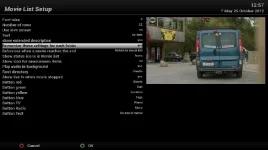
I forgot to say that there is also a menu-option that has to be taken into account: Movie list --> Menu --> Settings --> Remember these settings for each folder

Sorry for my bad memory (lost memories :confused: ).
 

Attachments

  • Sorting.webp
    Sorting.webp
    25.4 KB · Views: 13
I forgot to say that there is also a menu-option that has to be taken into account: Movie list --> Menu --> Settings --> Remember these settings for each folder

Sorry for my bad memory (lost memories :confused: ).

How will that work if I want reverse chronological order for the default recording directory, but I would like alphabetical order for my sub directories which have my ftp avi files from my PC.

Hope that makes sense.....

Sent from my GT-I9100 using Tapatalk 2
 
The English text is slightly wrong: it should be 'remember the settings for each folder -- Yes/No'.
Hope that makes it clear.
 
The English text is slightly wrong: it should be 'remember the settings for each folder -- Yes/No'.
Hope that makes it clear.

Have tried this setting. Still didn't work the way I hoped. I had it set to"yes"and it still looses the reverse chronological setting in the /hdd/movie folder once every so often. But keeps sub folders alphabetically.

Setting to "no" locked the folder and it's sub folders to the same sort setting. E.g. all folders sorted to reverse chronological.


Sent from my GT-I9100 using Tapatalk 2
 
Then I really don't understand what's going on in your setup: works like a charm here, for all locations and all folders.
 

OpenViX Feeds Status

Back
Top