Superb quality and spec AB-Com PULSe 4K SE. Crazy offer! Only £99! FREE UK DELIVERY! 4K UHD, Enigma 2, Multiboot 4 images & more!...
Superb quality and spec AB-Com PULSe 4K Rev II Twin Satellite tuner only £149! FREE UK DELIVERY! 4K UHD, Enigma 2, SATA HDD facility, Multiboot 4 images & more!...

[VU+ Solo2] oscam setup problem help please

spiderman01

New member
Joined
Mar 24, 2017
Messages
58
Reaction score
0
Points
0
Hi guys,

I have flash my solo 2 to 5.2.05 and I haven't been able to make softcam CCcam 2.3.0 clear my previous good CCcam.cfg file. I have FTP this file with FileZilla to etc folder without any success (advice welcome to) . So, I have decided to install oscam (I have another Mutant HD51 running with oscam with no problem), but for some reason, I couldn't download the plugins from the image browser: Menu/Setup/plugins/download..... The list is empty where before there was lots of things to download. So, I have FTP to the tmp file this IPK files and have installed them via the menu. These are the files: enigma2-plugin-cams-oscam_1.20.r9059_mipsel and enigma2-plugin-cams-cccam.2.3.0_1.0_mipsel

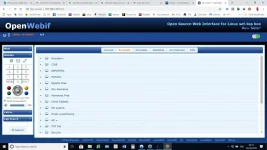
Then I have gone to the settings in OpenWebif within the plugin browser to "enable" it, use new design to "no" and http port to "8000". I have followed this tutorial http://www.techkings.org/threads/oscam-for-openvix-guide.112655/ but when I start the oscam manager and then tried to access the oscam webinterface in 192.168.XX:8000 the attached screenshot interface comes up. I can not change the config files in this screen and it has nothing to do to with the one I see when I connect my mutant. Can anyone please help me out? I have spent two days trying to sort this out. I have had a very good working box but now the missus is going mad because she can't watch her spanish channels.:confused::confused::confused:
 

Attachments

  • Screenshot 2019-02-01 02.21.55.webp
    Screenshot 2019-02-01 02.21.55.webp
    31.9 KB · Views: 34
For you to enable Oscam using the Oscam web interface, Oscam must be enabled and running, otherwise the Oscam interface won't work. You must also have Oscam config files transferred.

You enable the softcam using softcam manager. It should be accessible via blue button if you have installed the cam.

To find out why your plugins list is empty, issue following command using putty and post back results:
opkg update
 
I have the Oscam up and running and the CCcam unticked and stopped. I have also uploaded the config files to the server. But for some reason I do not connect with the Oscam web interface where you have the top menu with: Config, Readers, Users, Services, Files, Failban............. All I get is the screenshot I posted in my first post.

Regarding my empty plugin list, sorry but I don't know what putty is. Could you please share a bit of light? If it's something like telnet, where I could connect before, I can't now.. The network test LAN connection is fine. All ****ed green.
 
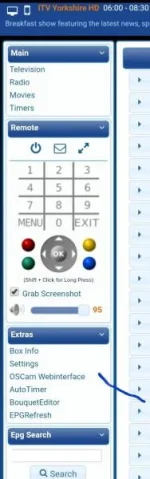
On that screen bottom left choose extras then oscam web interface.

Screenshot_20190201-073344_Samsung Internet.webp
 
On that screen bottom left choose extras then oscam web interface.

View attachment 58289
I press extras all I get is: box info, settings autoTimer and Bouquet Editor.

No sign of Oscam.
7639f2db223c221f168289e8abdd17a1.jpg


Sent from my Redmi 5 Plus using Tapatalk
 
Welcome to OpenViX for vusolo2
openvix 5.2 vusolo2

vusolo2 login: opkg update
Password:

Login incorrect
vusolo2 login: root
Last login: Fri Feb 1 08:21:57 GMT 2019 on pts/0
opkg updateroot@vusolo2:~# opkg update
Downloading http://www.openvix.co.uk/feeds/openvix/release/5.2/vusolo2/3rdparty/Packages.gz.
Updated source 'openvix-3rdparty'.
Downloading http://www.openvix.co.uk/feeds/openvix/release/5.2/vusolo2/all/Packages.gz.
Updated source 'openvix-all'.
Downloading http://www.openvix.co.uk/feeds/openvix/release/5.2/vusolo2/mips32el/Packages.gz.
Updated source 'openvix-mips32el'.
Downloading http://www.openvix.co.uk/feeds/openvix/release/5.2/vusolo2/vusolo2/Packages.gz.
 
Any suggestions?

Sent from my Redmi 5 Plus using Tapatalk
 
Wait to see what Abu baniaz says

After issuing the command did you try download plugins again? Also maybe try uninstalling the ipk's you've tried.
 
Nothing. Still the same. List of plugins empty, CCcam 2.3.1 softcam not working (It's in etc folder) whenOsc it worked previously and can not connect to Oscam web interface.
 
Notes:
That output you pasted is incomplete.
Plugins already installed will not be shown.
CCcam.cfg (config file) goes in /etc
CCcam (binary/executable/actual program) goes in /usr/softcams
Lots of people do not see the file extensions.


Actions:
Post full output of the "opkg update" command
Issue the following command and post back full output
opkg install enigma2-plugin-softcams-oscam-latest

Using Filezilla, check contents of following location /usr/softcams Take screenshot and paste it here
Check file permissions of all contents within that folder

Using Filezilla, check contents of following location /etc/tuxbox/config/ Take screenshot and paste it here
 
Hi abu baniaz,

Thank you very much for your help. I spent all day yesterday trying to get the softcam working. Finally, I decided to reverse to image 5.0.007 with a back up. I could then populate the plugins list and download anything I wanted. First problem solved. But softcam was still down. I decided to go to network settings and as soon as I disabled DHCP (off) I cleared the channels. I got two routers in the house and maybe that's why I needed DHCP off. But sometimes still goes scramble and I need to change nameserver second line to 0.0.0.0. Still. Strange. What I can't get myself around in EPG. Why is OpenTV list empty?
 
always use fixed ip for box and set gateway and first DNS the same address to your routers LAN address.Second GW 0.0.0.0 .Works fine here. This way the box always looks at the same router.

Be carefull with what you post because if you have legale subscription channels should open without internet connection
 
As you are not answering questions that were asked of you or performing tasks requested, it is going to be difficult to assist further. Questions are asked to help people. Saves you time.

I am presuming that you were being affected with the issue where the receiver tries to connect to Google's DNS server to test connectivity and fails this owing to the way your network is setup. Your usage of an old image that does not have the modification avoids this check. There was a thread elsewhere where this was being discussed, rather than provide usable suggestions that could be implemented, some people took to non-constructive criticism.
 
As you are not answering questions that were asked of you or performing tasks requested, it is going to be difficult to assist further. Questions are asked to help people. Saves you time.

I am presuming that you were being affected with the issue where the receiver tries to connect to Google's DNS server to test connectivity and fails this owing to the way your network is setup. Your usage of an old image that does not have the modification avoids this check. There was a thread elsewhere where this was being discussed, rather than provide usable suggestions that could be implemented, some people took to non-constructive criticism.


Hi abu baniaz,

Sorry for not replying to your suggestion and performing your checks but I had multiple problems and finally I decided to use a backup and restore a previous image. I didn't mean to ignore your response. I don't know what modification you are referring to where the latest image fails to perform a check. Could you please post link to the thread so I can have a look? And does anybody know why I have OpenTV EPG list empty? Thanks.
 
And does anybody know why I have OpenTV EPG list empty?
On the current version of CrossEPG Downloader plugin, you will only see the providers for which you have tuners configured. As an example, we don't show the New Zealand provider for those who do not have a tuner set to receive 160E. Conversely, those in New Zealand won't see Hotbird or Astra providers. I can't remember when we changed it.
 
Last edited:
On the current version of CrossEPG Downloader plugin, you will only see the providers for which you have tuners configured. As an example, we don't show the New Zealand provider for those who do not have a tuner set to receive 156E. Conversely, those in New Zealand won't see Hotbird or Astra providers. I can't remember when we changed it.
I know it’s a bit pedantic but NZ is 160e :)
 

OpenViX Feeds Status

Back
Top