Superb quality and spec AB-Com PULSe 4K SE. Crazy offer! Only £129! FREE UK DELIVERY! 4K UHD, Enigma 2, Multiboot 4 images & more!...
Superb quality and spec AB-Com PULSe 4K Rev II Twin Satellite tuner only £179! FREE UK DELIVERY! 4K UHD, Enigma 2, SATA HDD facility, Multiboot 4 images & more!...

[VU+ Solo2] Picons and Screensaver

  • Thread starter Thread starter bartjunited
  • Start date Start date
B

bartjunited

Guest
Hi I have just set up my Solo 2 and have a couple of issues

1 - I cant find a Picon List for Asrta 28.2E I can only find 26 E , Sandman 28E or sgflipflop 28E, The only one that gives some picons is the Sandman one but some bouquets still dont get any picons e.g Kids

2 - There was an automatic screensaver when you accessed the Radio channels but i cant see where to activate this.

Any help would be much appreciated

Thanks

Bart
 
Surely someone can tell me where to find a proper picon list for 28.2e pls. Searching around and can't find anything.

I believe there is a manual way to install too but need the picons first and don't know where to get them.

Help pls :-)
 
Thanks mate appreciated

I guess I install them as an ipk file like I would a softcam and then they appear in the picons plug in

Any advice on the screen saver issue
 
im having an issue trying to install any of the ipk picon packs that were suggested above.

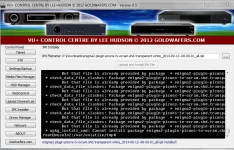
When I try to install them using VU CC I get the attached error message.

picons.webp

I have gone into Plugins and Picons and clicked download to see if they appear there but they dont, so Im unclear what I should do.

Ive also managed to find a picon pack which Ive downloaded which I can FTP to the box to the HDD but if I do that how would I activate using them and how would I move them to the internal flash where my current picon pack is?

Many thanks in advance

Bart
 
im having an issue trying to install any of the ipk picon packs that were suggested above.

When I try to install them using VU CC I get the attached error message.

View attachment 37988

I have gone into Plugins and Picons and clicked download to see if they appear there but they dont, so Im unclear what I should do.

Ive also managed to find a picon pack which Ive downloaded which I can FTP to the box to the HDD but if I do that how would I activate using them and how would I move them to the internal flash where my current picon pack is?

Many thanks in advance

Bart
 
figured out the error i was getting was because a picon pack was already installed
removed it and was then able to install the new pack.

would still like to know how to install a pack that i downloaded which is NOT in an ipk format.

THanks

Bart
 
Delete existing picon folder and transfer the new picon folder to same directiry
 
I assume you mean to install the ipk file.

Don't know how to locate or remove the picon folder in the flash though
 
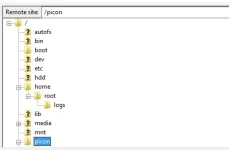
I dont have a picon folder in root see attached pic

piconroot.webp

i installed the picons via "Install Local Extension" after i uploaded the ipk file

does this suggest I dont have the picons in flash? if so how would i move the existing ones IF i chose to keep them?
 
I dont have a picon folder in root see attached pic

View attachment 38016

i installed the picons via "Install Local Extension" after i uploaded the ipk file

does this suggest I dont have the picons in flash? if so how would i move the existing ones IF i chose to keep them?
The picon folder is in the correct place. If you want to remove them delete the folder named picon and do a enigma restart.

To install picons which are not in ipk format you need to ftpa folder named 'picon' to flash, this folder should have your picons in only. Restart enigma and picons should be on view.
 
Last edited:
thanks for that

managed to get ocrams transparent white set to work.

looking for the set that had no padding meaning they were a bit bigger but i cant find them so these will do.....unless someone has a good 28.2E set they want to recommend.
 
Those were probably over 8MB in size, so I couldn't attach those to the forum.
 
Can I still get them from anywhere. Do you have somewhere I can download them directly from.

And btw a big thank you for your hard work on them
 
Those were probably over 8MB in size, so I couldn't attach those to the forum.

A file size of 8 mb is fine, just compress it with Winzip etc and upload them here,

Thanks.


Sent from my iPad Air using Tapatalk
 

OpenViX Feeds Status

Back
Top