Superb quality and spec AB-Com PULSe 4K SE. Crazy offer! Only £129! FREE UK DELIVERY! 4K UHD, Enigma 2, Multiboot 4 images & more!...
Superb quality and spec AB-Com PULSe 4K Rev II Twin Satellite tuner only £179! FREE UK DELIVERY! 4K UHD, Enigma 2, SATA HDD facility, Multiboot 4 images & more!...

[GiGaBlue UHD QUAD 4K] Playback Jump to Time

CRMS

Forum Supporter
Donated Member
Joined
Jun 18, 2020
Messages
339
Reaction score
2
Points
18
Just an idea and feature request. And probably not applicable to just Gigablue boxes.

I've looked at all the menus and in the manual and can't find anythging.

Can a "Jump to Time" command be added that could be set on a button??

So during play back, push a custom button and enter time to jump to in hours and mins format - eg 0:44 to jump to 44 minutes after start.
I know the 3, 6, 9 etc buttons can be programmed but I have them set at 15, 120 and 240s to jump advert breaks.
 
It's already there, long press fast forward (or rewind) and enter the time in minutes.

Long press right (or left) arrow is another way of doing it without the need to input any numbers.
 
Last edited:
It's already there, long press fast forward (or rewind) and enter the time in minutes.

Long press right (or left) arrow is another way of doing it without the need to input any numbers.

Thanks. Hadn't found those tips anywhere. Can they and the other uses of the numerical keys be put on a sticky in the images guides - say Remote Control Unit Commands?? Can't now find that useful post with the commands for the numerical keys!!
 
I am pretty sure we used to have "a skip to" function. (Might be mistaken though.)
 
Last edited:
Thanks. Hadn't found those tips anywhere. Can they and the other uses of the numerical keys be put on a sticky in the images guides - say Remote Control Unit Commands?? Can't now find that useful post with the commands for the numerical keys!!

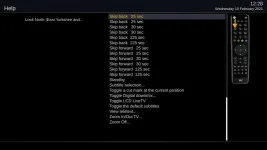
The help key can be handy, not sure if your box has one and if there's a workaround.

help.webp

This is what you get during playback.
 
.... your attachments don't work.
 

OpenViX Feeds Status

Back
Top