Superb quality and spec AB-Com PULSe 4K SE. Crazy offer! Only £129! FREE UK DELIVERY! 4K UHD, Enigma 2, Multiboot 4 images & more!...
Superb quality and spec AB-Com PULSe 4K Rev II Twin Satellite tuner only £179! FREE UK DELIVERY! 4K UHD, Enigma 2, SATA HDD facility, Multiboot 4 images & more!...

[ViX_Misc] Recording title column width. Is it customizable?

LorenzoS

New member
Joined
Mar 22, 2016
Messages
13
Reaction score
0
Points
1
Hello,
This may well be a noob question.
I have just updated from 5.1.033 to 5.2.043.
The appearance of the columns in the on screen graphics in the saved recordings screen (movielist) has changed and I don't know how to adjust them.
The title of the programme is now very short and doesn't display enough of the name. Can the column widths be adjusted?
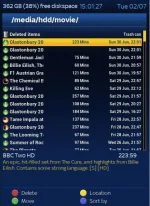
Vix01.webp
Any help would be much appreciated.
 
Last edited:
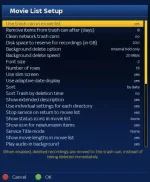
When in that list, press "Menu" and then settings to configure what you want.
 
Thanx for trying to help but it's not that simple.
Vix03.webp
This screen shot shows the menu I get after selecting settings.
There is no way that I can see to adjust the width of the columns. Changing font size and number of rows just changes the height.
Any more ideas?
 
Have you scrolled to the bottom of the list. There is more on the next page.
 
Yup, I have scrolled down. There's nothing useful down there!
 
It’ll be a sin related issue. What Skin is it, Blue HD?
Yeah, it's BlueHD

"Show movie lengths in movie list". Switch it off.
That will do it! I can't actually remember if movie lengths was on before I updated and I don't really need to see it anyway, so that will do. It really was that simple. :rolleyes: Thanks a lot guys!
 

OpenViX Feeds Status

Back
Top