Superb quality and spec AB-Com PULSe 4K SE. Crazy offer! Only £129! FREE UK DELIVERY! 4K UHD, Enigma 2, Multiboot 4 images & more!...
Superb quality and spec AB-Com PULSe 4K Rev II Twin Satellite tuner only £179! FREE UK DELIVERY! 4K UHD, Enigma 2, SATA HDD facility, Multiboot 4 images & more!...

Remote channel stream converter wrong names+wrong epg

joysleep1

Forum Supporter
Donated Member
Joined
Jun 15, 2013
Messages
1,255
Reaction score
0
Points
0
Age
35
Hi Guys

I seem to be having a strange problem with my second receiver which is being used to stream content from the main receiver. For some reason the channel names are all messed up and the EPG is all wrong. I thought when you download it from the main receiver it downloades it exactly like it is from the main receiver.

Both receivers are on the latest openvix image
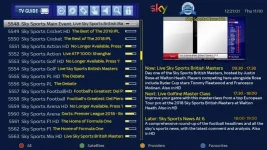
1_0_1_329_8_F020_FFFF0000_0_0_0_20181011122122.webp

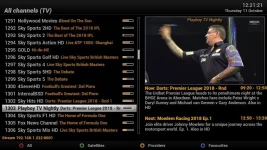
1_0_1_961_18_F020_FFFF0000_0_0_0_20181011122101.webp

So the image in blue background is my main receiver, everything is correct. The black background is my 2nd receiver which i downloaded but it looks like this. (ALL WRONG). Why is it doing this?

Any idea?

Thanks
 
From the channel numbers, you already have other bouquets installed???
It doesn't remove any installed bouquets just adds them.
Why not run in C/S mode then it will duplicate the serve box.
 
From the channel numbers, you already have other bouquets installed???
It doesn't remove any installed bouquets just adds them.
Why not run in C/S mode then it will duplicate the serve box.

I do not understand what you mean. my 2nd receiver is not connected to any feeds, it is only streaming from the main receiver. So i deleted everything on the 2nd receiver and imported the boquets and it still keeps coming up like that.
What is C/S?

Thanks
 
When you go to tuner config setup (either at wizard time) or later (menu/setup/tuner set up -> select yellow buton client mode) then everything will happen automaticaly to update the bouquets from server - but your tuners are disabled, so it runs as a slave from the main box.
... much easier and automatic once setup
 
When you go to tuner config setup (either at wizard time) or later (menu/setup/tuner set up -> select yellow buton client mode) then everything will happen automaticaly to update the bouquets from server - but your tuners are disabled, so it runs as a slave from the main box.
... much easier and automatic once setup

Hi
The reason i do not do client mode is because the slave receiver has two boqeuts. For satellite channels i use my brothers receiver and for cable channels i use mine. Having the flexibilty in remotechannel stream converter is the reason i use this. But why is it only those particular channels that are wrong. The rest of them import exactly how it is on my main reciever with the correct EPG. I tried deleting the EPG and using EPG importer and it still gets it wrong.
Very strange
 
When you go to tuner config setup (either at wizard time) or later (menu/setup/tuner set up -> select yellow buton client mode) then everything will happen automaticaly to update the bouquets from server - but your tuners are disabled, so it runs as a slave from the main box.
... much easier and automatic once setup

Yh i want it to run as a slave box but on my receiver it says sky sports main event and on the slave box is says nollywood movies even though it does play sky sports main event. It has just been labelled incorrectly, i can just manually label is corerctly i guess but the EPG is messed yup
 
Ok i have restarted my receiver and imported the EPG again. The EPG is now correct but the names are wrong. I will just manually change this and see if it works long-term
 
Remote channel stream converter wrong names+

please use image support section. you have been requested and reminded many times.
 
Last edited:

OpenViX Feeds Status

Back
Top