Superb quality and spec AB-Com PULSe 4K SE. Crazy offer! Only £99! FREE UK DELIVERY! 4K UHD, Enigma 2, Multiboot 4 images & more!...
Superb quality and spec AB-Com PULSe 4K Rev II Twin Satellite tuner only £149! FREE UK DELIVERY! 4K UHD, Enigma 2, SATA HDD facility, Multiboot 4 images & more!...

[VU+ Solo2] Remove Addtional Info Bouquets

dpullen87

Member
Joined
Sep 2, 2014
Messages
356
Reaction score
0
Points
16
Age
39
Hi

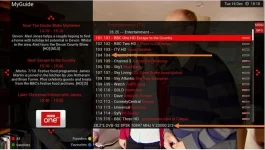
How do i stop two lots of channel numbers being shown when viewing bouquets from pressing the up button?

Can the transponder information also be removed?

Thanks,

Guide.webp
 
press menu and go into settings.
and change "show channel numbers in list to NO" and save

you can edit the skin yourself to remove the transponder info? why do u want to do that?
 
Thanks Rossi, keep up the good work.

Just wondered about the transponder info as I'm sure it was never there before i updated from 90 to 100 and didn't really think i needed it visible. Don't want to go editing the skin as its doing no harm.

Thanks again, appreciate all the time and effort you put into getting the skins perfect.
 
ye its a new additional, it can be quite helpful if something changes freqency etc. you can visually see the freqs now.
 
Since updating the HD channels now appear in my bouquets where as before they were hidden as they don't work, also 101 for example was bbc hd and 103 was ITV HD - these have now been replaced by there SD versions.

Can't work out how to change this back, any help would be much appreciated.

Thanks
 
Since updating the HD channels now appear in my bouquets where as before they were hidden as they don't work, also 101 for example was bbc hd and 103 was ITV HD - these have now been replaced by there SD versions.

Can't work out how to change this back, any help would be much appreciated.

Thanks

Needed to turn on custom channel swap :thumbsup:
 

OpenViX Feeds Status

Back
Top