K
kierank01
Guest
Hi,
I rebooted my vu+ duo, and now I cannot view any sat channels, the error I get is:
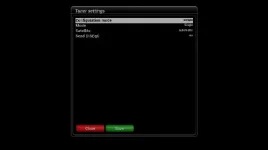
When I go to the service searching > tuner config, and go into either tuner A or B, I can only choose automatic or nothing configured, normally I can choose a load of different sats.
If I simple/single mode, & choose auto, and press save, I get a message:
The screen freezes there, and the only option is to abort, but pressing abort does nothing.
The box is not hung, because I can go the the web interface, and change channels to a dtt station, and view that, but the 'checking tuner 0' message stays up, the only way to get rid of it is to reboot.
this happened to me last week, and I tried a load of things to try and fix it, but couldn't resolve it.
I replaced the satellite.xml file (in a number of locations)
I did a factory reset, and reloaded a settings backup
I did a factory reset, without loading a backup.
I was running an old version of VIX, so decided to flash the latest, which worked fine, but now the same issue has recurred, and I would like to resolve it without having to reflash again, and if it happens after a reflash, it will probably happen again...
Any ideals?
I rebooted my vu+ duo, and now I cannot view any sat channels, the error I get is:
Code:
Service unavailable!
Check Tuner configuration!
When I go to the service searching > tuner config, and go into either tuner A or B, I can only choose automatic or nothing configured, normally I can choose a load of different sats.
If I simple/single mode, & choose auto, and press save, I get a message:
Code:
Checking tuner 0
DiSEqC port A for astra 2 28.2e
The screen freezes there, and the only option is to abort, but pressing abort does nothing.
The box is not hung, because I can go the the web interface, and change channels to a dtt station, and view that, but the 'checking tuner 0' message stays up, the only way to get rid of it is to reboot.
this happened to me last week, and I tried a load of things to try and fix it, but couldn't resolve it.
I replaced the satellite.xml file (in a number of locations)
I did a factory reset, and reloaded a settings backup
I did a factory reset, without loading a backup.
I was running an old version of VIX, so decided to flash the latest, which worked fine, but now the same issue has recurred, and I would like to resolve it without having to reflash again, and if it happens after a reflash, it will probably happen again...
Any ideals?