Superb quality and spec AB-Com PULSe 4K SE. Crazy offer! Only £129! FREE UK DELIVERY! 4K UHD, Enigma 2, Multiboot 4 images & more!...
Superb quality and spec AB-Com PULSe 4K Rev II Twin Satellite tuner only £179! FREE UK DELIVERY! 4K UHD, Enigma 2, SATA HDD facility, Multiboot 4 images & more!...

scale issue - EPG grid and volume bar

LraiZer

V.I.P
Joined
Jan 10, 2011
Messages
276
Reaction score
7
Points
0
[GI-XPEED-LX3] [OpenViX 6.2.001] [ViX-Night-1080]

Anyone else come across these two scale issues in the skin that comes with an image build?

Volume +- bars on volume slider not scaled and appear too small, only about 3/4 size and width even when on full volume.

EPG grid red line current time indicator is only about 3/4 correct length down the list.

Changed skin and back again and moved OSD position about and volume bar is normal again how is should be, but red line indicator in EPG grid is still not scaled correctly.
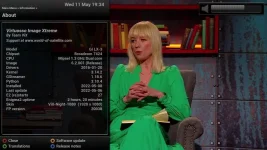
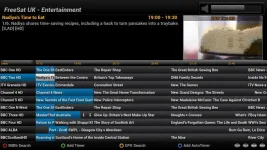
1_0_19_1B1C_802_2_11A0000_0_0_0_20220511193400.webp 1_0_19_1B1C_802_2_11A0000_0_0_0_20220511192607.webp
 
[GI-XPEED-LX3] [OpenViX 6.2.001] [ViX-Night-1080]

Anyone else come across these two scale issues in the skin that comes with an image build?

Volume +- bars on volume slider not scaled and appear too small, only about 3/4 size and width even when on full volume.

EPG grid red line current time indicator is only about 3/4 correct length down the list.

Changed skin and back again and moved OSD position about and volume bar is normal again how is should be, but red line indicator in EPG grid is still not scaled correctly.

View attachment 63874 View attachment 63875

Its one reason I changed back to vix-night-HD from vix-night-1080 - I also found a few other (text) scaling bugs in that latter skin.
 
So if you use fast skin change and switch from a 720 to a 1080 skin that can happen. Enigma restart should solve it.

My debug shows the resolve list and the selected file for that image.
Code:
<   187.5118> 23:58:39.3951 [Skin] Processing screen 'Volume', position=(1425, 15), size=(480 x 102) for module 'Volume'.
<   187.5132> 23:58:39.3964 resolveList ['/etc/enigma2/', '/usr/share/enigma2/ViX-Night-1080', '/usr/share/enigma2/skin_fallback_1080', '/usr/share/enigma2/skin_default', '/usr/share/enigma2/']
<   187.5135> 23:58:39.3967 file /usr/share/enigma2/skin_fallback_1080/screens/volume_up.png

In the case of the EPG marker line, the graphic is wrong... still scaled for 720, so needs fixing.
 
Yes, the vix skins seem to be a bit hit and miss with wrongly scaled pngs here and there when you switch between skins. Do skins not have the required pngs, but still have code to show them?
Code:
https://github.com/OpenViX/skins/blob/61f691e7622fd9814b812459c7a0d26e4f585208/src/skins/1080/ViX-1080-Common/CommonSkin.xml#L608
So if you switch to skin Magic-FHD which has the /epg/timeline-now.png and then back to ViX-Night-1080 which doesn't have a timeline-now.png image, you now have a wrongly scaled png image showing?
 
Yes, the vix skins seem to be a bit hit and miss with wrongly scaled pngs here and there when you switch between skins. Do skins not have the required pngs, but still have code to show them?
Code:
https://github.com/OpenViX/skins/blob/61f691e7622fd9814b812459c7a0d26e4f585208/src/skins/1080/ViX-1080-Common/CommonSkin.xml#L608
So if you switch to skin Magic-FHD which has the /epg/timeline-now.png and then back to ViX-Night-1080 which doesn't have a timeline-now.png image, you now have a wrongly scaled png image showing?
Have you got it set to do a fast skin switch? Or is enigma restarting on skin change?
 
BTW, ViX-Night-1080 pulls most of the graphics up from skin_default.
 
I don't understand how a wrong graphic is surviving an enigma restart. Strange.
 
@Huevos
The EPG marker commit fixed it thanks, BUT... the Volume bar slider went straight back to being scaled wrong again on the very next shutdown and bootup, so a missing scaling flag is still required on the Volume widget i guess.

Code:
https://github.com/OpenViX/skins/blob/e4ed4b2254538d4a3dd10066ab28f19698f9348b/src/skins/1080/ViX-1080-Common/CommonSkin.xml#L1531

Code:
<widget name="Volume" pixmap="screens/volume_up.png" position="93,21" zPosition="1" size="360,51" scale="1" transparent="1"/>

1_0_19_1B1D_802_2_11A0000_0_0_0_20220516133354.webp
 
No. The graphic is for 1080 res. You can't scale an eSlider graphic (c++ problem) so it has to be 1080 res, unless it is SVG which always loads at widget resolution.

I think something is wrong in Directories.py look up... or it is caching the wrong image on boot. I will try to capture the lookup path when it goes wrong... or just drop the slider graphic in the skin rather than it coming from 1080 default folder.
 
No. The graphic is for 1080 res. You can't scale an eSlider graphic (c++ problem) so it has to be 1080 res, unless it is SVG which always loads at widget resolution.

I assumed it just needed the scale="1" flag adding because that is all i did, then i restarted the GUI and it scaled it back to normal as it should be. Not looked at any logging to see what is actually happening though.

4097_0_1_1076_7E5_2_11A0000_0_0_0_20220516190934.webp
 
It is hard to test because sometimes it is right and sometimes not without changing anything.

But for me it has never been possible to force an eSlider to scale just by adding a scale attribute in the widget...

Except for SVG where the image is made to the dimensions of the widget.

But anyway, in this case the graphic was already 1:1 with the dimensions of the widget, so only thing I can think is wrong graphic getting selected sometimes.
720 graphic here: https://github.com/oe-alliance/oe-a...b/scalable/skin_default/screens/volume_up.png
1080 graphic here: https://github.com/oe-alliance/oe-a...able/skin_fallback_1080/screens/volume_up.png
 

OpenViX Feeds Status

Back
Top