Superb quality and spec AB-Com PULSe 4K SE. Crazy offer! Only £129! FREE UK DELIVERY! 4K UHD, Enigma 2, Multiboot 4 images & more!...
Superb quality and spec AB-Com PULSe 4K Rev II Twin Satellite tuner only £179! FREE UK DELIVERY! 4K UHD, Enigma 2, SATA HDD facility, Multiboot 4 images & more!...

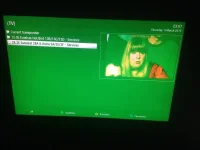
[TM-NANO-SE] tm nano SE green tint on picture

  • Thread starter Thread starter danscaccia
  • Start date Start date
D

danscaccia

Guest
the problem i am having is that when i plug my tm nano se into the back of the xbox one using the xbox tv app the screen goes a tinted green. the picture is perfect if i connect the satellite direct to the tv. after some on-line research i found a VU+ forum where someone said it is a driver/ kernel issue .. any ideas on a fix for this ??
thanks photo.webp
 
curious why plugging it into xbox and not tv,there were new drivers in the last update i heard but for what unsure.
 
my tv only has 1 hdmi port, therefore i have to keep swapping the cables around
 
in that case invest in a hdmi switcher saves you messing with hdmi cables:thumbsup:

HTML:
http://www.amazon.co.uk/Neet%C2%A9-SWITCH-input-output-Switcher/dp/B001DAHS5Q/ref=sr_1_1?ie=UTF8&qid=1425599386&sr=8-1&keywords=hdmi+hub+switch
 
Last edited:
i could do that but i like using the picture in picture function on the xbox which allows you to watch tv while doing something else on the console.
 
I had the same issue with running my Vu Solo2 through my Xbox one.
It was working fine for a while and after an update I was getting the exact same green tint.

It was a useful feature whilst it worked a few months back.

Edit- Just connected it back up and it seems to be working for now......let's see for how long.
 
Last edited by a moderator:
It has been reported to TM. You will have to wait for them to fix the drivers if they are the cause of it.
 
If that is the case where would I go if I wanted to download the driver when it becomes available
 
I had the same issue with running my Vu Solo2 through my Xbox one.
It was working fine for a while and after an update I was getting the exact same green tint.

It was a useful feature whilst it worked a few months back.

Edit- Just connected it back up and it seems to be working for now......let's see for how long.

This issue was fixed long ago for your receiver by a driver update, next time please also list the exact image version and build number when reporting bugs, thanks.

Has anybody found a fix for this ??

There is no fix to find, this is a driver issue and a such must be resolved by the manufacturers with a driver update.
 

OpenViX Feeds Status

Back
Top