Superb quality and spec AB-Com PULSe 4K SE. Crazy offer! Only £129! FREE UK DELIVERY! 4K UHD, Enigma 2, Multiboot 4 images & more!...
Superb quality and spec AB-Com PULSe 4K Rev II Twin Satellite tuner only £179! FREE UK DELIVERY! 4K UHD, Enigma 2, SATA HDD facility, Multiboot 4 images & more!...

[VU+ Duo2] Tuner does not switch when timer recording is starting.

Peterj

ViX Beta Tester
Joined
Jul 29, 2013
Messages
1,264
Reaction score
6
Points
0
Age
68
Location
Veendam
Duo 2
vix 3.0
build 808
2x DVB-C tuners
PTS on.
Always use EPG and blue or yellow button to set timers.

live tv tuned to channel 1
timer recording channel 1 20:00 - 20:30
timer recording channel 2 20:30 - 22:30
timer recording channel 3 21:30 - 22:30

result:
recording channel 1 ok
recording channel 2 ok
recording channel 3 nothing.
live tv was still running channel 1. VIX logo top left was spinning.
Box was not reacting on anything. cold boot was necessary.
 

Attachments

  • Nederland 3 HD-31122013-117.webp
    Nederland 3 HD-31122013-117.webp
    35.8 KB · Views: 24
  • Nederland 3 HD-31122013-1117.webp
    Nederland 3 HD-31122013-1117.webp
    60.1 KB · Views: 19
  • Nederland 3 HD-31122013-1131.webp
    Nederland 3 HD-31122013-1131.webp
    44.6 KB · Views: 15
  • Nederland 3 HD-31122013-1150.webp
    Nederland 3 HD-31122013-1150.webp
    30.4 KB · Views: 17
Spinners means system = busy.
System busy means that recordings & live-TV will continue, but user-interaction is not possible. If that remains for quite some time, something is wrong.
To be able to see what is wrong, we need at least the debug-logs. But even then it may be difficult to find the cause.
 
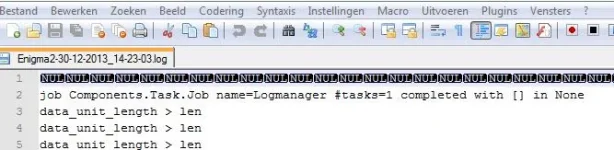
There are a lot of NUL in the beginning of the second file. Otherwise try Notepad++.
ScreenShot018.webp
 
tried to simulate the same situation.
Again same result. At the moment of the spinning VIX logo, there was no log file.
Panic button 0, no effect.
Now I did a reboot with init 6.
After reboot no live tv (ofcourse, last channel and no tuner available).
Noticed he started to record the last 2 channels.

Hopefully now more info in log file, or it was created after reboot?
(last starting channel to record = Julian & Camilla's World Odyssey, begin=Thu Jan 2 14:55:00 2014)
 

Attachments

Last edited:
Nope, sorry, nothing strange as far as I can see.
It looks like you use the XMLTV-importer. As you only have DVB-C channels: are you sure that provides info for your channels? I see dozens of unknown channels so it seems not. Maybe better not use it then? Although I'm not sure it actually causes issues, it seems a bit pointless to import data you can't use.

Otherwise: I know you don't want to hear it, but maybe flashing the box without restoring previous settings and not installing plugins will help.
 
ok, was already afraid you would say that.:D
Will do a fresh install.

XMLTV importer by default activated? I will deactivate it.
 
ok, was already afraid you would say that.:D
Will do a fresh install.
Yeah, sorry about that. But it sounds better then 'I haven't got the foggiest', don't you think :p

XMLTV importer by default activated? I will deactivate it.
No it is not active by default. Nor is Cross. In your case you need neither of them.
 
Did a fresh install (808). No result. same problem.:(
installed:
Bouquets protection (to hide my dummy channel)
CCcam
Magic-HD-Noire skin (my favorite)
FTP-ed back the CCcam files and my Bouquet.
 

Attachments

Fresh install again. Kept it clean.
Only scanned for channels.
This is ok. It switched channel on live tv when recording was starting.
Will install everything step by step to figure out what causes the problem.
 
It is working now as it should be.:)
It has something to do with my bouquet.
I created a new one in the box and edited it using dreamboxEdit, instead of pushing the old one back into the box.
I noticed 1 difference.
It the old situation my bouquet was part of userbouquet.favourites.tv.
Code:
#NAME User - bouquets (TV)
#SERVICE 1:7:1:0:0:0:0:0:0:0:FROM BOUQUET "userbouquet.favourites.tv" ORDER BY bouquet
#SERVICE 1:7:1:0:0:0:0:0:0:0:FROM BOUQUET "userbouquet.LastScanned.tv" ORDER BY bouquet
Code:
#NAME SKV
#SERVICE 1:0:1:76D:13:25A8:FFFF0000:0:0:0:
#SERVICE 1:0:1:76E:13:25A8:FFFF0000:0:0:0:
.....
In the new situation it has his own file, named 'skv'.
Code:
#NAME User - bouquets (TV)
#SERVICE 1:7:1:0:0:0:0:0:0:0:FROM BOUQUET "skv" ORDER BY bouquet
#SERVICE 1:7:1:0:0:0:0:0:0:0:FROM BOUQUET "userbouquet.LastScanned.tv" ORDER BY bouquet
#SERVICE 1:7:1:0:0:0:0:0:0:0:FROM BOUQUET "userbouquet.favourites.tv" ORDER BY bouquet
Code:
#NAME SKV
#SERVICE 1:0:1:76D:13:25A8:FFFF0000:0:0:0:
#SERVICE 1:0:1:76E:13:25A8:FFFF0000:0:0:0:
......
 
On my ET6500 exactly the same problem.
Replaced the bouquets for the new ones I made for the duo2.
Problem solved.
 

OpenViX Feeds Status

Back
Top