Superb quality and spec AB-Com PULSe 4K SE. Crazy offer! Only £99! FREE UK DELIVERY! 4K UHD, Enigma 2, Multiboot 4 images & more!...
Superb quality and spec AB-Com PULSe 4K Rev II Twin Satellite tuner only £149! FREE UK DELIVERY! 4K UHD, Enigma 2, SATA HDD facility, Multiboot 4 images & more!...

[VU+ Duo4K SE] Unable to move channels in a bouquet

Daveo

New member
Joined
Feb 18, 2021
Messages
6
Reaction score
0
Points
0
The image is generally working fine except when I want to change the channel order in a bouquet.

Any help on finding the option to move channels up or down the list would be appreciated.

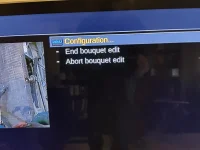
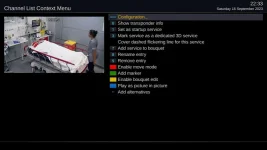
I can get to the bouquet list, select a channel and press menu but when I select "enable bouquet edit" from the options I get the channel list and can select a channel but don't seem to have any move options even if I press menu again.

Am I doing this correctly?
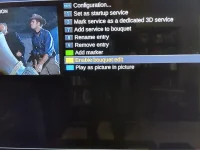
IMG20230916151011.webpIMG20230916151054.webpIMG20230916151815.webp
 
if you have a computer use DBE is mutch easyer
 
You should never update an image when it is just released as its usually full of holes and this is a good example. The red button and the green button are missing.

What box are you using, when did you update?
 
If they dont fix it I wont be updating for a good while and it makes no sense whatsoever to remove these.

And just to be precise the easy way to move channels is via the enable move mode and has been for years.
 
Last edited:
If they dont fix it I wont be updating for a good while and it makes no sense whatsoever to remove these.
They? Who are you talking about?

On my box running 6.4.006 the red button shows fine.
 

Attachments

  • 1.webp
    1.webp
    28.4 KB · Views: 17
any idea why it would be missing from the op box??
 
What is the 'Setup mode' ? With 'Simple' it is not possible to 'enable move mode'.
 
Red button missing

They? Who are you talking about?

On my box running 6.4.006 the red button shows fine.

On my box in that menu the red button is missing as well as the +Alternative. Looks like a bug? VU+Duo 4K SE.

Update: Thanks to Orlandox for solution Setup-System-Customise-Setup mode. Not a bug.
 
Last edited:
Thanks. Yes I have used that although Microsoft Edge was blocking the IP address until I fixed some default settings.
 
Problem Solved "Setup-System-Customise-Setup mode".

Thanks. That seems to do the trick Setup-System-Customise-Setup mode. Change to "Expert" and save.
 
It seems it was just a config issue. Setup-System-Customise-Setup mode change to Expert and Red button appears.
 

OpenViX Feeds Status

Back
Top