Superb quality and spec AB-Com PULSe 4K SE. Crazy offer! Only £129! FREE UK DELIVERY! 4K UHD, Enigma 2, Multiboot 4 images & more!...
Superb quality and spec AB-Com PULSe 4K Rev II Twin Satellite tuner only £179! FREE UK DELIVERY! 4K UHD, Enigma 2, SATA HDD facility, Multiboot 4 images & more!...

[VU+ Solo2] Vert slow FTP transfer spped

  • Thread starter Thread starter Martincape
  • Start date Start date
M

Martincape

Guest
Hi guys,

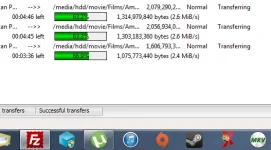
Does anyone know why my FTP transfer speed is so slow? It's ridiculous. It's normally faster than this. Im transferring over WIFI from laptop to Solo2 which is plugged into a gigabit Ethernet port on the router. I even tried connecting laptop via Ethernet, still the same painfully slow speed!!
Untitled2121.webp
 
Hi,
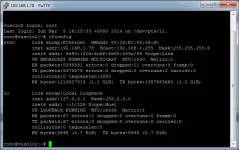
telnet to box and then ifconfig and look if you have errors. If you have very many errors try putting a gigabit switch between the Solo2 and your Router. I read some reports that the Solo2 does not like all switches. I assume your laptop has gigabit.

Try with one transfer at a time only.

ciao
 
The solo2 is attached via gigabit aswell. It's been fine till it's been randomly running slow.
 
Yea rebooting brings the box back up to speed. But as soon as I try FTP'ing again, it's slow and it slows up the box again. Seems to be something to do with the hdd or the transfer function which is causing the issue.
 
Hi,
what about ifconfig? Do you have errors? If yes then it is a different thing.

ciao
 
What's if config pal?

Also, how do you initialise a drive, basically to format it on ViX. I can't remember lol
 
ifconfig
It is a telnet command to run on your receiver. Similar to ipconfig for windows.

Initialise:
Unmount the HDD first
Blue button > Vix > Mount Manager > Select device > Yellow for unmount

Then
Menu > Setup > System > Storage Devices > Initialisation
 
Im transferring over WIFI from laptop to Solo2 which is plugged into a gigabit Ethernet port on the router.

View attachment 33022

What speed wifi? wifi is crap at best in most cases ;)

The transfer rates in you picture is about right for wifi (makes no difference if you have a gigabit router, your chain is only as strong as your weakest link)
 
Hi,
looks OK. Take a look at the back of your Solo2 if the green or orange LED is blinking. If it is blinking it always talks to you switch/router to discuss the best transfer rate and it slows down actual transfer.

When your laptop has gigabit and you connect both with a cable you should get around 40MByte/sec.

ciao
 
I initially was getting around 16mb/sec before all these issues started. Laptop is connected via 5ghz wifi. I can download from the net at 10mb/sec lol. Internal transfer should be faster I would have thought.

I'm reflashing the box tomorrow. Got the hdd's re initialised and I mounted at the min.

Hopefully will sort it. I'll probably reflash tomorra and they will release Zeus day after lol
 
I actually got it correct lol. Zeus released on the 11th, I said on the 9th that tomorra I would reflash then know my luck Zeus be released day after!!

I'm psychic :)
 

OpenViX Feeds Status

Back
Top