FYI I had to revert to 6.2.010 on my Vu+ Ultimo 4K as videos were being vertically stretched on 6.7.004.
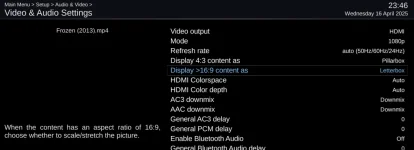
Tried every setting I could find. I tried toggling Letterbox, Just Scale, etc and tried installing aspectratio plugin (but could not find how to enter it or get it to work.
Also looked at the UI settings and nothing was relevant. The TV channels were not being stretched, just mp4 videos. It seems as though the system was stretching the videos to remove the black bars from top and bottom.
Anyway, by rolling back to 6.2.010 this is no longer happening thankfully.
Below is a screenshot from of the two images' full names.

Tried every setting I could find. I tried toggling Letterbox, Just Scale, etc and tried installing aspectratio plugin (but could not find how to enter it or get it to work.
Also looked at the UI settings and nothing was relevant. The TV channels were not being stretched, just mp4 videos. It seems as though the system was stretching the videos to remove the black bars from top and bottom.
Anyway, by rolling back to 6.2.010 this is no longer happening thankfully.
Below is a screenshot from of the two images' full names.