Superb quality and spec AB-Com PULSe 4K SE. Crazy offer! Only £99! FREE UK DELIVERY! 4K UHD, Enigma 2, Multiboot 4 images & more!...
Superb quality and spec AB-Com PULSe 4K Rev II Twin Satellite tuner only £149! FREE UK DELIVERY! 4K UHD, Enigma 2, SATA HDD facility, Multiboot 4 images & more!...

VU+ UNO4K SE Default Resolution

vuesolo

Member
Joined
Apr 18, 2013
Messages
127
Reaction score
0
Points
16
Guys I have a VU+ UNO4K SE and with to pair it wth a Lumagen video processor.

What I'd like to know is what the default resolution I should output the VU+ box at, should it be 1080i 50 or 1080p 50?

Id like the Lumagen to do all the upscaling and just want the VU+ box to output at default resolution. Cheers
 
see specs from your lumagen box or as they always say RTFM .Witch box at least is something to mention maybe.
 
The Lumagen box is irrelevant, I just want to know what default resolution I should output the VU+ UNO4K SE?
I have a Lumagen XS if it really helps :)
 
The Lumagen accepts any resolution, but the optimal option is to input default non scaled resolution from the VU+ box
 
Set the box to automatic and then lumagen does all the rest.
 
Hi don’t see any automatic options apart from the usual options of 576, 720, 1080 etc.
 
Menu/setup/audio&video …….> mode 2160p or 1080p refresh rate auto
 
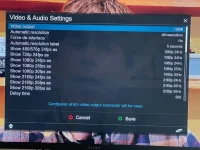
hi this is what i see when i go to video settings i toggle automatic resolutions to all resolutions and save. I can toggle the hertz as well if required. But with this setting when I move from channels I get a delay so I leave it at disabled and mode at 1080i.

here is a pic
 

Attachments

  • IMG_7141.webp
    IMG_7141.webp
    64.5 KB · Views: 13
As the name says the box uses the resolution the channel uses so that is wnat you want. If you want really the original resolution you must live with it. If not the box itself will scale one or another chennel/movie. Normally there should be no delay if you switch from 1080i50 to 1080i50 only if resolution changes.

Ralf
 
hi this is what i see when i go to video settings i toggle automatic resolutions to all resolutions and save. I can toggle the hertz as well if required. But with this setting when I move from channels I get a delay so I leave it at disabled and mode at 1080i.

here is a pic
@bmitie
that's an old image ..... what version are you on??
or are you using the av plugin??
 
Last edited:
At the moment its an Openbh 5.3 but same principle.
 
At the moment its an Openbh 5.3 but same principle.

all that autoresolution stuff is crap ....fixed in later versions, so that you only need to specify the mode and refresh rate auto to handle all inputs ... automatically
 
So just to confirm I change Openvix setting to 1080p & refresh rate to Auto?

Refresh rate to auto. 1080p or 2160 depends on whether the projector upscales to 2160
Personally I always set the receiver to upscale if necessary rather than (in my case) the Oled tv
 

OpenViX Feeds Status

Back
Top