Superb quality and spec AB-Com PULSe 4K SE. Crazy offer! Only £129! FREE UK DELIVERY! 4K UHD, Enigma 2, Multiboot 4 images & more!...
Superb quality and spec AB-Com PULSe 4K Rev II Twin Satellite tuner only £179! FREE UK DELIVERY! 4K UHD, Enigma 2, SATA HDD facility, Multiboot 4 images & more!...

[VU+ Ultimo4K] VUULTIMO4K/Harddisk File Sharing Server

thecaretaker

Forum Supporter
Donated Member
Joined
Apr 22, 2012
Messages
327
Reaction score
4
Points
18
Location
Southern UK
Website
www.thecaretakers.co.uk
While on ViX 5.3.06 (last week) I discovered to my delight that my TV (Panasonic) had an icon pop up in devices called VUULTIMO4K/Harddisk File Sharing Server. I entered root and a space and was able to watch all the files on the HHD even 4K files which the VU Ultimo doesn't normally handle. The TV automatically handled screen resolutiion/frame rates etc.

I just updated the software to 5.3.07 and although it appears it logs me in, I cannot see any files.

Is there something I need to do to enable the newer image to share HDD files as before?

Please help!
 
I've been switching between the 2 images and in VIX 5.3.06 I see under Network, Utilities that SAMBA is running, but in VIX 5.3.07 it is not. I can't get it to run either. Could this be the problem?
 
Same problem on Vu+Uno 4k cannot get Samba to start on 5.3.007
 
This problem crops up from time to time.

Alas, I'm not familiar with how to use Telnet. Do I need to install Putty on my PC to send that command?

I've re-flashed all versions from 5.3.01 to 5.3.6 (I'm sad I always keep backups of my working setup) and all versions are working apart from 5.3.07. I have noticed that with 5.3.07 there is no /usr/share/samba folder after the install, so guess you are on the right track.

Any chance of a dummies guide to how to Telnet into the box and initiate the install manually?
 
…. see abu's signature.
 
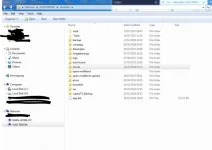
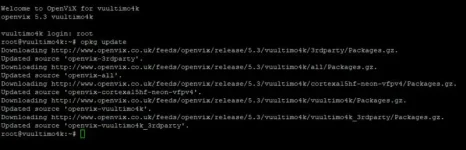
OK, I ran putty and it produced this:

Annotation 2019-10-19 154233.webp

I went to Network/Utilities/SAMBA and pressed start (green button). The VU+ said it needed to install the packages. I said YES and the Vu+ rebooted.

I went back to Network/Utilities/SAMBA and the service said it was stopped. I pressed start but nothing happens.

1_0_19_521C_812_2_11A0000_0_0_0_20191019154421.webp

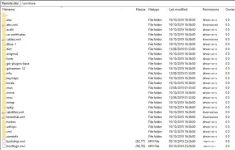
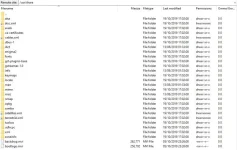
I FTP to the Vu+ and looked for the SAMBA folder in user/shares, but it is still missing.

Annotation 2019-10-19 154610.webp

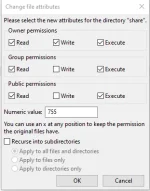
Checked the shares folder file permission and that is set to 755

Annotation 2019-10-19 155336.webp

What am I doing wrong?
 
Just re-flashed 5.3.06 and there is definitely a SAMBA folder in the user/share folder. So why won't it install on 5.3.07?

06.webp

PS: I tried changing the share folder permission to 777 and used putty and start/install and still nothing :confused:
 
I've just couch flashed 5.3.007 with a settings restore of 5.3.006, and Samba is working ok.
 
I've just couch flashed 5.3.007 with a settings restore of 5.3.006, and Samba is working ok.

I can't believe I didn't try that... Just did the couch flash, restored settings and all is working fine again. It must be a problem with the upgrade file when you do an update through the box.

Thank you. I spent more time on this issue than is healthy :thumbsup:
 
I can't believe I didn't try that... Just did the couch flash, restored settings and all is working fine again. It must be a problem with the upgrade file when you do an update through the box.

Thank you. I spent more time on this issue than is healthy :thumbsup:

I never do a software update —- doing an online image flash and settings restore takes no time - and at the end you have a clean system
... but people just believe that software updates are the way to go........(personal view!!)
 
I never do a software update —- doing an online image flash and settings restore takes no time - and at the end you have a clean system
... but people just believe that software updates are the way to go........(personal view!!)
Me too!! :)
 
I have similar on my Uno4k software update to vix 5.3.007 and Samba wont start. Tried remove and re install Samba but still the same. Looks like ill have to reflash when I get time

I never do a software update —- doing an online image flash and settings restore takes no time - and at the end you have a clean system
... but people just believe that software updates are the way to go........(personal view!!)

I have modified files and plugins/skins that are not on restore although it wont take me long to re add but software updates normally works without issues.
 
There were a few Samba changes between 5.3.006 and 5.3.007

Code:
[samba4] Don't treat users-insecure.map as CONFFILE
[samba4] Tweak config Insecure: The mapping in users-insecure.map should ensure that password-less logins succeed in cases where users accidentially entered a valid user name (like root or kids or any mapping to them). Password-less logins require that the user is INVALID!
[Samba] Cleanup
[Samba] Build libsmbpass by patching Samba
 
I have similar on my Uno4k software update to vix 5.3.007 and Samba wont start. Tried remove and re install Samba but still the same. Looks like ill have to reflash when I get time


I have modified files and plugins/skins that are not on restore although it wont take me long to re add but software updates normally works without issues.

you know you can add those files to the backup don't you?
 

OpenViX Feeds Status

Back
Top