Superb quality and spec AB-Com PULSe 4K SE. Crazy offer! Only £99! FREE UK DELIVERY! 4K UHD, Enigma 2, Multiboot 4 images & more!...
Superb quality and spec AB-Com PULSe 4K Rev II Twin Satellite tuner only £149! FREE UK DELIVERY! 4K UHD, Enigma 2, SATA HDD facility, Multiboot 4 images & more!...

Which folder should I tick to save AutoBouquets for Backup

iba

New member
Joined
Aug 15, 2013
Messages
63
Reaction score
0
Points
0
Location
Ireland
Hi,

As the title says where do I save autobouquet in the backup file.

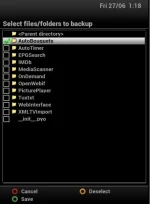
In other words, which of the boxes/folders do I tick in the image below so that autobouqets are saved so that I do not have to reinstall them everytime I reflash.

I have a USB stick set up so that they should be saved to it. Same place as my Picons and EPG is saved to.

Whilst I am at it, is there any other boxes/folders I should tick.

I hope my question makes sense but if not please please ask.

Thanks
87823365e7a228da83112b7394cd05c7.webp
 
Your channel lists are saved by default making a back-up. No need to add them.
 
Your channel lists are saved by default making a back-up. No need to add them.

Thanks Judge,

Any idea then why, after I do a flash and then restore backup, I have no stations and I have to do a rescan of autobouquet to get the stations back again?

Regards
 
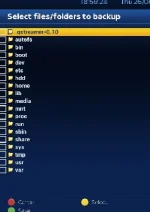
To save the whole of the AB 28.2 plugin (customised files etc), navigate to its location and then select it.
Code:
/usr/lib/enigma2/python/Plugins/Extensions/AutoBouquets
 

Attachments

  • AB backup.webp
    AB backup.webp
    14.5 KB · Views: 15
To save the whole of the AB 28.2 plugin (customised files etc), navigate to its location and then select it.
Code:
/usr/lib/enigma2/python/Plugins/Extensions/AutoBouquets

by doing that you run the risk of overwriting any updates for ABM in the image with older versions.
 
Thanks Judge,

Any idea then why, after I do a flash and then restore backup, I have no stations and I have to do a rescan of autobouquet to get the stations back again?

Regards

Did you do the backup before scanning?

Do another backup when you have everything set up as you want it

Sent from my SM-N9005 using Tapatalk
 
by doing that you run the risk of overwriting any updates for ABM in the image with older versions.
I understood it as AutoBouquets E2 by Lraizer, not ABM.

I have double checked the backup details in the settings file on build 12. '/etc/enigma2/' is still there so any chanenl data should still be saved/restored.
 
I understood it as AutoBouquets E2 by Lraizer, not ABM.

I have double checked the backup details in the settings file on build 12. '/etc/enigma2/' is still there so any chanenl data should still be saved/restored.

no worries, I read it as ABM not LraiZers version.
 
Did you do the backup before scanning?

Do another backup when you have everything set up as you want it

Sent from my SM-N9005 using Tapatalk

Hi Thanks for your reply - I have been away thus teh delay in reply.

No, I did the backup after scanning.

Regards
 
I understood it as AutoBouquets E2 by Lraizer, not ABM.

I have double checked the backup details in the settings file on build 12. '/etc/enigma2/' is still there so any chanenl data should still be saved/restored.

Hi Abu,

Sorry been away thus the late reply.

Sorry for not clarifying, yes it is Autobouquet E2
 
To save the whole of the AB 28.2 plugin (customised files etc), navigate to its location and then select it.
Code:
/usr/lib/enigma2/python/Plugins/Extensions/AutoBouquets


Abu,

Thanks very much for that but I do not know how to get to that screen/menu - can you tell me in idiot proof English please?

Thanks
 
When in teh backup screen, press Menu then Yellow button. That screen shot you posted will be shown. Navigate to each section in the path until you reach the full path.

go to "usr", press OK
go to "lib", press OK
go to "enigma2", press OK
go to "python", press OK
go to "Plugins", press OK
go to "Extensions", press OK

go to "Autobouquets", press YELLOW to select it and then press Green to save
 
When in teh backup screen, press Menu then Yellow button. That screen shot you posted will be shown. Navigate to each section in the path until you reach the full path.

go to "usr", press OK
go to "lib", press OK
go to "enigma2", press OK
go to "python", press OK
go to "Plugins", press OK
go to "Extensions", press OK

go to "Autobouquets", press YELLOW to select it and then press Green to save

Thanks so much Abu,

I never understood what sentences like what you wrote earlier meant before, now I do.

Thanks so much, very much appreciated.

Regards
 

OpenViX Feeds Status

Back
Top