Superb quality and spec AB-Com PULSe 4K SE. Crazy offer! Only £99! FREE UK DELIVERY! 4K UHD, Enigma 2, Multiboot 4 images & more!...
Superb quality and spec AB-Com PULSe 4K Rev II Twin Satellite tuner only £149! FREE UK DELIVERY! 4K UHD, Enigma 2, SATA HDD facility, Multiboot 4 images & more!...

[VU+ Duo2] YouTube

grahammcm1888

Forum Supporter
Donated Member
Joined
Feb 3, 2014
Messages
158
Reaction score
1
Points
18
Age
52
Location
Glasgow
Hi everyone

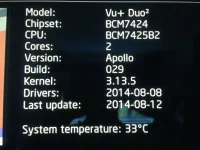
I am having a problem with the YouTube App (Blue Button > Red Button > Green Button). Every time I try to open the App it just freezes and I have to reboot the box. I did not perform a full flash to version 25 so I am wondering if this could be the issue? Should I perform a full flash back to 25 then upgrade via the feeds or is there a genuine issue with the YouTube app on version 29?

Any help would be appreciated.

Cheers

Graham.
IMG_3183.webp
 
I would try doing a Full FRESH FLASH of 29 if you have upgraded from 22/23/24 or earlier versions of Apollo they are not compatible with Apollo from 25 onwards
and 25 has been marked as Unstable and has been well Documented so that could be giving you your problems you could try a Couch Flash without any Backups and see how it goes
I am running 29 on my Duo2 without any probs but I do not have the YouTube app installed though
 
Just tried this on a clean flash of 29, all works fine..
 
where can I find this app pls ?
 
It is included as part of the Vu+ HbbTv package on the feeds.
 
oke thx.Will give it a go tmorrow.I am watching now on trough smart tv.
 
installed it but how do I search and plat youtube video's or files ?
 
just push down through all the menus... search is there somewhere.
 
Quickest route to search is push up twice...
 
When you have installed Hbbtv through extensions (in plugins) do a restart enigma and then blue button and select YouTube TV then green button to start.
At this point the YouTube app will load up. I use my iPad/iPhone and is easy to pair up. Using your remote scroll up one to 'Sign In & Settings' and then scroll
across to 'Pair Device', On your device e.g. iPad go to safari and type in youtube.com/pair and insert the number which is shown on screen. You have now
paired your device and can use your iPad/iPhone/Samsung Galaxy etc to view Videos etc. Have fun peeps. :thumbsup:
 

OpenViX Feeds Status

Back
Top