Superb quality and spec AB-Com PULSe 4K SE. Crazy offer! Only £129! FREE UK DELIVERY! 4K UHD, Enigma 2, Multiboot 4 images & more!...
Superb quality and spec AB-Com PULSe 4K Rev II Twin Satellite tuner only £179! FREE UK DELIVERY! 4K UHD, Enigma 2, SATA HDD facility, Multiboot 4 images & more!...

ET9000 ViX 2.3 image queries

kunmun23

Forum Supporter
Donated Member
Joined
Jul 1, 2011
Messages
185
Reaction score
0
Points
0
Hi m8s,

First of all, I would like to congratulate the ViX team on the 2.3 image....(in time for X-mas that a few on this forum were wishing for :) ). I have used it for just 2 hours now and am loving it. Its an EXCELLENT image, very stable (like all ViX images !!), very user-friendly (as is always the case with ViX images) YET if you want to take control there's an option for it.


Couple of quick queries :

1) I was eagerly waiting to see if the new image would manage to give audio on my collection of Bluray rips X264 DTS. I still don't get any audio :confused: ..is this still WIP, any chance of getting this improvement any time soon ? This is one feature that I am really eagerly looking for to in the ET9x00.


2) Can someone give me a short tutorial on how to use the HDMI-CEC features? Can't seem to make it work with my Bravia EX4 series TV.

3) Any tutorials on how to use the uShare DLNA ?

4) How do I use permanent time-shift ? I have enabled it but still can't seem to be able to use it.

5) How do I get rid of some of the info on the info bar like signal strength, satellite/transponder info etc?


Thanks in advance !!
 
Another (probably a dumb) question :

I loved using the Enhanced Movie Center plugin on Vix2.2. Does it work smoothly with ViX2.3?

Are all the plugins that I used on Vix2.2 compatible with ViX2.3?
 
yes EMC works fine with vix 2.3 i'm using version 3 on my duo.
 
Do ALL other plugins work as well? I'm assuming not given that ViX2.3 is based on Kernel 3.x which has major changes.

yes EMC works fine with vix 2.3 i'm using version 3 on my duo.
 
every plugin i use from 2.2 still works but some may not, you will only know which do or dont if you try them.
 
Update :

Query 1 : bluray rips x264 DTS mkv no audio issue resolved by installing the drivers from post #1 from HERE

Query 2 : The basic function switching the TV on and off along with the receiver seems to work fine. That's enough for me so I'd say this is resolved for now...the HDMI CEC is in beta at the moment.

Query 3 : Any help appreciated...

Query 4 : This one remains a pain point..it didn't work for me in ViX2.2 and it doesn't work in ViX 2.3 either. Am I understanding the expected behaviour correctly ? Once I zap into a channel, it should automatically start to buffer and I should be able rewind back. This doesn't seem to happen. When I press rewind, it pauses the channel and then the timeshift kicks in.

Query 5: Any help appreciated


Hi m8s,

First of all, I would like to congratulate the ViX team on the 2.3 image....(in time for X-mas that a few on this forum were wishing for :) ). I have used it for just 2 hours now and am loving it. Its an EXCELLENT image, very stable (like all ViX images !!), very user-friendly (as is always the case with ViX images) YET if you want to take control there's an option for it.


Couple of quick queries :

1) I was eagerly waiting to see if the new image would manage to give audio on my collection of Bluray rips X264 DTS. I still don't get any audio :confused: ..is this still WIP, any chance of getting this improvement any time soon ? This is one feature that I am really eagerly looking for to in the ET9x00.


2) Can someone give me a short tutorial on how to use the HDMI-CEC features? Can't seem to make it work with my Bravia EX4 series TV.

3) Any tutorials on how to use the uShare DLNA ?

4) How do I use permanent time-shift ? I have enabled it but still can't seem to be able to use it.

5) How do I get rid of some of the info on the info bar like signal strength, satellite/transponder info etc?


Thanks in advance !!
 
Update :

Query 4 : This one remains a pain point..it didn't work for me in ViX2.2 and it doesn't work in ViX 2.3 either. Am I understanding the expected behaviour correctly ? Once I zap into a channel, it should automatically start to buffer and I should be able rewind back. This doesn't seem to happen. When I press rewind, it pauses the channel and then the timeshift kicks in.

If I remember correctly you first need to press pause, then press play and then press pause again! When you press pause the second time a red marker comes up that allows you to rewind in the buffer
 
Firstly thanks for the image, excellent.
Just had an issue with a skin and am reflashing , with the update Sicilain put out yesterday.
I realise I can find out when I have re-loaded, but does Sicilians's update include the driver update of 12.12.11
from the image descriptor it does not ?
 
To answer my thread:
Checked after reflash.
The new ones are there
 
Yes there was an update on the ViX image y'day...I mean when I went to Software Update on ViX it did download an update yesterday ...am assuming the new drivers are included in it.

To answer my thread:
Checked after reflash.
The new ones are there
 
Yes...its covered in THIS thread
If I remember correctly you first need to press pause, then press play and then press pause again! When you press pause the second time a red marker comes up that allows you to rewind in the buffer
 
Update 2 :
Did a reflash of the image after cleaning up folders in the hard drive and removing the USB flash drive

Query 3 : ushare DLNA works now. I can see ViX on my laptop

Query 5 : Any help appreciated.


Update :

Query 1 : bluray rips x264 DTS mkv no audio issue resolved by installing the drivers from post #1 from HERE

Query 2 : The basic function switching the TV on and off along with the receiver seems to work fine. That's enough for me so I'd say this is resolved for now...the HDMI CEC is in beta at the moment.

Query 3 : Any help appreciated...

Query 4 : This one remains a pain point..it didn't work for me in ViX2.2 and it doesn't work in ViX 2.3 either. Am I understanding the expected behaviour correctly ? Once I zap into a channel, it should automatically start to buffer and I should be able rewind back. This doesn't seem to happen. When I press rewind, it pauses the channel and then the timeshift kicks in.

Query 5: Any help appreciated
 
5) How do I get rid of some of the info on the info bar like signal strength, satellite/transponder info etc?

i'm no expert so forgive me if i am wrong, and no doubt if i am some on will correct me. but you cant just remove that info without going into the configuration files of the chosen skin and editing it out your self as it is part of the skin it self.
 
i'm no expert so forgive me if i am wrong, and no doubt if i am some on will correct me. but you cant just remove that info without going into the configuration files of the chosen skin and editing it out your self as it is part of the skin it self.
Correct or try a different skin
 
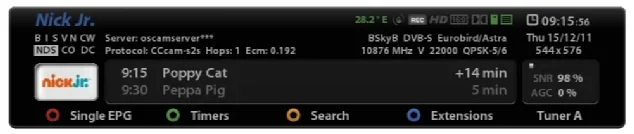
Hmm...there are so many customizations of the OSD possible through the UI. I wish I could customize the infobar to give it a cleaner look...i don't want to see the transponder info, the cccam server details, SNR values etc.

Is there a plugin to do that..if not may I request the ViX team experts for this enhancement on the next release ? Not even something complex...a simple solution like "Info bar settings >> Simple/Intermediate/Advanced" would work great !!


infobar.webp
 
4) How do I use permanent time-shift ? I have enabled it but still can't seem to be able to use it.
Once PTS is enabled you can always rewind (max. to the moment you tuned to the channel). Just press rewind and all normal playback options are available. There's no need to press "Pause" first.

5) How do I get rid of some of the info on the info bar like signal strength, satellite/transponder info etc?
In the skin Magic-HD I reduced the info in the InfoBar to the minimum: only items needed for normal TV-watching are there. The SecondInfoBar (if enabled) gives you all additional info (see screenies).
 

Attachments

  • SecondInfoBar.webp
    SecondInfoBar.webp
    60.6 KB · Views: 32
  • InfoBar.webp
    InfoBar.webp
    73.6 KB · Views: 31
PTS no-go ...had the same issue on ViX2.2 and could never solve it....can you pls share a screen grab of the timeshift menu so that i can ensure I have the settings right?

Magic-HD info bar is very beautiful...but I don't like the other menus...too much of unused space and don't like the small playback window during OSD...wish i could get the best of both worlds... an uncluttered elegant infobar in the ViX night HD skin :)

Once PTS is enabled you can always rewind (max. to the moment you tuned to the channel). Just press rewind and all normal playback options are available. There's no need to press "Pause" first.


In the skin Magic-HD I reduced the info in the InfoBar to the minimum: only items needed for normal TV-watching are there. The SecondInfoBar (if enabled) gives you all additional info (see screenies).
 
Magic-HD info bar is very beautiful...but I don't like the other menus...too much of unused space and don't like the small playback window during OSD...wish i could get the best of both worlds... an uncluttered elegant infobar in the ViX night HD skin :)
That's why we have Magic-HD Light.
 
Tried that ....and am sticking with ViX Night :)...everything about it is great ...large readable fonts, no minimization of the tv screen while in OSD mode..."Now", "Next" in the listings...BUT for the infobar which as I mentioned earlier is a bit too cluttered.
 
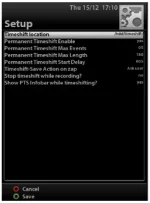
Here are my settings for Timeshift. No rewind happens when i press the << button. It goes on pause, then when I unpause, it seems to enable time shift...please help..this is one feature i would definitely like to use on my ET9000
Timeshift Settings.webp
 

OpenViX Feeds Status

Back
Top