Superb quality and spec AB-Com PULSe 4K SE. Crazy offer! Only £129! FREE UK DELIVERY! 4K UHD, Enigma 2, Multiboot 4 images & more!...
Superb quality and spec AB-Com PULSe 4K Rev II Twin Satellite tuner only £179! FREE UK DELIVERY! 4K UHD, Enigma 2, SATA HDD facility, Multiboot 4 images & more!...

Vu Duo ViX 2.3 (Linux 3.1.1) 25-12-2011

  • Thread starter Thread starter silverfox0786
  • Start date Start date
I have to say unlike most I have had nothing but problems since upgrading to the latest vix i may just resort back to a previous version which worked fine with no problems.
 
With latest update I get following message when stop playing a recorded movie and deleting the movie is choosen:

"Cannot move to trash can
local variable ´trashcan´referenced before assignment"
 
will this require a full reflash pheonix.. ??.. or just an online update.. ??

Thanks

i'm not sure if its been pushed to the public image yet but a online update should suffice if it has.
 
I have just checked mine and it does not show any change log option strange, but can see the log on your image, so nothing major.

well thats just the changelog from 190 to 191 for the log from 161 to 190 look here
2.3 Build 190:
enigma2: InfobarGenerics: fix 2nd info bar as event view timeout.
enigma2: EpgSelection: add option to Enable/Disable preview mode.
enigma2: EpgSelection: add Timer List and AutoTimer to long coloured buttons. (Green & Blue)
enigma2: RecordTimer/TimerList: add failed state. timers will now fail if less than 1GB free space on the chosen device.
enigma2: ChannelSelection: add option to set button jump order.
enigma2: renamed Harmony suppport to "Text support"
enigma2: Trashcan now supported on all devices (each have there own).
enigma2: fix a few timeshift bugs. (number jump & starting on et's)
enigma2: media playback remaining/elapsed config options, setup in customise.
enigma2: tweaks made to MessageBox and ChoiceBox code.
enigma2: OLED update display. for Vu Ultimo
enigma2: update LED Buttons setup, to show Deepstandby setting when changing it.
enigma2-plugins: remove 'emission, menusort, movieepg, namezap, pipzap, pluginhider, pluginsort' at request of [email protected]
enigma2-plugins: update.
feeds: add PO package so people can update to email back to [email protected]
image: vuplus driver update
image: xtrend driver update
ViX: RestoreWizard, nows allows to select backup file to restore, and allows plugin only restore.
ViX: SoftwareUpdate: add an option to view changes before deciding to update.
Translations: NL updates.
 
With latest update I get following message when stop playing a recorded movie and deleting the movie is choosen:

"Cannot move to trash can
local variable ´trashcan´referenced before assignment"

need to see log
 
Considering the fact that u have threads and sections for even "How many times to shake it after pissing".
It will be nice to have one sticky thread with all the change logs, also another-one with what goes on with development.
 
DTT Drivers

I've been running build 133 on the old kernel and using the ItalySatDTT plugin to get my usb DTT going.

The ItalySatDTT doesn't support the new kernel, so I've been trying to figure how to get my DTT going with the new builds. I've finally succeeded and I'm now running build 190. Below I have set out how I got my device working.

There are drivers for various usb DTT devices in the plugin downloads, but none for the af9035 devices! My device is an Avermedia Twinstar (a825) usb dual dtt which uses the af9035 chipset.

Well, I tried the following from Telnet
Code:
opkg install kernel-module-dvb-usb-af9035

This resulted in various encouraging things being installed from the Vix feeds. I then rebooted but my device was not detected.

Then I tried installing the driver plugin for dib0700 (even though this didn't suit my device)... and I noted that (apart from kernel modules) it installed firmware files and also usbtunerhelper start script.

Then I located a firmware for the af9035 (BlackHole site) and ftp'd it into the same directory as the dib0700 firmware.

After another reboot, my device was detected and is working (so far so good).

Okay so I got lucky and everything is sweet. (The SNR and Signal Strength are still rubbish).

Is there any reason why the af9035 drivers cannot be made available via the plugin menu... as they do seem to work? The "opkg install ..." found most of the necessary files except for the firmware file and the installation of the usbtunerhelper. It appears as though it would be straightforward to add the af9035 devices?

Thanks for all the hardwork. I'm happy to be back using a fairly current Vix image rather than Blackhole.
 
Last edited:
I've been running build 133 on the old kernel and using the ItalySatDTT plugin to get my usb DTT going.

The ItalySatDTT doesn't support the new kernel, so I've been trying to figure how to get my DTT going with the new builds. I've finally succeeded and I'm now running build 190. Below I have set out how I got my device working.

There are drivers for various usb DTT devices in the plugin downloads, but none for the af9035 devices! My device is an Avermedia Twinstar (a825) usb dual dtt which uses the af9035 chipset.

Well, I tried the following from Telnet
Code:
opkg install kernel-module-dvb-usb-af9035

This resulted in various encouraging things being installed from the Vix feeds. I then rebooted but my device was not detected.

Then I tried installing the driver plugin for dib0700 (even though this didn't suit my device)... and I noted that (apart from kernel modules) it installed firmware files and also usbtunerhelper start script.

Then I located a firmware for the af9035 (BlackHole site) and ftp'd it into the same directory as the dib0700 firmware.

After another reboot, my device was detected and is working (so far so good).

Okay so I got lucky and everything is sweet. (The SNR and Signal Strength are still rubbish).

Is there any reason why the af9035 drivers cannot be made available via the plugin menu... as they do seem to work? The "opkg install ..." found most of the necessary files except for the firmware file and the installation of the usbtunerhelper. It appears as though it would be straightforward to add the af9035 devices?

Thanks for all the hardwork. I'm happy to be back using a fairly current Vix image rather than Blackhole.

what firmware did you use just the one file 'dvb-usb-af9035-01.fw' ?

we only have stuff in feeds that has been (at least) partly tested. i will make plugin for you if you can reply with the answer to the question about the firmware.
 
Yes, that's the same filename and I put it in /lib/firmware and chmod 755. I guess the firmware itself is not kernel sensitive, but all the other kernel modules were already in the default Vix feeds.

Thanks Andy, I reckon there would be quite few af9035 users and they'll appreciate the convenience of having the plugin rather than trying to follow my example:)

As far as testing is concerned, I can advise that it seems to be working well. I recorded the Australian Open Tennis in HD this evening while watching something else on another frequency. I'll certainly let you know if there are any problems to warn people. Currently the only deficiency is SNR and Signal strength (which have been fixed in the BH 1.7.0 I believe). Also I believe that Ambrosa has fixed this aspect on the Openpli for the a867 devices.

Cheers
 
Last edited:
VIX 2.3 Bug ?.

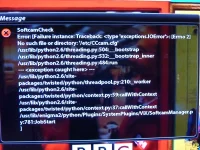
Hi, VU+DUO with the latest update yesterday build 190, have error message every 5 min, the original CCcam file keeps dissapering in ect,ect then error message, there one minute gone the next. 001.webp
 
Keep on reinstalling until next time error message then gone out of ect ect·

Sent from my GT-P1000 using Tapatalk
 
yup, in for next updates. unlike PLi any patches that get done for ETx00, i can add to Vu plus too, they decided not to use my git for Vu linux 3.1.1, so there stuck with the vu linux core where as we are not, any patches that get created for et linux core i can add to Vu linux core :D
 
Hi, VU+DUO with the latest update yesterday build 190, have error message every 5 min, the original CCcam file keeps dissapering in ect,ect then error message, there one minute gone the next. View attachment 14150


you seem to be missing a required file for cccam and softcam manager to work '/etc/CCcam.cfg' make sure the file exist and the file is chase sensitive..
 
you seem to be missing a required file for cccam and softcam manager to work '/etc/CCcam.cfg' make sure the file exist and the file is chase sensitive..

CCcam.cfg is installed in ect ect then i use the config switcher in the CCcam info, then black screen/then error message go back to CCcam.cfg in ect ect and the original CCcam.cfg has gone thus the error message/but the CCcam_0.cfg CCcam_1.cfg is still there, it seems it only happens when using the CCcam.cfg switcher worked ok before update to 2.3 190.
 
CCcam.cfg is installed in ect ect then i use the config switcher in the CCcam info, then black screen/then error message go back to CCcam.cfg in ect ect and the original CCcam.cfg has gone thus the error message/but the CCcam_0.cfg CCcam_1.cfg is still there, it seems it only happens when using the CCcam.cfg switcher worked ok before update to 2.3 190.

hmm, strange nothing has changed in this area lately, i suggest you create a new thread asking others that use the cccam switcher to test and help, i am sorry but i don't use cccam at all. so i don't know much about it. but i will follow the new treed you create and fix image if the reason is found.

andy.
 
Hi All

has anyone installed the latest version of vix for the vu+ duo without any problems occurring? Im scared to upgrade to the latest build as all i hear is problems, i installed the download v2.3, but as of yet not updated it to the build 190, as the only problem im getting at the moment is the volume control disappearing,

and for those who have updated without fault, is there an advantage to upgrade to latest build?

thanks
 

OpenViX Feeds Status

Back
Top