reverend
New member
Hi,
Just had my Vu+ Duo for a week after upgrading from a Spiderbox! I'm loving the depth of configuration I can do on the Vu+
One thing I have not been successful in is using NetworkBroswer to get to a shared folder on my Win7 PC on the same home LAN. Running the auto discovery finds no devices, and rtying to manually browse to the IP address of my PC gives me a spinning ViX logo for a few minutes but no results.
All the other network functions of the Vu+ seem to be working normally: I have an IP address on the Vu+; I can browse from my PC to the VUDUO 'harddisk' share with no problems.
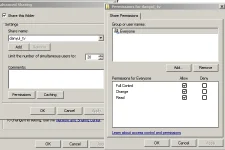
My Win7 PC network share seems to be set up correctly, because I can browse to it from a Win7 laptop I have, and I can even browse to it from my Android phone
A few restarts and restarting Enigma seem to have made no difference.
There are one or two threads already here that seem to indicate this function is difficult to set up. Does anyone have any ideas that might help me?
cheers
rev
Just had my Vu+ Duo for a week after upgrading from a Spiderbox! I'm loving the depth of configuration I can do on the Vu+
One thing I have not been successful in is using NetworkBroswer to get to a shared folder on my Win7 PC on the same home LAN. Running the auto discovery finds no devices, and rtying to manually browse to the IP address of my PC gives me a spinning ViX logo for a few minutes but no results.
All the other network functions of the Vu+ seem to be working normally: I have an IP address on the Vu+; I can browse from my PC to the VUDUO 'harddisk' share with no problems.
My Win7 PC network share seems to be set up correctly, because I can browse to it from a Win7 laptop I have, and I can even browse to it from my Android phone
A few restarts and restarting Enigma seem to have made no difference.
There are one or two threads already here that seem to indicate this function is difficult to set up. Does anyone have any ideas that might help me?
cheers
rev